
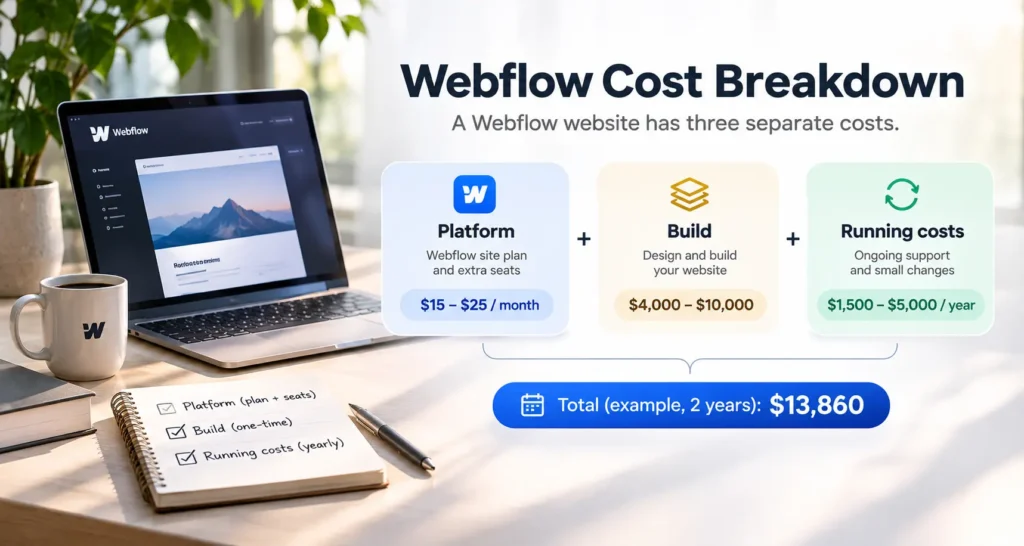
Ask what a Webflow website costs and you will usually get one of two answers. Webflow’s pricing page says $15 or $25 a month. An agency quote says several thousand dollars, sometimes far more. Both are correct, because they price different things, and a third number, what it takes to keep the site running each year, is often left out of the conversation entirely.
This guide covers the full Webflow cost in three parts. Part 1 prices the platform, with every plan and seat price taken from webflow.com on 18 November 2026. Part 2 prices the build by site type and walks through a sample quote line by line. Part 3 prices the running costs. After that, we add all three together for one example site over two years, so you can see where the money actually goes and swap in your own numbers.
One disclosure before we start. We design and build Webflow sites for clients, so the build and support ranges in this post are our own estimates and are marked that way. Every platform price comes from Webflow’s own pages.
Key takeaways
- A Webflow site has three separate costs. The site plan, the one-time build and the yearly running costs. Budget for all three before you compare quotes.
- The Starter plan is free, but it only publishes to a webflow.io address. A custom domain needs the Basic plan at $15 a month, billed yearly, or higher.
- Any site with a blog, case studies or other CMS content needs the Premium plan at $25 a month billed yearly, or $39 billed monthly.
- A small business site usually costs $4,000 to $10,000 to build, and copywriting and content migration are the two lines most likely to push a quote higher (our estimate).
- In our worked example, a 10-page site with a blog costs $13,860 over two years. The build is about two thirds of that, and the Webflow plan and seat together are under 7%.
The quick answer
Every figure below comes from the sections that follow, so the ranges match all the way down the page.
| Cost | What it covers | Typical range |
| Webflow site plan | Hosting, your own domain, page and CMS limits | $0 to $25 a month on yearly billing, or $29 to $212 a month for an online store |
| Extra seats | People besides the owner who edit or build in Webflow | $15 or $39 a month per person, billed yearly |
| Build, landing page | One page, designed and built | $1,500 to $4,000 (our estimate) |
| Build, small business site | 5 to 10 pages | $4,000 to $10,000 (our estimate) |
| Build, custom site with CMS | 10 to 25 pages with a blog or case studies | $10,000 to $25,000 (our estimate) |
| Build, larger site or migration | 25 pages or more, or content moved from another platform | $25,000 to $60,000 or more (our estimate) |
| Running costs per year | Site plan, seats, support and small changes | $180 for a Basic plan alone, and roughly $1,500 to $5,000 with seats and support (our estimate) |
Part 1. What the Webflow platform costs
Webflow price questions usually start with the plans page, and the plans page makes more sense once you know it sends two kinds of bills.
The first is the Site plan. You pay one for each site you publish to your own domain. It sets your page limit, your CMS limit and your bandwidth, and it includes hosting. Anyone comparing webflow hosting plans is really comparing site plans, because on Webflow the hosting comes with the site plan. There is no separate hosting company to pick and no server to look after.
The second is the Workspace plan, with its seats. This pays for the people who build and edit sites inside Webflow. A site owner who edits their own content can often stay on the free workspace. A team with several editors will pay for extra seats.
Webflow prices changed in May 2026. If you have read an older article that lists CMS and Business plans, treat its figures with care. In May 2026 Webflow merged those two plans into a single Premium plan. New purchases moved over right away, and most existing sites move at their next renewal on or after 29 June 2026.
Site plans
| Plan | Billed yearly | Billed monthly | Static pages | CMS items | Bandwidth included | Best fit |
| Starter | Free | Free | 2 | 50 | 1 GB a month | Building a draft and sharing it on a webflow.io address |
| Basic | $15 a month | $25 a month | 300 | No CMS | 10 GB a month | Simple sites with no blog or other collection content |
| Premium | $25 a month | $39 a month | Not listed on the pricing page | 20,000 across 40 Collections | 50 GB a month, with paid add-ons up to 2.5 TB | Sites with a blog, case studies, team pages or resources |
| Enterprise | Custom | Custom | Custom | Custom | Custom | Large organizations that need a custom contract |
Prices checked on webflow.com on 18 November 2026. Monthly billing prices for Basic and Premium come from Webflow’s May 2026 plan announcement.
The webflow starter plan costs nothing, and it is where every site starts. You can design and build a full draft on it and share the webflow.io link for feedback. What it cannot do is publish to your own domain. With 2 static pages and 50 CMS items, it is a workspace for building and reviewing a draft, and you will move off it before launch.
The webflow basic plan is the cheapest way to go live on your own domain. It now allows 300 static pages, up from 150 before the May 2026 update, and unlimited form submissions. That covers a brochure site with services, an about page and a contact form. The limit that catches people is the CMS. Basic has none, so the day you want a blog or a set of case studies that you add to from a template, you need Premium.
Premium is the plan we put most client sites on, because most business sites end up with at least one collection. Twenty thousand CMS items is far more than a small or medium site will use.
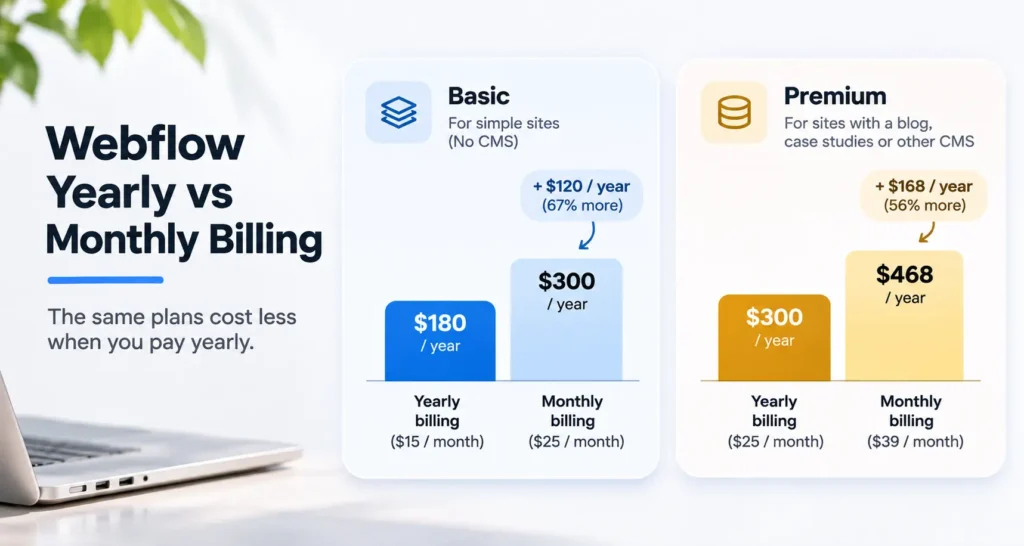
Billing choice matters more than the plan list suggests. On yearly billing, Basic costs $180 a year. Paid monthly it costs $300, so $120 more for the same plan. Premium costs $300 a year on yearly billing and $468 a year paid monthly, a gap of $168. If you are sure the site will stay live for a year, yearly billing is the easiest saving available on Webflow.
Workspace and seats
Every workspace plan includes one full seat for the owner. The free Starter workspace allows two staging sites, and any number of sites on paid site plans, so a business with one site and one person editing it can run on Starter without paying for a workspace at all.
| Workspace plan | Price per month, billed yearly | Seats included |
| Starter | Free | 1 full seat. Two staging sites, unlimited sites on paid site plans |
| Core | $19 | 1 full seat |
| Growth | $49 | 1 full seat |
| Freelancer | $16 | 1 full seat, plus 1 free client seat per site |
| Agency | $35 | 1 full seat, plus 3 free client seats per site |
Extra people need their own seat. Webflow sells three kinds.
| Seat | Price per month, billed yearly | What it allows, in Webflow’s terms |
| Full | $39 | Design full sites or manage admin settings |
| Limited | $15 | Edit content or build pages with components |
| Free | $0 | Review and comment, without edit access |
Prices checked on webflow.com on 18 November 2026.
So when does a client actually pay for seats? The usual pattern after a build looks like this. The agency designs and builds in its own workspace. At handover, the site moves to the client’s workspace, often the free Starter one, and the business owner edits with the full seat that comes with it. Each extra person who updates the site every week, such as a marketing lead who publishes blog posts, needs a Limited seat at $15 a month. Reviewers who only leave comments can use free seats.
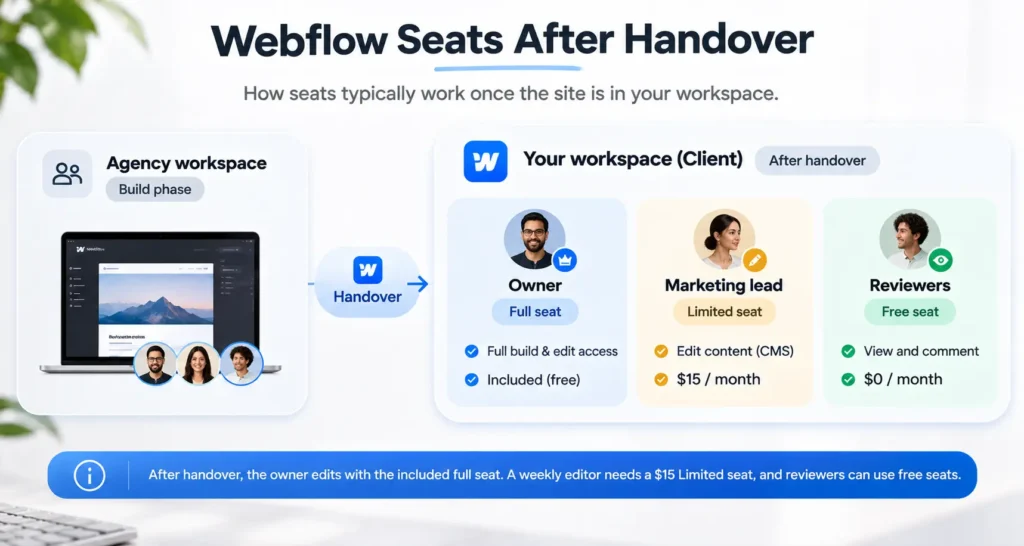
Some agencies keep the client’s site in their own Freelancer or Agency workspace instead, and give the client one of the free client seats. Webflow describes these seats as limited access to specific sites, so ask your agency exactly what yours will let you edit before you agree to that setup.
Ecommerce plans
An online store uses an ecommerce plan in place of a site plan. All three include the CMS.
| Plan | Price per month, billed yearly | Products | Webflow transaction fee | Bandwidth |
| Standard | $29 | 500 | 2% | 50 GB |
| Plus | $74 | 5,000 | 0% | 100 GB |
| Advanced | $212 | 15,000 | 0% | 100 GB |
Prices checked on webflow.com on 18 November 2026. Card processing fees from your payment provider come on top of these.
The 2% fee on Standard is worth a quick sum. Plus costs $45 a month more than Standard and removes the fee. Two percent of $2,250 is $45, so once your store sells more than about $2,250 a month, Plus works out cheaper than Standard.
Webflow suits stores with a small catalogue and a strong brand story. For large catalogues, complex shipping rules or a long list of sales apps, Shopify or WooCommerce often fit better. Our Webflow vs WordPress comparison covers that choice in more depth.
Add-ons
These are optional, and many small sites never need any of them. Prices are per month, billed yearly, as listed on webflow.com on 18 November 2026.
| Add-on | Price per month | What it is for |
| Localize Essential | $9 | Publishing the site in more than one language |
| Localize Advanced | $29 | More languages and more control over localized content |
| Analyze | $9 | Site analytics inside Webflow |
| Optimize | $299 | A/B testing and personalization |
| AI credits | $20 for 2,000 credits | Extra credits for Webflow’s AI features |
| Extra bandwidth | From 30 if billed monthly) | Sites with heavy traffic or large media files |
If you have a multilingual audience, add Localize to your budget early, since it changes how the site is built. Optimize only pays for itself on sites with enough traffic to run meaningful tests.
Part 2. What it costs to build a Webflow site
The build is the one-time cost, and it is almost always the largest part of the bill. Page count matters less than people expect. What drives the price is the number of unique layouts the designer has to create, the number of CMS collections and templates, how much animation and interaction you want, which tools the site has to connect to, and who writes the words. A 20-page site built from four page layouts can cost less than a 10-page site where every page is different.
Build cost by site type
| Site type | Typical pages | Usually included | Price range (our estimate) |
| Landing page | 1 | Design, build, form, basic SEO setup | $1,500 to $4,000 |
| Small business site | 5 to 10 | Template-based or light custom design, contact forms, basic SEO setup | $4,000 to $10,000 |
| Custom marketing site with CMS | 10 to 25 | Custom design, blog or case study collections, interactions, CRM forms | $10,000 to $25,000 |
| Larger site or migration | 25 or more | Several collections, content moved from WordPress or another platform, redirects, integrations | $25,000 to $60,000 or more |
A small business site at the low end of its range usually starts from a purchased template with your brand applied. At the high end, the layouts are designed from scratch. Neither is wrong. A template gets a new company online fast and cheaply, and a custom design makes sense once you know what your buyers need to see and the site has a real sales job to do.
Freelancer, studio or agency
Who you hire changes the price more than any single feature. Rates vary a lot by country and experience. As a rough guide, freelance Webflow developers often charge about $25 to $100 an hour, and studios and agencies about $75 to $175 an hour (our estimate).
A freelancer is usually the cheapest route and works well for a template-based site or a landing page. The risk sits with availability. If your one developer gets ill or takes on a bigger client, your project waits. A small studio usually has a designer and a developer, sometimes a project manager, so the work keeps moving when one person is away, and design and build decisions get checked by a second pair of eyes. A larger agency adds strategy, copywriting and research, which is useful for complex sites and costly for simple ones.
The right choice depends on how much of the thinking you want to do yourself. If you already know your pages, your message and your content, a capable freelancer may be all you need. If you want someone to work out what the site should say and how it should sell, you are paying for that thinking, and it is worth paying for. Our guide on how to choose a Webflow agency covers the questions to ask before you sign, and our Webflow development services page shows how we run these projects.
The lines that move the quote
Two quotes for the same number of pages can differ by thousands of dollars. These are the lines that usually explain the gap, and the ones to ask about when a quote seems low.
Copywriting. If you supply final copy, the studio designs around real words. If they write it, expect a separate line, because good page copy needs interviews, drafts and rounds of edits. Late copy is also the most common reason a launch date slips.
Content and blog migration. Moving 200 blog posts from WordPress means mapping fields, cleaning formatting, re-uploading images and checking every post. It can be partly automated with CSV imports, but someone still has to check the results by hand.
SEO redirects. When page addresses change, every old URL needs a 301 redirect to its new home, or you lose the rankings those pages built. On a larger site, the redirect map alone can take a day or two.
Integrations. Sending form leads to HubSpot, booking calls through Calendly or connecting a membership tool each needs setup and testing. Each one is small on its own, and together they add up.
Accessibility. Checking color contrast, keyboard navigation, alt text and heading order takes time. It is far cheaper to build in from the start than to fix after launch.
Interactions and animation. Webflow makes scroll effects and page transitions possible without custom code, but each one still has to be designed, built and tested on mobile. A few well-placed interactions cost little, while a heavily animated site can add days to the build.
CMS templates. Every collection, such as blog posts, case studies or team members, needs its own template page and fields. Each extra collection adds design and build time.
A sample quote, line by line
This is an example quote for an 8 to 10 page business site with a blog and a case study collection. It is an illustration, so use it to read real quotes, and expect real numbers to vary.
| Line item | What it buys | Price |
| Discovery and sitemap | A call about your goals and buyers, a page list and a sitemap you approve | $600 |
| Wireframes | Page layouts in grey boxes, so structure is agreed before visual design starts | $1,200 |
| Visual design | Final designs for desktop and mobile, using your brand | $2,400 |
| Webflow build and CMS setup | Responsive build, blog and case study collections, two CMS templates | $2,700 |
| Interactions | A small set of scroll and hover effects | $500 |
| Forms and CRM connection | Contact and quote forms sending leads to your CRM | $400 |
| SEO setup and redirects | Page titles, meta descriptions, Open Graph images, 301 redirects from the old site | $400 |
| Testing and launch | Browser and device checks, accessibility checks, domain connection | $500 |
| Training and handover | A recorded walkthrough showing your team how to edit pages and publish posts | $300 |
| Total | $9,000 |
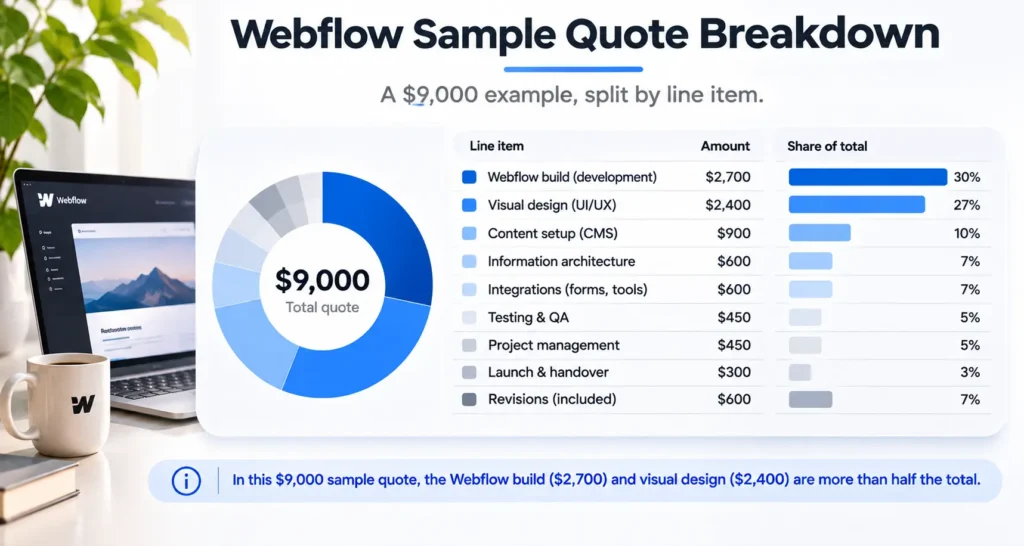
Copywriting is not in that total. If the studio writes the copy for all pages, a line of around $1,600 would sit on top (our estimate). The Webflow plan is not in it either, because you pay Webflow directly.
When you compare quotes, line them up against a list like this one. When a cheaper quote leaves out redirects, CRM forms or testing, that work usually lands back on you after launch, at a higher price.
Part 3. What it costs to run a Webflow site
Running costs are what you pay every year after launch. On Webflow they are lower and more predictable than on many platforms, because Webflow looks after hosting, security updates and backups. There are no plugins to update and no server to patch.
| Item | Yearly cost | Notes |
| Site plan | $180 for Basic or $300 for Premium, billed yearly | Includes hosting |
| Extra seats | $180 per Limited seat | Only for people who edit content each week |
| Domain | Set by your domain registrar | Renews every year |
| Business email | Priced per user by your email provider | Webflow does not host email |
| Third-party tools | Varies | Cookie consent, booking, CRM, forms, chat |
| Support and maintenance | $1,200 to $6,000 (our estimate) | Depends on how often the site changes |
Maintenance on Webflow means something different from maintenance on WordPress. Nobody needs to update core software or plugins every month. What a support plan usually covers is content updates you would rather not do yourself, new landing pages for campaigns, fixes when an edit breaks a layout on mobile, checks that forms still deliver leads, and a quarterly look at speed and search performance. If your site rarely changes and someone on your team is comfortable in the Webflow editor, you may only need a few hours of help a year.
A worked example, what a Webflow site costs over two years
Here is how the three costs add up for one example site. A B2B service company commissions a 10-page site with a blog and a case study collection, using the sample quote from Part 2. The owner edits pages, and a marketing lead publishes blog posts. The company buys a small support block each year, and in year two it adds two campaign landing pages.
| Line | Year 1 | Year 2 |
| Build (sample quote from Part 2) | $9,000 | $0 |
| Premium site plan, billed yearly | $300 | $300 |
| One Limited seat for the marketing lead | $180 | $180 |
| Support block (example figure) | $1,200 | $1,200 |
| Two new landing pages (example figure) | $0 | $1,500 |
| Total | $10,680 | $3,180 |
Two-year total, $13,860. The domain and email are left out because they cost the same whichever platform you choose.
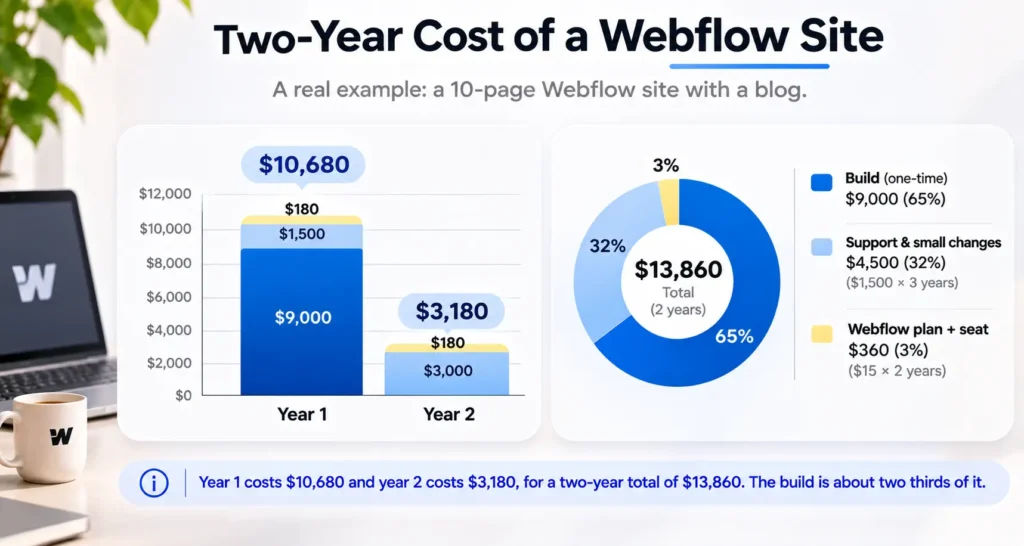
Look at where the money went. The Webflow plan and the seat came to $960 over two years, under 7% of the total. The build was about two thirds of it. That is why arguing over a $10 difference in monthly plan price rarely changes much, while the scope of the build and who writes the copy can move the total by thousands.
A few changes and what they do to the total. Paying Premium monthly in place of yearly adds $168 a year, or $336 over two years. Dropping the blog and staying on Basic saves $120 a year on the plan, and usually a few hundred dollars of build time. Asking the studio to write the copy adds around $1,600 to year one (our estimate).
To use this for your own budget, copy the table, put in the plan you need from Part 1, the build range for your site type from Part 2, and a support figure that matches how often your site will change.
Is Webflow expensive compared with WordPress and Framer?
We build on all three platforms, so this comparison sticks to platform costs and who does the upkeep. Prices come from each platform’s own pricing page on 18 November 2026.
| Webflow | WordPress (self-hosted) | Framer | |
| Platform cost per month | $15 Basic, $25 Premium, billed yearly | The software is free. Hosting is priced by the host you choose | $10 Basic, $30 Pro |
| Hosting | Included in the site plan | Bought separately | Included in the site plan |
| Who handles updates | Webflow | You or your developer, for core, theme and plugins | Framer |
| Extra editors | $15 or $39 a month per seat | No per-user fee from WordPress itself | $10 or $20 a month per editor |
On monthly fees alone, a budget WordPress host can look cheaper than Webflow. The difference shows up in upkeep. A WordPress site needs regular core, theme and plugin updates, and premium plugins often carry their own yearly licenses. Someone has to do that work, and if it is a developer, it shows up on an invoice. Webflow folds hosting and updates into the plan, so the running cost is mostly fixed.
Framer is cheaper per month at the entry level and quick to build in for marketing sites. Webflow gives more control over CMS structure, larger collection limits and a more mature ecommerce option. For the full trade-offs, read Webflow vs WordPress and Framer vs Webflow.
How to keep your Webflow cost down
Start on the cheapest plan that fits. If you do not need a blog yet, launch on Basic and move to Premium when you do. The trade-off is a small rebuild of any content you later turn into a collection.
Use yearly billing. It saves $120 a year on Basic and $168 on Premium. The trade-off is paying up front and committing for twelve months.
Keep paid seats for people who edit every week. Reviewers and occasional contributors can use free seats or send changes to one editor. The trade-off is a little more coordination inside your team.
Write your own copy, or at least a strong first draft. You know your customers better than any copywriter does on day one. The trade-off is your time, and the risk of the launch waiting on you.
Start from a template for your first version. A good template with your brand applied can cut the build cost by half or more. The trade-off is a site that looks less distinct, which matters less in year one than getting live and learning what buyers respond to.
If you are also planning a rebuild of an existing site, our post on website redesign cost covers the extra lines a redesign brings, and our guide to web design agency pricing compares pricing models across platforms.
Frequently asked questions
How much does Webflow cost per month?
A Webflow site plan costs $0 to $25 a month on yearly billing. Basic is $15 and Premium is $25, or $25 and $39 if you pay monthly. Online stores start at $29 a month. Extra seats for editors cost $15 or $39 a month each. These prices were checked on webflow.com on 18 November 2026.
Is the Webflow Starter plan enough to launch?
No, if you want your own domain. The Starter plan is free and publishes only to a webflow.io address, with 2 static pages and 50 CMS items. It is good for building a draft and sharing it for feedback. To go live on your domain, you need Basic at $15 a month billed yearly, or Premium if the site has a blog.
Do I pay for hosting separately on Webflow?
No. Hosting is included in every Webflow site plan, so the $15 Basic or $25 Premium price already covers it. You do not choose a host or manage a server. You will still pay separately for your domain name and business email, since Webflow does not sell or host those.
How much does a Webflow developer charge?
Rates vary by country, experience and team size. As a rough guide, freelance Webflow developers often charge about $25 to $100 an hour, and studios and agencies about $75 to $175 an hour (our estimate). For a fixed-price project, a small business site usually lands between $4,000 and $10,000.
Is Webflow cheaper than WordPress?
On monthly fees, often not. WordPress software is free and budget hosting is cheap. Over a few years the gap usually narrows, because WordPress needs regular plugin and theme updates, often paid premium plugins, and someone to do the upkeep. Webflow includes hosting and platform updates in its plan, so running costs are more predictable.
What does Webflow maintenance cost?
Less than on most platforms, because Webflow handles hosting, security and backups. Support usually covers content updates, new pages and fixes after edits. Expect roughly $1,200 to $6,000 a year depending on how often your site changes (our estimate). A site that rarely changes may need only a few hours of help a year.
The short version
A Webflow website has three costs, the plan, the build and the upkeep, and the build is usually the biggest. When you collect quotes, ask for one broken into line items so you can see what each price includes. And budget for year two before you sign, because that is the year nobody quotes you for.
Want a Webflow Quote With Every Line Explained?
Send us your sitemap or a rough page list. We will send back a quote broken down the same way as this post, platform, build and running costs, so you know what you are paying for before you sign.
Book a call or see our pricing.