Search this question, and you get a range: $5,000 to $120,000. Technically accurate, practically worthless. It is the pricing equivalent of asking how long a piece of string is and being handed a ruler with no numbers on it.
The reason the range is so wide is simple. App design is priced on screen count, flow complexity, and research depth. Every agency knows this. Almost none of them teach you how to measure your own project against it, which is why a $9,000 quote could be a steal or a red flag, and you have no way to tell which.
Pixelean designs mobile apps. Worth saying up front, because it means you should read everything below as a working designer showing you its pricing logic, not a neutral survey. So read everything below as a working designer showing you its pricing logic, not a neutral survey. That is exactly why the numbers here are specific instead of flattering.
By the end you will have a screen count, a per-screen rate that matches the market you are actually buying in, and a way to tell whether the quote sitting in your inbox is fair. If you have wondered how much does it cost to design an app without getting a straight answer, this is the straight answer.
Key takeaways
- Mobile app design cost runs $5,000 to $120,000+ in 2026, driven by unique screen count, flow complexity, and research depth.
- Design is 15 to 25% of the total app project cost (Netguru, 2026).
- Published “per screen” rates of $100 to $500 describe freelance UI work (Twine, 2025). Full-service agency design runs $600 to $1,500 per unique screen. The gap is scope, not markup.
- The same app costs $8,000 to $40,000 with a freelancer and $25,000 to $80,000 with an agency (Orbix, 2026).
- A 10-screen app takes 4 to 6 weeks. A 25-screen app takes 8 to 12 weeks.
- Quotes rarely include copywriting, illustration, motion, App Store assets, or post-handoff support.
Design cost is not app cost
Most founders treat the design fee and the total build as the same number. They are not the same, and the difference decides whether your budget survives.
Design is research, information architecture, user flows, wireframes, UI, prototype, and developer handoff. Development is engineering, backend, quality assurance, and shipping to the store. When you compare app design vs development cost, design is the smaller slice by a wide margin. A clean app design cost breakdown looks like this.
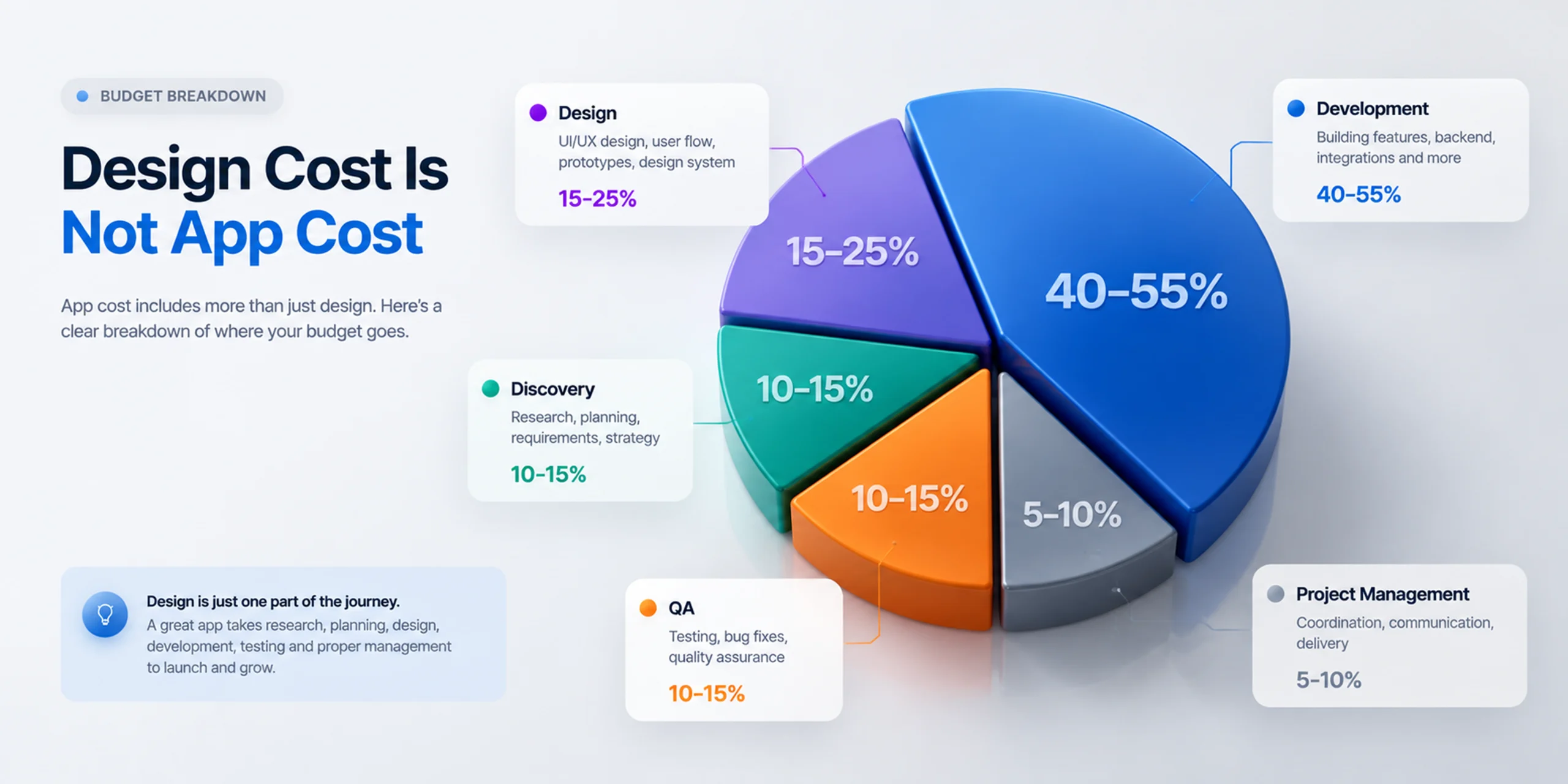
| Phase | Share of total | Who does it |
| Discovery and research | 10-15% | Design team |
| Design (IA, UI, prototype, handoff) | 15-25% | Design team |
| Development | 40-55% | Dev team |
| QA and testing | 10-15% | Dev team |
| Project management | 5-10% | Either |
Source: dbbsoftware 2026 phase breakdown; Netguru 2026, which puts design at 15 to 25% of total project cost. Design is the smaller slice. Development is the number that moves your total.
Run the math on a real budget. A $50,000 total app project means roughly $8,000 to $12,000 for design. So if a design studio quotes you $40,000 against that same $50,000, one of you misread the scope. Find out which before you sign, not after.
Watch for one line in particular. “The dev agency said design is included.” Sometimes that is true. Often it means a developer will arrange the screens between building them. Ask to see finished design work they have shipped. If they cannot show you flows, wireframes, and a prototype, design is not really included. It is being skipped.
Count your screens first
Everyone says screen count drives cost, then leaves you standing there with no idea how many screens your app has. Let us fix that, because this one number changes every conversation you are about to have.
Agencies price unique screen designs, not screens. Ten list screens that share one layout is one design. Three screens that each need their own layout is three. So you are not counting pages. You are counting distinct things a designer has to draw from scratch.
Walk your app through five groups and tally as you go.
- Entry and auth. Splash, onboarding (2 to 4), sign up, log in, forgot password, verification. Typical count: 6 to 9.
- Core loop. The screens users touch every session. Home, the main action, the result. This is where your app actually lives. Typical count: 3 to 8.
- Secondary features. Search, filters, detail views, notifications, chat. Typical count: 4 to 12.
- Account and settings. Profile, edit profile, settings, notification preferences, payment, help. Typical count: 5 to 8.
- The screens founders forget. Empty states, error states, loading states, permission requests, offline mode, success confirmations. These edge cases and empty states are where real hours hide. Typical count: 6 to 15.
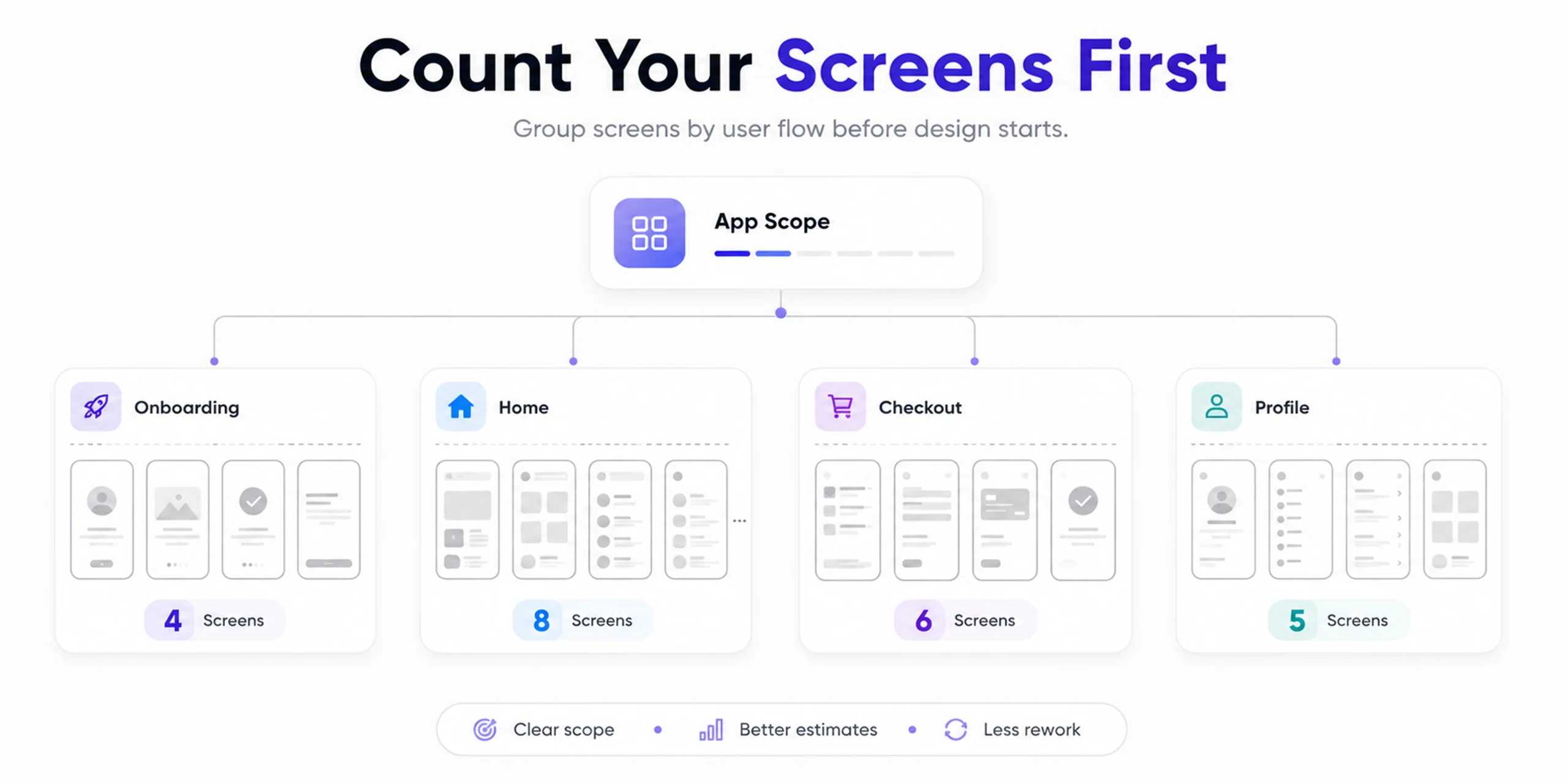
Now make it concrete. Here is a real fitness tracking app counted the way an agency counts it.
| Group | Screens | Unique designs |
| Entry and auth | Splash, 3 onboarding, sign up, log in, forgot password | 7 |
| Core loop | Home dashboard, start workout, active workout, workout summary | 4 |
| Secondary | Exercise library, exercise detail, history list, history detail, progress charts | 4 (two lists share one layout) |
| Account | Profile, edit profile, settings, notifications, subscription | 5 |
| Forgotten states | 3 empty, 2 error, loading, 2 permission prompts, success | 6 (empty and error states share templates) |
| Total | 26 unique screen designs |
Look at the Secondary row. Two list screens collapse into one design, and that single move is worth more than any negotiation you will ever have on rate.
Twenty-six lands in the standard tier. The founder who walks in saying “26 unique screens, one user type, no payments yet” has a completely different conversation than the founder who says “it’s a fitness app, pretty simple.” One of them gets a real number. The other gets a guess with padding built in.
This is a starting estimate, not a quote. Research depth and flow complexity move it in both directions. But you now hold the single most useful number in the entire pricing conversation.
Why one agency says $200 a screen and another says $1,500
Search “mobile app design cost per screen,” and you will find rates as low as $100 to $500. Then an agency quotes you $1,200 a screen. One of those looks wrong, and which one you believe decides whether you think you are being overcharged.
Neither is lying. They are describing different amounts of work. Here is what “per screen” actually buys at each rate.
| What “per screen” includes | Typical rate |
| UI layout only, from a supplied wireframe | $100-$200 |
| UI plus basic states, freelancer, no research | $200-$500 |
| Research, flow, wireframe, UI, edge states, prototype, handoff | $600-$1,500 |
That lower figure is real. Twine lists static screens at $100 to $500 each (Twine, 2025). It describes visual layout for a screen someone else already specified. It leaves out the user research that decides which screens exist, the user flows that decide what order they come in, the edge cases and empty states that eat real hours, and the annotated developer handoff.
Full-service mobile app ui ux design cost is higher because it is a different quantity of work, not a prettier version of the same work. That is also the honest answer to app ui design cost when someone quotes you a suspiciously low number: ask what is missing, because something always is.
Three things move you up inside that $600 to $1,500 band.
- Flow complexity. One user type with one goal sits at the floor. A booking app with customer, provider, and admin roles is three products wearing one name, and it sits near the ceiling.
- Research depth. An internal tool needs less than a consumer fintech app, where trust is the product and every screen has to earn it.
- Accessibility. WCAG accessibility compliance (2.1 AA) adds roughly 20 to 30% to design hours and pulls in extra QA cycles (Netguru, 2026). For healthcare and fintech it is not optional.
So the formula is simple. Multiply your unique screen designs by $600 to $1,500 and you have a realistic full-service design budget. Apply it to the 26-screen fitness app and you get $15,600 to $39,000. Place that same app in the standard tier in the next section and the band tightens to roughly $23,400 to $31,200, because a 26-screen standard build sits at $900 to $1,200 a screen, not the full $600 to $1,500 spread. Both numbers come out of the same model, which is the point. A pricing model that contradicts itself is one you should not trust.
One more thing worth saying out loud, because 2026 made it unavoidable. Founders now ask us for a price “with AI” versus “without AI.” AI tools have genuinely lowered the cost of producing individual screens. What they have not touched is deciding which screens should exist and whether the flow actually works. The value moved; it did not disappear. We spend less time pushing pixels and more time on the research and flow decisions that AI cannot make for you. If a vendor tells you AI makes design nearly free, they are quoting you the pixel-pushing and quietly dropping the part that determines whether anyone uses the app.
For how research depth shapes a project, see our approach to UI/UX design.
Mobile app design cost by scope
Now put the screen count against real tiers. This is the app design cost table most founders come here for, with a per-screen column added so it visibly agrees with the section above.
| Scope | Screens | Per screen | Design cost | Timeline |
| Lean MVP (most startups) | 8-15 | $600-$900 | $5,000-$20,000 | 4-7 weeks |
| Standard app | 20-40 | $900-$1,200 | $20,000-$60,000 | 8-14 weeks |
| Complex product | 40-70 | $1,200-$1,500 | $60,000-$120,000 | 14-20 weeks |
| Enterprise / regulated | 70+ | $1,500+ | $120,000+ | 20+ weeks |
The per-screen rate rises with the tier because complexity rises, not because the agency charges more for identical work. Here is what each tier actually includes.
Lean MVP. This is the mobile app design cost for the startups tier. Basic research (5 to 10 hours), core flows only, wireframes for primary screens, UI for one user type, a clickable prototype, and handoff files. Right for validating an idea with a single user type and one core action. This is the right MVP scope for most first builds.
Standard app. Full discovery, multiple documented user flows, a complete wireframe set, full UI across all screens including edge cases and empty states, a basic design system, an interactive prototype, and annotated handoff. Right for consumer apps, ecommerce, and multi-flow products.
Complex product. Deep research including live usability testing, multi-role information architecture and flows, a comprehensive design system, an accessibility compliance check, multiple prototype rounds, and full handoff with developer support. Right for multi-role platforms, SaaS companions, and data-heavy products.
These are design costs only. Development is separate, and it is the bigger number. The timelines in the table are our own delivery estimates, measured from research to developer handoff, not a published benchmark.



Counted your screens and still not sure?
Send us the count. We will tell you what that scope realistically costs.
Who you hire moves the number more than what you build
Here is the variable most cost guides skip, and it swings the price harder than any feature you could add. The same 25-screen app is $8,000 to $40,000 with a freelancer and $25,000 to $80,000 with an agency (Orbix, 2026). Nothing about the app changed. Only who drew it. That is the heart of mobile app design pricing. You are choosing a supplier as much as a scope.
| Who | Range (25-screen app) | You get | You do not get |
| Freelance UI designer | $8,000-$20,000 | Screens, fast turnaround | Research, flow strategy, edge cases, cover if they vanish |
| Freelance product designer | $15,000-$35,000 | Flows and UI, senior judgment | Parallel capacity, a second opinion |
| Boutique agency (5-20 people) | $25,000-$60,000 | Full process, design system, handoff support | Enterprise process, 24/7 coverage |
| Large agency | $60,000-$150,000+ | Depth, compliance, scale | A senior designer on your project daily |
| Offshore team, low cost | $3,000-$12,000 | Volume of screens | Usually research, usually timezone overlap, sometimes originality |
Now the part that turns a saving into a bill. A founder saves $8,000 by choosing a $4,000 designer over a $12,000 studio. Research gets skipped. The onboarding flow ships confusingly. Developers build it anyway, because it looks done. Day-one drop-off runs high. Diagnosing why takes four to eight weeks of live data. Then the flow gets redesigned, then rebuilt. The redesign rarely costs less than the original design. The rebuild always costs more than the original build. And the users who churned in month one do not come back for version two.
Design is the cheapest place in the whole project to be wrong. Fixing a flow in Figma costs an afternoon. Fixing the same flow after launch costs a sprint, a redesign fee, and the users who already left.
That said, expensive is not automatically safer. A $30,000 quote for a 12-screen MVP is overpriced no matter how good the studio is. The goal is right-sized, not maximum.
For a practical way to vet studios, see our guide to choosing a UI/UX design agency.
iOS, android, or both
“Does designing for both platforms double my cost?” No, and the guides saying it does are running on old information. The honest answer on iOS vs Android app design cost in 2026 is that the gap is small.
Ten years ago iOS and Android needed genuinely separate design work: different navigation, different components, different assets. A shared design system changed that. One system now serves both platforms with platform-specific adjustments instead of two parallel design efforts.
| Approach | Design cost impact | When it fits |
| Single platform (iOS or Android) | Baseline | MVP, testing a market |
| Both, shared design system | +10 to 20% | Most products |
| Both, fully native per platform | +40 to 60% | Rare, only when platform conventions matter deeply |
| Add tablet or iPad layouts | +20 to 30% | If tablet usage is real, not hypothetical |
The recommendation is short. Design a system, not two apps. Start with one platform if budget is tight, but design the system so the second platform is an adjustment, not a rebuild.
What the quote doesn’t include
The design quote covers design. Everything below lands as a separate invoice, and founders tend to find them late.
- App copywriting. Onboarding text, empty state messages, error messages, push notification copy. Budget $1,000 to $5,000, or write it yourself.
- Custom illustration or 3D. Stock works until your brand needs its own. $500 to $8,000 depending on volume.
- Icon design beyond system icons. Usually minor, occasionally not.
- Motion and micro-interactions. Often quoted separately. Adds $2,000 to $15,000.
- App Store assets. Screenshots, preview video, store listing design. $500 to $3,000.
- Post-handoff developer support. Some agencies include two weeks. Some bill hourly. Ask.
- Design QA after build. Checking that the built app matches the design. This is where designs quietly degrade. Ask if it is included.
Rule of thumb: budget 15 to 25% on top of the design fee for the things around it. And ask for the “what is not included” list in writing before you sign. A good agency sends it without being chased. One you have to ask twice is telling you something about how the whole project will run.
For how this plays out across design work generally, see what to expect from web design agency pricing in 2026.
How to read the quote you just received
You now have a screen count, a per-screen rate, and a list of exclusions. This is where you spend them. Run any quote through five checks, in order.
- Does it state a screen count? A quote with no screen number is a quote with no scope. Everything else on the page is unverifiable.
- Does per-screen land in range? Divide the quote by the screens. Under $400, ask what research is included. Over $1,800, ask what makes this project complex enough to justify it.
- Are revision rounds numbered? “Revisions until you are happy” is not generosity. It is an undefined liability that gets recovered somewhere else in the price.
- Is handoff described? Annotated files, a component library, a developer support window. Vague handoff is where budget quietly leaks after the invoice is paid.
- Is there a written exclusions list? The list from the section above, in their words, before signing.
Four red flags, one line each: a quote handed over before any scope conversation, a range instead of a firm number after scope is defined, “starting from” pricing, and a timeline that does not depend on how fast you give feedback. Any one of them means the number is a placeholder, not a price.
How to reduce app design cost without hurting quality
You can cut this budget intelligently or clumsily. Here is how to reduce app design cost the intelligent way, with five levers that actually work.
- Cut screens, not research. Research is what stops you building the wrong screens. Cutting features cuts screens. Cutting research just moves the cost into development.
- Reuse layouts deliberately. Design one list template that serves five content types. Remember the fitness app, where two list screens collapsed into one design. That single move is the biggest lever you control.
- Ship one platform first. Design the system for both. Build one. Add the second after validation.
- Bring your own content. Copy, product photography, and brand assets save $1,000 to $5,000.
- Phase the scope. MVP now, secondary features after users tell you which ones matter. Phase two is always cheaper than building the wrong phase one.
What not to cut: discovery and research, wireframes (skipping them just moves problems into UI, where they cost more), developer handoff quality, and edge case and empty state design.
When a budget is tight, remember one line. You negotiate on scope, not on hourly rate. A good agency will help you cut scope to hit a number, and that conversation is worth having in the open.
How Pixelean prices app design
Since we put the disclosure up top, this part is just the mechanics.
- Screen count and flow complexity get established before any number is given.
- Pricing is fixed once scope is defined, not hourly.
- Every quote lists scope, deliverables, revision rounds, timeline, and what is excluded.
- No “starting from” pricing.
That is the same discipline this whole article argues for, applied to our own invoices. See how Pixelean designs mobile apps.
Frequently asked questions
How much does it cost to design a mobile app in 2026?
The cost to design a mobile app runs $5,000 to $120,000 or more, set by screen count, flow complexity, and research depth. A lean MVP of 8 to 15 screens usually runs $5,000 to $20,000. A standard 20 to 40 screen app runs $20,000 to $60,000. These are design costs only, separate from development.
Is it cheaper to hire a freelancer or an agency for app design?
A freelancer runs $8,000 to $40,000 for a mid-size app; an agency runs $25,000 to $80,000 for the same scope (Orbix, 2026). The difference is research, edge case coverage, and continuity if someone leaves, not the quality of individual screens. Freelancers fit simple, single-user-type apps. Agencies fit multi-role products where a flaw is expensive to unwind.
Does designing for both iOS and Android cost double?
No. A modern design system serves both platforms with platform-specific adjustments rather than parallel work. Designing for both typically adds 10 to 20% over a single platform, not 100%. Fully native, separately designed apps can add 40 to 60%, but most products do not need that.
How long does mobile app design take?
A simple 10-screen app takes four to six weeks from research to developer handoff. A 25-screen app takes eight to twelve weeks. Complex products with multiple user roles take fourteen to twenty weeks. Rushing research or wireframes rarely saves time, because the problems surface later during development.
What is not included in a mobile app design quote?
Most quotes exclude app copywriting, custom illustration, motion design, App Store assets, and post-handoff developer support. Design QA after the build is often excluded too. Budget 15 to 25% on top of the design fee, and ask for a written list of exclusions before signing.
How can I reduce mobile app design cost?
Reduce the number of unique screen layouts by reusing templates, ship one platform first, phase the scope so secondary features wait for user feedback, and supply your own copy and brand assets. Do not cut research or wireframes, since both prevent expensive rework during development.
Ready to find out what your app should actually cost?
Pixelean designs mobile apps for startups and SaaS teams around the world, from first wireframe to developer handoff. Every project starts with a defined scope, so the number you get is a price, not a placeholder. See how Pixelean works.