
The most expensive decision in your WordPress project gets made in week one before a single page is designed. And you are usually not in the room for it.
Two agencies quote you $18,000 for the same site. One builds on a page builder and twenty plugins. The other on native blocks and four. At handover, they look identical. Eighteen months later, one loads in four seconds, breaks on every update, and costs $6,000 to untangle. Nobody told you which one you were buying.
That is the real work of choosing a WordPress development agency: reading the decisions that never appear on the quote. This guide walks through every one of them before you sign. Full disclosure. Pixelean builds websites on WordPress and Webflow. We have no reason to tell you WordPress is always the answer, because half the time it is not. Read this as a working studio explaining what we check before we sign, not a neutral survey.
Key takeaways
- The stack an agency picks in week one sets your page speed, your maintenance bill, and how easily you can leave.
- Freelancer, agency, or in-house is the first question. It depends on how often the work recurs, not how big the first project is.
- A WordPress development agency typically charges $8,000 to $60,000 for a business site. Maintenance runs $200 to $3,000 a month.
- Ask who owns the code, the hosting, and the accounts before you sign. Not after.
- Ask how they measure the site. A build with no analytics plan is a build you cannot improve.
- The cheapest quote is often the most expensive site.
First, decide what you are actually hiring
Match the model to how often the work recurs, not to the size of the first build.
Most teams jump straight to comparing agencies. That is the second decision. The first is what kind of help the business needs at all. Four options, honest trade-offs.
Freelancer, $30 to $100 an hour. Right when the scope is small, and you can judge the quality yourself. Wrong when the site is business-critical, because one person is a single point of failure. The real risk is continuity, not skill.
Offshore team, lowest cost. Right when you have a clear spec and someone internally who can review the work. Wrong when you need judgment rather than execution. Common outcome: cheap build, expensive maintenance.
Specialist agency, $75 to $200 an hour. Right when the site drives revenue, integrations are involved, or several stakeholders are in the room. Wrong when you need one small thing done. You are buying process and redundancy, not just hours.
In-house developer, $70,000 to $130,000 a year. Right when WordPress work is constant and you can keep someone busy year-round. Wrong when the work is bursty, which describes most companies.
| Model | Cost | Best for | Main risk |
| Freelancer | $30 to $100/hr | Small, defined scope | One person leaves |
| Offshore | Lowest | Clear spec, internal review | Judgment gaps |
| Agency | $75 to $200/hr | Business-critical builds | Paying for process you do not need |
| In-house | $70K to $130K/yr | Continuous work | Idle capacity |
One more distinction people miss. A specialist WordPress shop is not the same as a generalist full-service agency that lists WordPress next to Shopify, Webflow, and Wix. The generalist can build you a site. The specialist has an opinion about how, and can defend it. For a site that carries revenue, the opinion is what you are paying for.
Practitioners who do this work full-time land in the same place. On a Hacker News thread about small-business web work, one developer put it plainly: super small companies are usually best off with Squarespace or Wix, and companies slightly larger end up needing what those platforms cannot offer (Hacker News, retrieved 2026-08-31). The size of the first project is a bad guide. Recurrence is the real one.
For the full picture on budgets, see what web design agency pricing looks like in 2026.
The question that decides everything
The stack is chosen in week one, and it sets three things you live with for years: how fast your pages load, how much maintenance costs, and how easily you can hand the site to someone else.
Every agency says “custom WordPress.” Ask what that means, and you get a shrug. Here is what it actually means, in three approaches.
- Page builder plus a premium theme. Elementor, WPBakery, Divi, on top of a bought theme. Fast to build, low skill floor, good margins for the agency. What it costs you: heavier pages, more scripts, layouts that break after updates, and content wrapped in a format that is painful to move. Real users say so. Recent Elementor reviewers describe pages where “the CSS and JS that are loaded are pretty heavy,” and report load times dragging once a handful of add-ons stack up (Capterra, retrieved 2026-08-31). Fine for a small marketing site where speed is not a competitive factor.
- Native Gutenberg blocks plus a lightweight theme. WordPress’s own block editor, a minimal theme, and Advanced Custom Fields for structured content. Needs real development skill, which is why fewer agencies default to it. What you get: faster pages, fewer plugin conflicts, and content that stays portable. This fits most business sites, and anything where Core Web Vitals affect your traffic.
- Headless WordPress. WordPress as the content backend, the front end built separately. Performance and flexibility at scale. It costs more to build, needs more developers to maintain, and you cannot hire the next agency casually. Right for large content operations with engineering capacity.
| Approach | Build cost | Page speed | Maintenance | Portability |
| Page builder | Lower | Heavier | Higher | Hard to leave |
| Gutenberg + ACF | Moderate | Fast | Lower | Portable |
| Headless | Highest | Fastest | Specialist | Locked to skillset |
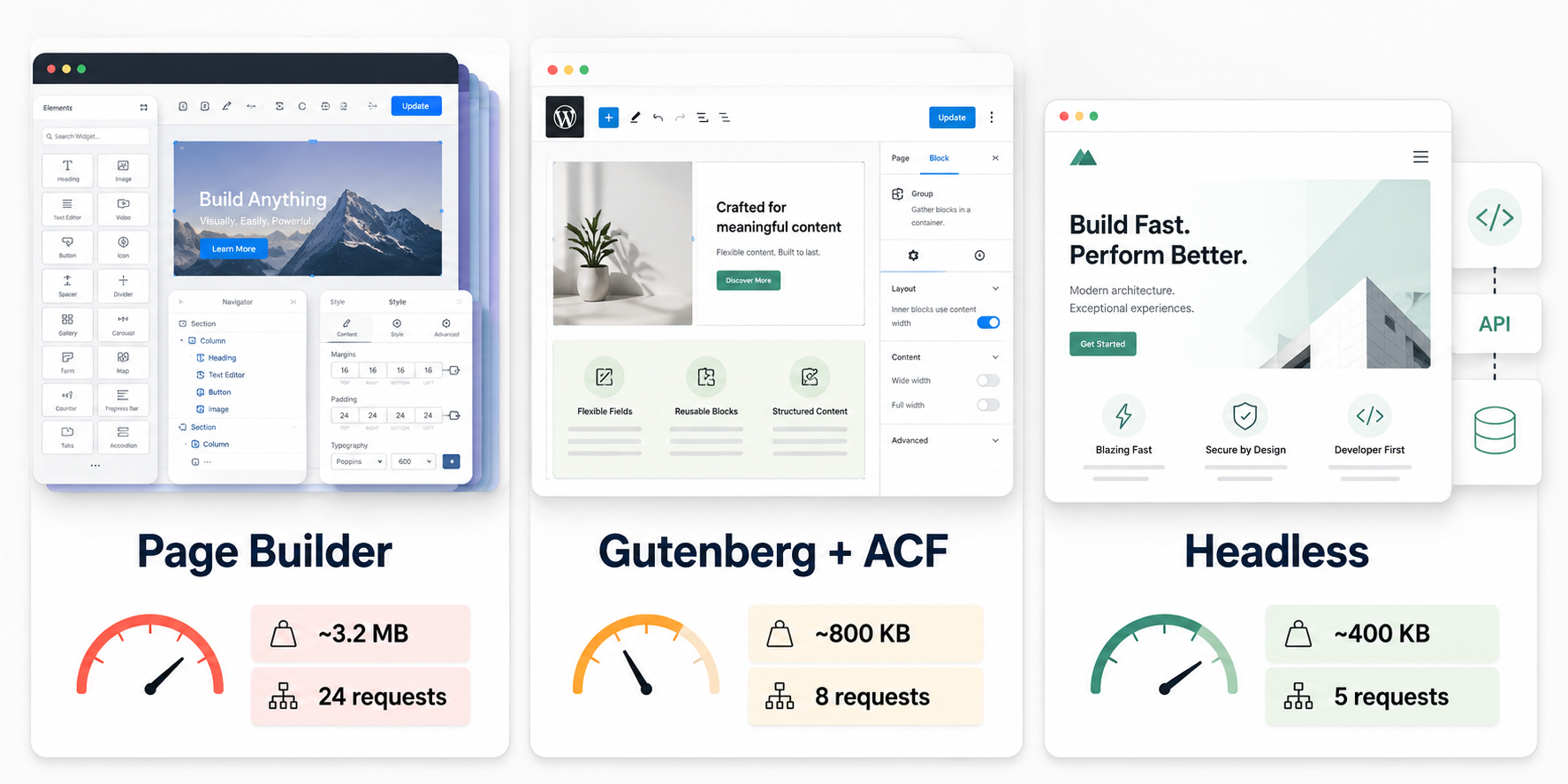
Portability is the column nobody reads until it matters. The day you want to change agencies, move hosts, or redesign, the format your content lives in decides whether that is an afternoon or a rebuild. Page-builder content rarely travels clean.
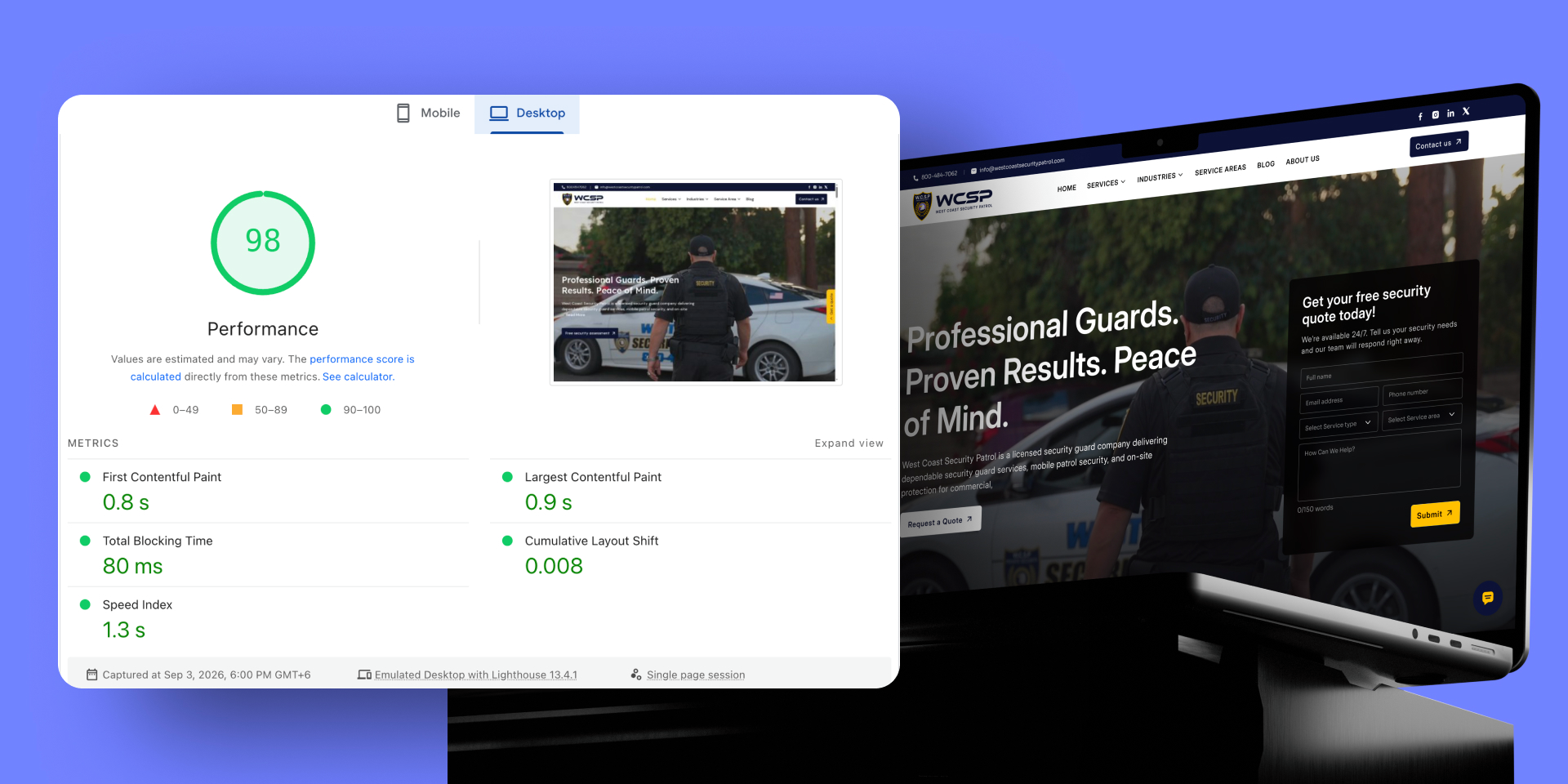
Page speed is not a vanity number. Google holds a fast page to Largest Contentful Paint under 2.5 seconds, Interaction to Next Paint under 200 milliseconds, and Cumulative Layout Shift under 0.1 (Google web.dev, retrieved 2026-08-31). A page-builder site with twenty plugins fights those numbers from day one.
So ask one question: what will you build this on, and why that choice for our site specifically? An agency with a real position answers in a sentence. An agency that says “whatever you prefer” has just told you they have not thought about it. That is the whole interview.
The pattern we see with page-builder sites is consistent. They launch fine and get slower every quarter, and the bill to fix that arrives about two years in. Still weighing platforms?
Read our Webflow vs WordPress comparison.



Not sure what your current site is built on?
Send us the URL. We will tell you what is under it and what that means for your next five years.
What a good agency actually does
You are paying for the work around the build, not just the build.
Scope should cover the following, and each line is a place a cheap quote quietly drops:
- Discovery and requirements before any design, so the build solves a defined problem rather than a guessed one.
- Information architecture and page structure, decided before pixels.
- A custom theme, or your design built faithfully from Figma.
- A CMS your team can actually run without calling a developer for every edit.
- Performance treated as part of the build, with Core Web Vitals targets in scope, not sold back to you later.
- On-page SEO foundations, including URL structure and redirect planning if this replaces an existing site.
- Security, backups, and a staging environment so changes are tested before they hit live.
- Analytics and conversion tracking, set up and verified, not assumed.
- Training and documentation for your team, plus a defined support window after launch.
One line separates good from average. Ask whether a staging environment is included. An agency that pushes changes straight to a live site is telling you how the rest of the project will go.
If this replaces an existing site, redirect planning is not optional. Skipping it is how a redesign loses its rankings.
New to the platform question? Start with what a content management system is and how to choose one.
Ask how they handle analytics and tracking
A site that cannot measure itself is a site you cannot improve, and this is where a surprising number of builds quietly fail.
Ask exactly how they set up GA4 events, conversion tracking, and consent handling. If tracking is a finishing touch bolted on the week of launch, the numbers you report to your own team will not hold up. The details that separate a real setup from a checkbox are event naming, server-side tracking where it matters, and a short written measurement plan that says which actions count as a conversion and why. An agency that treats analytics as your problem is building you a site it never has to be judged on.
Seven signals worth checking
You can judge most of these in an afternoon, before a single call.
- A WordPress-specific portfolio, with live links. Not screenshots. Sites you can open and run a speed test on. It takes two minutes and tells you more than any case study.
- A stated position on the stack. Covered above. The fastest way to separate a developer from an installer.
- Performance as a deliverable. Ask what Core Web Vitals scores they target, and whether that is in scope or an add-on.
- Handover quality. Documentation, credentials in your name, a walkthrough with your team. Ask what handover includes in writing.
- Willingness to say no. An agency that agrees to every request is a production shop. You are partly paying for someone with the standing to push back.
- Maintenance offered separately and priced clearly. An agency with no maintenance answer is planning to disappear at launch.
- Named references you can contact. Two calls with past clients beat a page of testimonials.
The same test applies beyond development. See how to choose a UI/UX design agency.
Seven questions, six red flags
Two of these questions matter more than founders expect, and almost nobody asks them during the sales call.
Ask these seven:
- What will you build this on, and why that for our site?
- How many plugins will the finished site run, and what are they?
- What Core Web Vitals scores are you targeting?
- Is a staging environment included?
- Who owns the code, the hosting, and the domain when the project ends?
- What does handover include, in writing?
- What happens if we want to work with someone else next year?
The last two are the ones nobody asks. They separate a partner from a vendor, and they cost nothing to ask.
Ask them.
Walk on these six:
- A price quoted before any scope conversation.
- No answer on the stack, or “whatever you prefer.”
- Guaranteed SEO rankings, which nobody can promise.
- Hosting only on their own account, in their name.
- No staging environment.
- No written scope, timeline, payment terms, or IP clause.
Any one is a yellow flag. Two together is your answer.
WordPress agency cost: what you actually pay
The build is the visible number. Maintenance is the one most quotes skip, and the one nobody prices the same way twice.
| Project | Cost | Timeline |
| Template-based small site | $2,000 to $8,000 | 2 to 4 weeks |
| Custom business site (10 to 20 pages) | $8,000 to $25,000 | 6 to 10 weeks |
| Custom site with integrations | $25,000 to $60,000 | 10 to 16 weeks |
| WooCommerce store | $15,000 to $80,000 | 8 to 20 weeks |
| Enterprise or headless | $60,000 to $200,000+ | 4 to 9 months |
What moves the number is rarely page count. It is the number of unique templates a designer has to draw, the integrations a developer has to wire, and the content someone has to migrate and reformat. A twenty-page site built from five templates costs less than a ten-page site that needs ten. Ask any quote how many unique templates and integrations it assumes, and you will understand the price in a sentence.
| Maintenance level | Monthly | What it covers |
| Basic | $200 to $500 | Updates, backups, uptime monitoring |
| Standard | $500 to $1,200 | Above plus security, small content changes |
| Managed | $1,200 to $3,000 | Above plus performance work, development hours |
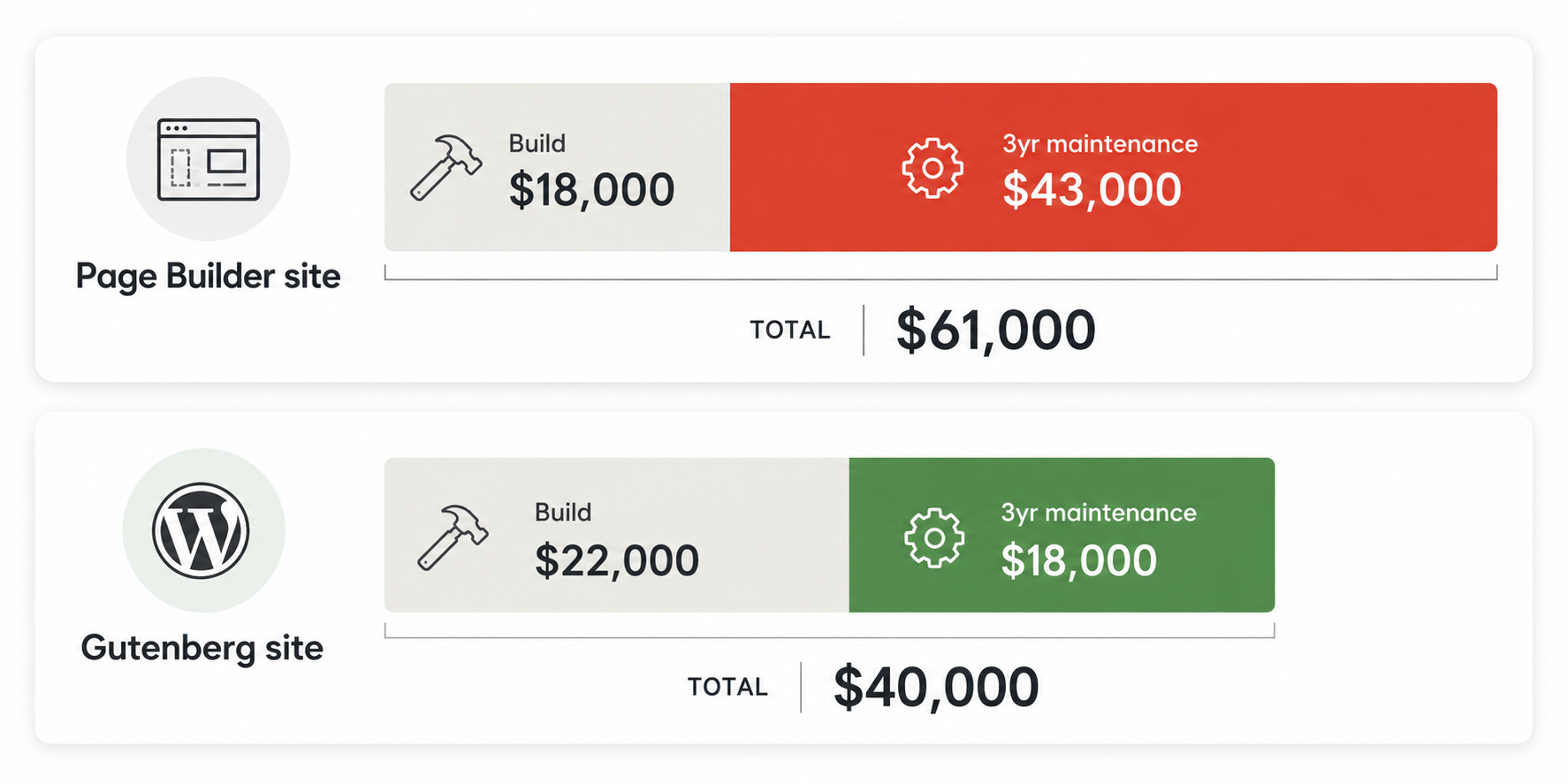
The maintenance market has no anchor. Marketplace plans advertise anywhere from about $30 to a few hundred dollars a month, while developers describe bundling hosting, updates, and support into monthly retainers that run higher again (Hacker News, retrieved 2026-08-31). The exact figure is not the point. That so few agencies will state one before you sign is.
Two things worth saying plainly. First, the cheapest build is frequently the most expensive site. A page-builder site with twenty plugins costs less on day one and more every year after. Second, hosting should be in your name. Some agencies bundle hosting at a markup and hold the account. That is not a service. It is a retention strategy.
What the engagement actually looks like
A good WordPress build runs in visible phases, and you should be able to name the one you are in at any point.
The shape rarely changes. Discovery and requirements come first, usually a week or two. Then information architecture and wireframes, then design, then the build, then quality assurance on a staging environment, then launch, then a defined support window. A custom business site of ten to twenty pages typically runs six to ten weeks end to end.
The variable is almost never the agency. It is how fast content and feedback arrive from your side. Sites stall in the client’s inbox, not the developer’s editor. An agency that cannot describe its phases, or that collapses everything into “we will build it and show you,” is improvising with your budget. Ask to see the phases and the checkpoints where you sign off before work continues.
Who owns your site when you leave
If the domain, hosting, code, and accounts are not in your name, you do not own your site. You rent it from your agency.
This is the part nobody raises in the sales call, and the part that ends up in a lawyer’s inbox. Search the web for the phrase every locked-out client eventually types, some version of “my web designer will not give me my login,” and you find a whole rescue industry built on it. One practitioner guide calls the situation “really common” (Whitepeak, retrieved 2026-08-31).
The locked assets are always the same:
- The domain, registered in the agency’s name at their registrar instead of yours.
- The hosting account, opened under their email, with you as a guest at best.
- The CMS admin, where you were never made an administrator.
- The code and design files, never handed over, with no repository you can access.
- The third-party accounts and API keys, sitting under their logins.
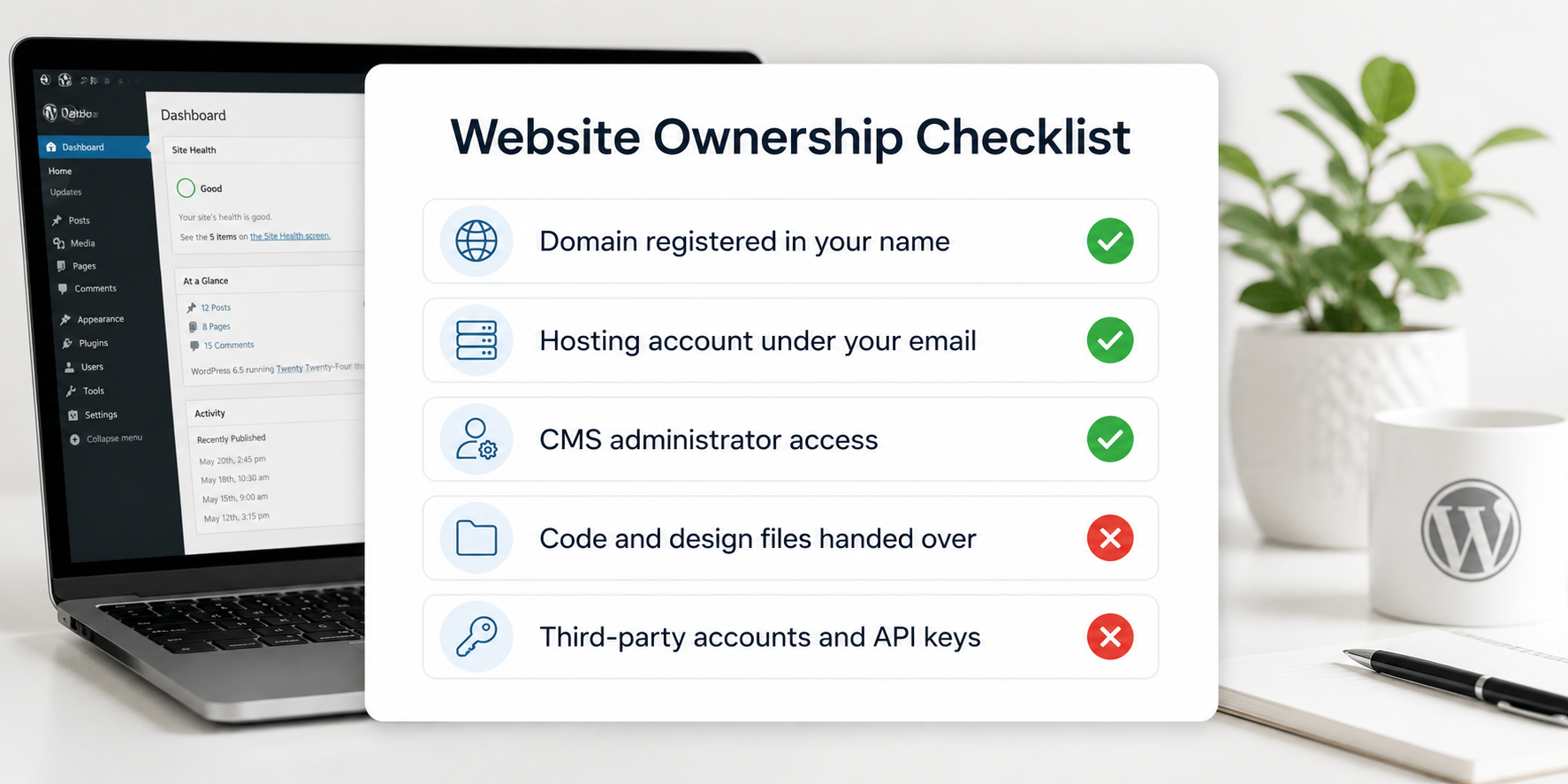
The fix is boring, and it belongs in the contract, not in a panicked email a year later. Register the domain and hosting in your own name from day one. Get a work-for-hire clause that transfers the code and design on final payment. Make sure you hold an administrator account on your own site, and ask for a short offboarding step in writing that lists exactly what gets handed back and when. None of this is expensive. All of it is invisible until the day you need it.
In our experience, clients rarely call because they overpaid. They call because they cannot get into their own website.
Ownership is built into how we work. See how Pixelean handles WordPress builds and handover.
Enterprise and high-stakes builds
At scale, the bar moves from can they build it to can they run it safely while it keeps earning.
For a large or revenue-critical site, evaluate different things. Look for a documented delivery process rather than a talented improviser. Look for a dedicated team instead of rotating contractors, so institutional knowledge stays with your account. Look for disciplined staging and rollback, accessibility and compliance experience where your industry requires it, and the capacity to handle complex integrations without destabilizing what already works.
The single risk to remove at this level is key-person dependency. Ask what happens if their lead developer leaves. If the answer is vague, treat it as disqualifying, because a high-stakes site cannot rest on one person’s memory.
When WordPress is the wrong choice
WordPress is not automatically right, and its own numbers admit it.
WordPress still powers about 41% of all websites, and roughly 59% of sites that run a known CMS (W3Techs, retrieved 2026-08-31). It is also slipping. Its share has fallen for six months straight through mid-2026 (Search Engine Journal, retrieved 2026-08-31). Popular is not the same as correct for your site.
WordPress is the wrong answer when:
- You need a marketing site your team edits weekly, and nobody on staff is technical. Webflow is usually easier to live with.
- Your site is five pages and will stay five pages. A simpler tool costs less to run.
- You are building a web application, not a website. WordPress can be forced into that shape and usually should not be.
- You have no plan or budget for maintenance. WordPress rewards care and punishes neglect.
It is the right answer when content is a real part of the business, when you sell products at volume where WooCommerce is hard to beat, when you need custom functionality the ecosystem already solved, or when you want to own everything, including the freedom to move hosts whenever you like.
We build on Webflow too. So when we tell you WordPress is the wrong call for your situation, we have no reason to be lying.
Read the head-to-head: Webflow vs WordPress.
How Pixelean builds on WordPress
Full disclosure: we do this work, so read this as disclosure.
- Native Gutenberg blocks and a lightweight theme, not a page builder.
- Advanced Custom Fields when a site needs structured content.
- Core Web Vitals treated as part of the build, not a later fix.
- Analytics and conversion tracking set up and verified before launch.
- Security, backups, and a staging environment on every project.
- A redirect map included whenever we replace an existing site.
- Every account in your name. Domain, hosting, everything.
- We also build on Webflow, so we will tell you when WordPress is not the right call.
Frequently asked questions
How much does a WordPress development agency charge?
A custom business site of 10 to 20 pages typically costs $8,000 to $25,000. Sites with integrations run $25,000 to $60,000, and WooCommerce stores range from $15,000 to $80,000 depending on catalogue size. Maintenance runs $200 to $3,000 a month. Agency hourly rates generally sit between $75 and $200.
Should I hire a WordPress developer as a freelancer or use an agency?
Match the model to how continuous the work is. A freelancer suits small, defined projects where you can judge quality yourself. An agency suits business-critical builds, projects with integrations, or anything with multiple stakeholders. The real risk with a freelancer is not skill. It is continuity when they take on other work or move on.
What should I ask a WordPress development company before hiring?
Ask what they will build on and why, how many plugins the finished site will run, what Core Web Vitals scores they target, whether a staging environment is included, and who owns the code, hosting, and domain when the project ends. The ownership question matters more than most founders expect and rarely comes up during the sales call.
How do I compare two WordPress agency quotes?
Compare scope, not headline price. Line the two quotes up and check how many unique templates each includes, how many plugins the finished site will run, whether performance and a staging environment are in scope, whether content migration is included, and what maintenance costs after launch. Two numbers that look the same often describe very different projects. The cheaper one is usually cheaper because something on this list was left out.
What is a staging environment and why does it matter?
A staging environment is a private copy of your site where changes are tested before they go live. It matters because it is the difference between catching a broken layout in private and catching it because a customer emailed you. An agency that edits directly on your live site is telling you how carefully it works.
Is Elementor bad for WordPress sites?
Page builders trade long-term cost for short-term speed. They add markup and scripts that slow pages down, their updates can break finished layouts, and they wrap content in a format that is hard to migrate away from. For a small marketing site where speed is not a competitive factor, that trade can be fine. For a business site where page speed affects traffic and conversion, native Gutenberg blocks with a lightweight theme are the more durable choice.
Who owns my WordPress site after the project ends?
You should. The domain, the hosting account, the code, and every third-party account should be in your name from the start. Some agencies register hosting in their own name and bundle it at a markup, which makes leaving harder than it should be. Confirm ownership in writing before signing.
How long does a WordPress website take to build?
A template-based small site takes two to four weeks. A custom business site of 10 to 20 pages takes six to ten weeks. Sites with integrations take ten to sixteen weeks, and WooCommerce stores run eight to twenty weeks. Timelines depend heavily on how quickly content and feedback arrive from the client side.
The bottom line
Two agencies can quote the same number and hand you very different sites. The difference is not the price. It is what they build on, whether performance is in scope, and whose name the accounts are in. Ask what they will build on and why, get ownership in writing, and match the model to how often the work recurs. Do that, and the quote stops being a gamble.
Ready to build on WordPress without the debt?
Pixelean builds fast, maintainable WordPress sites for startups and growing businesses around the world, with every account in your name. If you want custom WordPress development done without the lock-in, send us the URL of your current site, and we will tell you what it is costing you.
Sources
- W3Techs, Usage statistics of WordPress as a content management system, retrieved 2026-08-31. w3techs.com
- Search Engine Journal, WordPress market share in decline, retrieved 2026-08-31. searchenginejournal.com
- Google, web.dev, Web Vitals thresholds, retrieved 2026-08-31. web.dev
- Capterra, Elementor user reviews, retrieved 2026-08-31. capterra.com
- Hacker News, Ask HN discussion on small-business web work, retrieved 2026-08-31. news.ycombinator.com
- Whitepeak, on web designers withholding site access, retrieved 2026-08-31. whitepeak.io