You are about to pay for a new website or a redesign. In the first meeting, someone says the design “affects SEO.” Nobody says how, or how much.
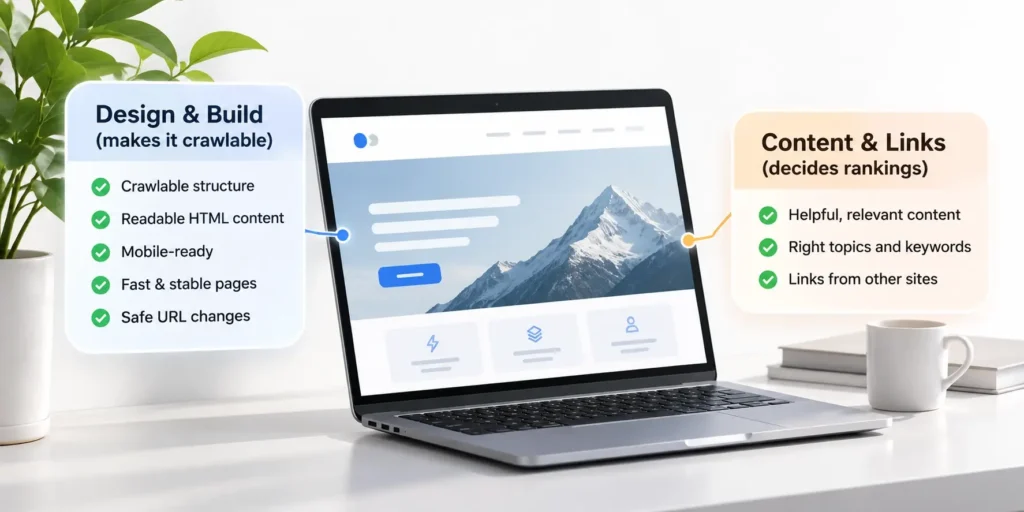
SEO friendly web design comes down to one split. Design and build decide whether Google can reach a page, read it and load it quickly. Content and links decide whether that page ranks. When the two get mixed up, budgets go to the wrong fixes. Teams polish heading order while the menu is built from links Google cannot follow.
Every rule in this post links to the Google Search Central or web.dev page that states it. Where Google has not documented something, the post says so and stops there.
Key takeaways
SEO-friendly web design means building a site that Google can crawl, render, index and load quickly, and that keeps its existing rankings when URLs change. Design controls five things.
- Crawlable structure and links
- Content Google can read in the HTML
- The same content on mobile and desktop
- Fast, stable pages (Core Web Vitals)
- Safe URL changes during a redesign
Content quality and links from other sites decide rankings after that. No design choice guarantees a position in search results.
What is SEO website design
SEO website design is the part of search work that lives in templates, code and hosting. It covers how pages link to each other, whether text arrives in the HTML, how the site behaves on a phone, how fast pages load and what happens to old URLs when the site changes.
That makes web design for SEO a build problem with a short, checkable list. Google’s SEO Starter Guide defines SEO as “helping search engines understand your content, and helping users find your site.” Design and build handle the first half of that sentence, for every page at once. A template that ships a crawlable menu fixes navigation on 200 pages. A template that hides product copy behind a click hides it on 200 pages too.
The other parts of search work are real, and they belong to other jobs.
| Design and build | Content | Ongoing SEO |
| Site structure and navigation | Choosing topics people search for | Earning links from other sites |
| Crawlable links and URLs | Writing and editing pages | Monitoring Search Console |
| Rendering and page templates | Keywords and search intent | Technical fixes over time |
| Page speed and Core Web Vitals | Updating pages as facts change | Reporting on traffic and rankings |
| Mobile layout | Images and media for each page | Testing changes after launch |
| Redirects when URLs change | Title and description text | Competitor and SERP tracking |
The table answers a common worry. A well-built site is ready for search on launch day. Ongoing SEO is what a business adds when it wants someone to produce content, earn links and watch performance after launch. That is a separate decision from website design for SEO, and it can wait until the site is live.
This post stays on the first column, the work Pixelean does when it designs and builds a site. Our website design and development service covers that column.
Design decisions that affect search, and the myths
Fourteen beliefs come up again and again in design meetings. Some are true, some are half true and some were never documented by Google at all. The table puts each belief next to what Google or web.dev actually says and what to do about it on your site.
The sources are the SEO Starter Guide, Mobile site and mobile-first indexing best practices, Understand the JavaScript SEO basics, Pagination, incremental page loading, and their impact on Google Search, Link best practices for Google, Understanding page experience in Google Search results, Avoid intrusive interstitials and dialogs, How to move a site, and two web.dev guides, Best practices for carousels and Best practices for fonts.
| The belief | What is true | Source | What to do |
| Headings must be in perfect order for SEO. | Google says heading order does not matter for Search. Semantic order still helps screen reader users. | Google, SEO Starter Guide | Keep a logical order for accessibility and stop auditing it for rankings. |
| Longer pages rank better. | Length alone does not matter for ranking. Google says there is no word count target, minimum or maximum. | Google, SEO Starter Guide | Write to the length the topic needs. |
| Keywords in the domain name help ranking. | Keywords in the domain or URL path have hardly any effect beyond appearing in breadcrumbs. | Google, SEO Starter Guide | Pick a domain that suits the brand. Keep URLs readable for people. |
| Duplicate content gets a penalty. | Content reachable at several URLs does not cause a manual action. It is inefficient. Copying other sites is a different case. | Google, SEO Starter Guide | Set one canonical URL for each page. |
| Google ignores content in tabs and accordions. | Google suggests tabs or accordions on mobile instead of removing content. The content has to be in the page. | Google, Mobile-first indexing best practices | Put tab content in the HTML and show it without a network request. |
| Google cannot read JavaScript. | Google renders JavaScript in a separate phase after crawling, and pages can wait in a render queue. | Google, JavaScript SEO basics | Server-render or pre-render the pages you want found. |
| Infinite scroll is fine for SEO. | Google’s crawlers do not click buttons and generally do not trigger JavaScript that needs user actions. | Google, Pagination and incremental page loading | Back infinite scroll and load more with paginated URLs linked with a href. |
| Buttons and onclick links work like normal links. | Google can generally crawl a link only when it is an a element with an href attribute. | Google, Link best practices | Build every menu, card and pagination link as an a element with an href. |
| A perfect PageSpeed score lifts rankings. | Good Core Web Vitals reports do not guarantee top rankings. Google calls chasing a perfect score for SEO reasons possibly a poor use of time. | Google, Page experience in Google Search | Pass the three thresholds, then spend effort on content. |
| Pop-ups always hurt SEO. | Google warns against interstitials that cover the whole page. Small banners are fine, and legally required dialogs are exempt. | Google, Avoid intrusive interstitials | Use banners or overlays. Never redirect to a separate consent page. |
| Hero carousels are harmless. | A well-built carousel has minimal performance cost. Large carousels above the fold often hold the LCP element, and autoplay can cause infinite CLS. | web.dev, Best practices for carousels | Load slides in the HTML, size the first image and avoid autoplay. |
| Fonts have nothing to do with SEO. | Font swapping can cause layout shift, and web fonts can delay Largest Contentful Paint. | web.dev, Best practices for fonts | Set font-display to optional or swap, and preload only the fonts above the fold. |
| A better-looking redesign is safe for rankings. | Changing URLs needs a URL map and server-side redirects. Google says to expect temporary ranking fluctuation. | Google, How to move a site | Map every old URL and test redirects before launch. |
| Meta keywords still matter. | Google Search does not use the keywords meta tag. | Google, SEO Starter Guide | Leave the field out of the CMS. |
Why do these beliefs last? The SEO advice that gets repeated is rarely checked against Google’s documentation. Some guides list bounce rate, dwell time or a “three clicks to any page” rule as ranking rules. Of the eight pages ranking for this topic that we read on 17 October 2026, six mention bounce rate next to their SEO advice. None of the Google pages linked in this post lists bounce rate, dwell time or Google Analytics data as a ranking input. The three-clicks rule does not appear in any of them either.
Checking takes minutes. The pages are public, dated and short. When a claim has no Google page behind it, treat it as an opinion and ask for the source.
The fourteen rows fall into three groups, and each group needs a different response.
Rules that matter less than people think. Heading order, word count, domain keywords, meta keywords and duplicate URLs. Google’s starter guide lists each one under “Things we believe you shouldn’t focus on.” Time spent on them in a design review is time taken from navigation and content.
Rules that are true with conditions. Tabs, JavaScript, pop-ups, carousels and fonts. Each is fine when built one way and a problem when built another. A tab is fine when its text is in the HTML. JavaScript is fine when the content renders. A carousel is fine when the first slide is light and static. The condition lives in the template, so this is where a design review earns its time.
Risks that look harmless. Infinite scroll, click-handler links and URL changes in a redesign. Nothing looks broken in the browser. The damage shows up weeks later in Search Console, as pages that were never crawled or rankings that still point at old addresses.
A review that covers the third group and the conditions in the second covers the parts of search that design actually controls.
Site structure and navigation
Structure decides which pages Google can find and how it understands their relationships. It is also the cheapest part of the site to get right, because it is decided once in the templates.
Page hierarchy and URLs
Group pages the way a visitor would look for them. Services sit under /services/, articles under /blog/, and each page has one clear parent.
Google’s guide to URL structure recommends simple, descriptive URLs that use readable words instead of long ID numbers. Readable URLs help people decide what to click and what to share. Keywords in them do little for ranking. The SEO Starter Guide says domain and URL keywords have “hardly any effect beyond appearing in breadcrumbs.”
Depth matters less than connection. A page four levels down is fine when it is linked. The problem is the orphan page, which exists in the CMS and in the sitemap but has no link from any other page. Campaign landing pages and old posts dropped from category listings are the usual cases.
Menus built from real links
Google’s link best practices state that Google can generally crawl a link only when it is an <a> element with an href attribute. Menus built from styled buttons or click handlers look identical to a visitor. To Googlebot they can be invisible.
The fix costs nothing at build time. An <a> element that has both an href and an onclick handler is still crawlable, so JavaScript behavior can stay.
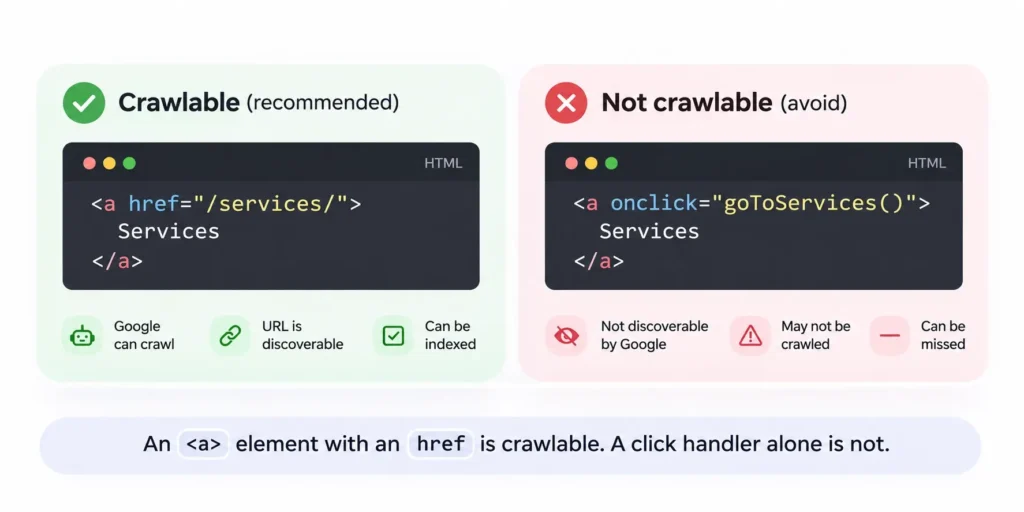
<a> element with an href is crawlable. A click handler alone is not.Internal links and breadcrumbs
Google’s rule is plain. “Every page you care about should have a link from at least one other page on your site.”
Write anchor text that says where the link goes. Google describes good anchor text as “descriptive, reasonably concise, and relevant.” There is no ideal number of links per page. Breadcrumbs give every page a link back to its parent and can show the page’s path in search results, which is where readable URL words still do some work.
Content Google can read
Google indexes what it can read. Content that only exists in an image, in a script that never runs or behind a click may not exist for search at all.
Text belongs in the HTML
Headlines and offers baked into a hero image cannot be read as text. web.dev’s carousel guide says text “baked into” an image file “is bad for accessibility, localization, and compression rates.” Put the text in the HTML and place it over the image with CSS.
JavaScript sites
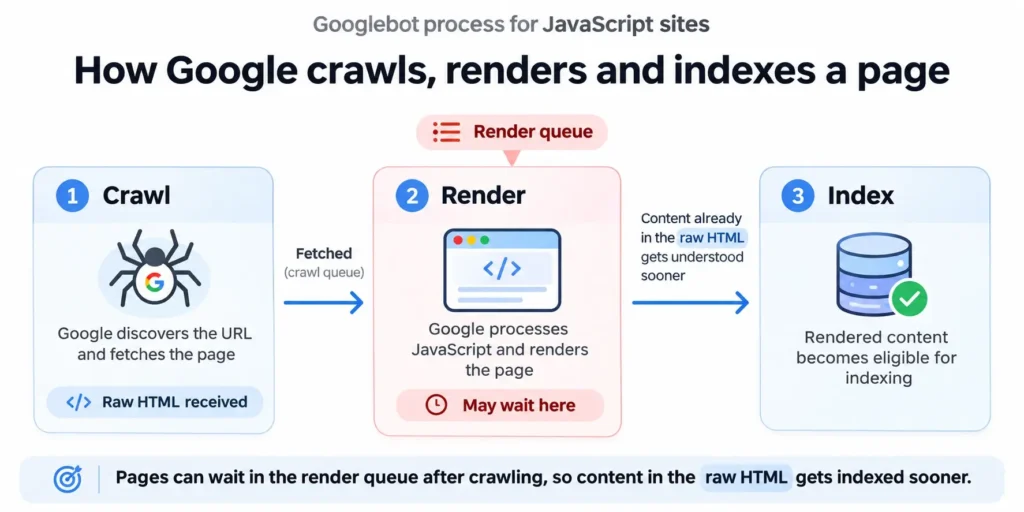
Google’s JavaScript SEO basics describe three phases, crawling, rendering and indexing. Googlebot queues pages for rendering, and a page “may stay on this queue for a few seconds, but it can take longer than that.”
Google can render JavaScript. The question is how long you want to wait and what other crawlers see. Google’s answer is that “server-side or pre-rendering is still a great idea because it makes your website faster for users and crawlers, and not all bots can run JavaScript.”
Two details catch teams. A noindex tag in the original HTML can stop rendering, because Google “may skip rendering and JavaScript execution” when it sees one. Sites generated by AI site builders follow the same rules, so check what they actually ship. Use the URL Inspection tool in Search Console to see the rendered HTML Google gets.
A quicker first check needs no tools. Open the page, view the page source (the raw HTML, before scripts run) and search for a sentence from the main content. If the sentence is there, the content does not depend on rendering. If it only appears in the browser’s inspector, it depends on JavaScript, and the page is waiting on the render queue every time it changes.
Tabs, accordions and “read more”
These patterns are fine for search when the content is already in the page. Google’s mobile-first indexing guide suggests them directly. “Instead of removing content, consider moving content into accordions or tabs to save space.”
The risk is a tab that fetches its content from the server only after a click. Google will not click it.
Infinite scroll and “load more”
Google’s pagination guide says its crawlers “don’t ‘click’ buttons and generally don’t trigger JavaScript functions that require user actions.” Products or posts that load on scroll can stay unseen.
The fix keeps the scroll and adds real pages behind it.
- Unique URLs. Give each page its own URL, such as ?page=2 at the end of the address.
- Real links. Link page to page with <a href>.
- Own canonicals. Give each page its own canonical URL. Do not point every page at page one.
- No fragments. Google ignores the text after a # in a URL, so do not use it for page numbers.
Lazy loading
Lazy loading images below the fold is good practice. Lazy loading primary content on interaction is a different case. Google’s mobile guide is direct. “Don’t lazy-load primary content upon user interaction.” Load content when it enters the viewport, as Google’s lazy loading guide describes.
Mobile-first design
Google indexes the mobile version of your site. In its own words, “indexing on your site comes from the mobile site.” Whatever the phone layout removes, Google does not see.
That turns a common design habit into a search problem. A designer trims a long service page on mobile to “clean up” the layout. The trimmed copy, the FAQ and the comparison table disappear from Google’s view of the page. Google says that if the mobile page has less content than the desktop page, “you can expect some traffic loss.”
Responsive design avoids the issue, because both layouts serve the same HTML from one URL. Separate mobile templates or an m-dot site bring the issue back, because every page then has two versions that can drift apart over time. Check these four things in the design review.
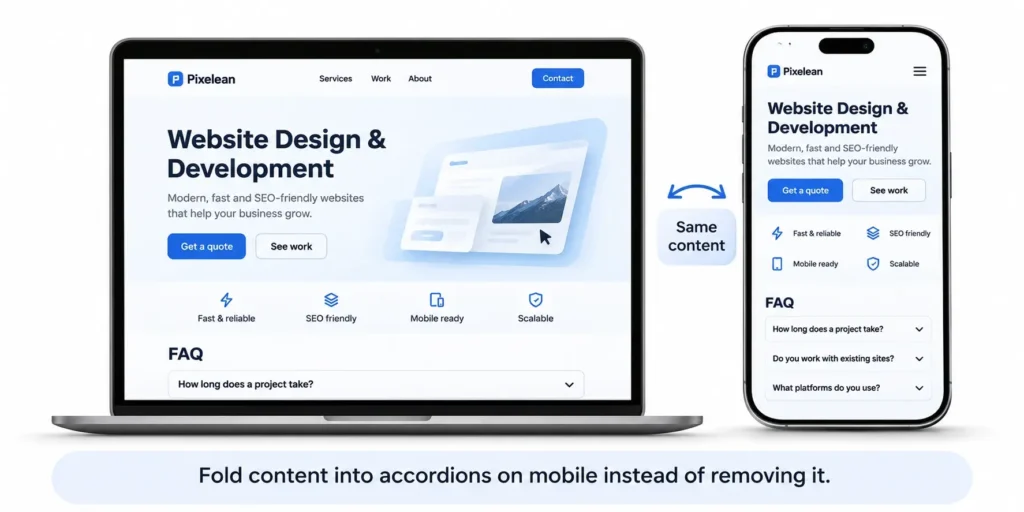
- Same content. Mobile carries the same primary content as desktop, folded into accordions where space is tight.
- Same headings. Google asks for “the same clear and meaningful headings on the mobile site.”
- Same alt text. Images keep their alt text on mobile.
- Same structured data. Any structured data on desktop is present on mobile too.
Check it the way Google sees it. Run the live test in the URL Inspection tool and compare the rendered text with the desktop page. Anything missing from the mobile render is missing from the index.
Page speed and Core Web Vitals in design terms
Core Web Vitals turn page speed into three numbers. Google’s Core Web Vitals guide sets the targets. LCP should occur “within the first 2.5 seconds,” INP should be “less than 200 milliseconds” and CLS “less than 0.1.”
Design decisions set these numbers long before a developer touches the code. The hero, the fonts and the widgets are all chosen in Figma.
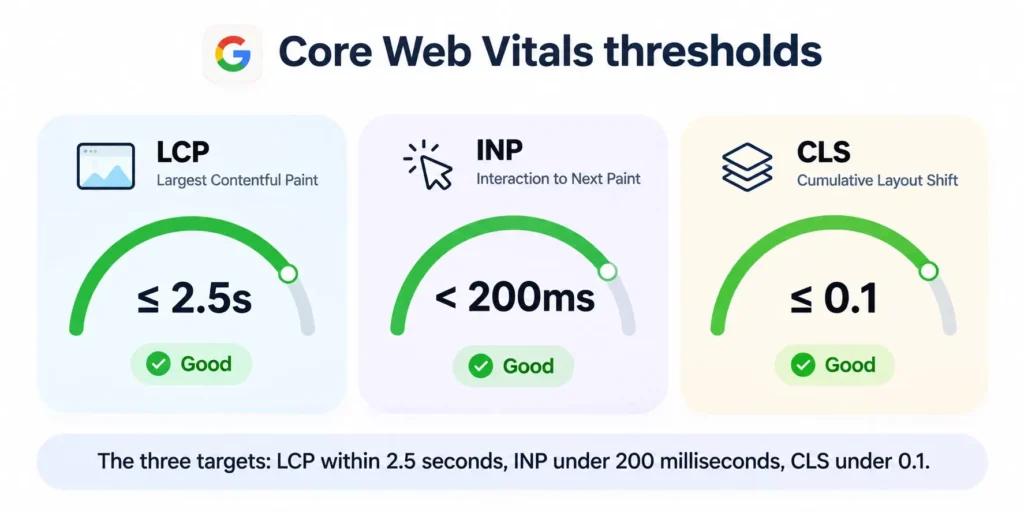
| Metric and threshold | Design decisions that move it | The fix |
| LCP, within 2.5 seconds | Hero image size, a carousel as the hero, web fonts holding back the headline | Compress and size the hero image, load the first slide in the HTML, preload the one font the headline uses |
| INP, under 200 milliseconds | Heavy scripts, chat widgets, animation libraries, third-party tags | Load chat and tag scripts after the page is usable, cut animation scripts, keep long tasks short |
| CLS, under 0.1 | Images without dimensions, font swap, banners that push content down | Set width and height on images, reserve space for banners and embeds, use size-adjust on the fallback font |
web.dev lists “images without dimensions” first among the common causes of a poor CLS in its guide to optimizing Cumulative Layout Shift. The fix is two attributes.
Carousels deserve their own line. web.dev says “large, above-the-fold carousels often contain the page’s LCP element,” and autoplaying carousels have “the potential to cause infinite CLS.” It also notes that carousels which “advance automatically, are easily mistaken for advertisements by users.” We think an autoplay hero carousel costs more than it earns. One strong image with real text does the same job.
Fonts work the same way. web.dev’s font guide says font swapping “has the potential to cause layout shifts” and that web fonts can delay LCP in some situations. The shift happens when the web font and its fallback take up different amounts of space. The guide’s options are font-display set to optional for performance, or swap when the brand font must always show, plus the size-adjust descriptor to close the gap between the two fonts. Each extra family and weight is another file the browser has to fetch before the text settles.
Now the reality check. Google confirms that “Core Web Vitals are used by our ranking systems.” The same page experience guide also says “Google Search always seeks to show the most relevant content, even if the page experience is sub-par.” Good scores do not guarantee top rankings, and Google adds that chasing “a perfect score just for SEO reasons may not be the best use of your time.”
Pass the three thresholds on real users’ data in Search Console. Check new templates in PageSpeed Insights before launch. Then put the effort into content.
Two kinds of data are involved. Field data comes from real Chrome users and feeds the Core Web Vitals report in Search Console. Lab data comes from a single simulated test, which is what PageSpeed Insights runs on a new template before it has any visitors. Use lab data to catch problems before launch and field data to confirm them after.
Images, headings and the on-page elements designers own
Several on-page elements are set in templates, so designers own them by default.
Images. Google’s image SEO best practices call alt text “the most important attribute” for image metadata, and it also serves screen reader users. Use descriptive filenames such as blue-running-shoe.webp. A camera default like IMG_2041.jpg tells Google nothing. Write alt text that describes the image in the context of the page. “Team reviewing a homepage layout on a large screen” tells a screen reader user and Google what the image shows. A string of keywords tells them nothing useful. Google Search supports BMP, GIF, JPEG, PNG, WebP, SVG and AVIF, and the file extension should match the file type.
Headings. Use headings to show structure. One H1 per page, H2s for sections and H3s inside them is a sound default for readers and screen readers. Do not chase heading order for rankings. Google’s starter guide says heading order makes no difference for Search.
Titles and meta descriptions. Google asks that every page have a title in the <title> element, written to be “descriptive and concise” in its guide to title links. Google builds snippets mainly from page content and may use the meta description “when it describes the page better than other parts of the content,” according to its snippet guide. Design the CMS templates with editable title and meta description fields for every page type, including blog posts, services and product pages. If the team is still choosing a system, our guide to what a content management system does covers those fields by platform.
Pop-ups, banners and cookie notices
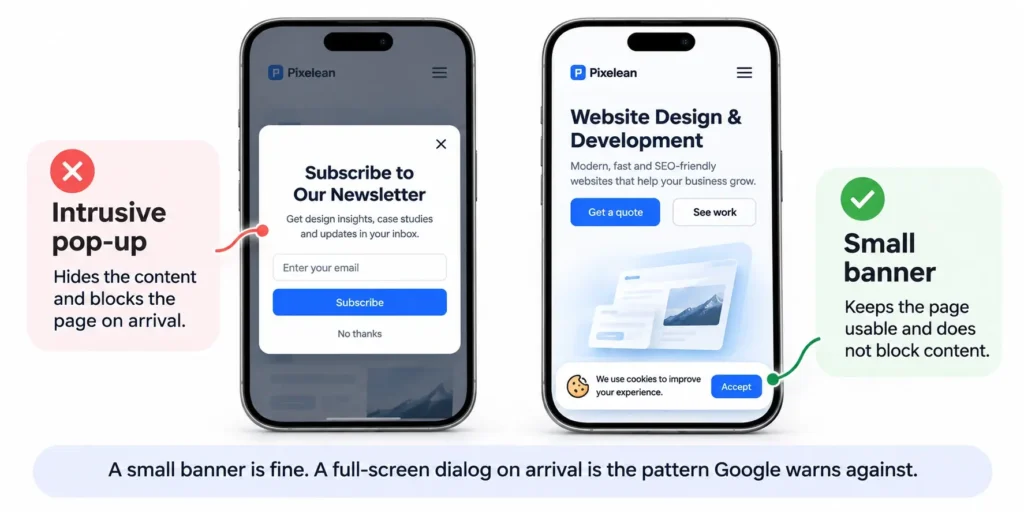
Google’s guide to avoiding intrusive interstitials gives three rules. Use “banners that take up only a small fraction of the screen.” Do not cover the entire page. Do not redirect users to a separate page for their consent or input.
Cookie notices need one nuance. Google says the two “avoid” rules do not apply to dialogs that are legally mandatory, and it exempts required interstitials such as age gates. Even then, it recommends overlaying the content instead of redirecting every URL to one consent page, because Googlebot can only fetch that one page.
In design terms, use a bottom banner for cookies, a small slide-in for newsletter sign-ups and no full-screen promotion on arrival.
Test the arrival on a phone. If the first screen a visitor sees is a dialog with the content hidden behind it, that is the pattern Google’s guide describes as intrusive. A chat widget that opens itself over the content on arrival counts as a dialog in the same sense.
Choosing a platform with search in mind
There is no best platform for search. WordPress, Webflow, Framer and Shopify all give an SEO friendly website design the basics it needs. They differ in how much control you keep and what you have to add.
| What to check | WordPress | Webflow | Framer | Shopify |
| Control over titles and meta | Core has no meta description field. A theme or SEO plugin adds it | Title and meta per page and per CMS template | Title and meta per page, templated for CMS pages | Editable for products, collections, pages and the store |
| Redirects | Through a plugin or server config | 301 redirects in site settings on a paid plan | Up to 2,500 redirects per project on the Pro plan | URL redirects in the Shopify admin |
| Clean URLs | Post name permalinks give example.com/sample-post | Editable slugs, CMS items under a collection path | Editable slugs, CMS items under a collection path | Editable handles after the /products/, /collections/ and /pages/ prefixes |
| XML sitemap | Built in since WordPress 5.5 at /wp-sitemap.xml | Generated and updated on each publish | Generated automatically | Generated automatically |
| How pages render | Page text present in the HTML response | Page text present in the HTML response | Page text present in the HTML response | Page text present in the HTML response |
| Control over speed | Full control of hosting, theme and plugins | Hosting set by Webflow, control over assets and custom code | Hosting set by Framer, control over assets and components | Hosting set by Shopify, control over theme code and apps |
The render row is based on one live page per platform that we checked on 17 October 2026. Each returned its page text in the HTML before any JavaScript ran. A custom build on any platform can still break that, so check your own templates with the URL Inspection tool.
The rest of the table comes from each platform’s documentation, read on the same date. Sources are WordPress’s permalink settings and sitemaps announcement, Webflow’s help article on SEO titles and meta descriptions, Framer’s guide to SEO features, and Shopify’s help pages on sitemaps and URL redirects.
Choose on who edits the site, how much content it carries and whether it sells products. Our Webflow vs WordPress comparison covers that decision for the two most common choices. We build on WordPress, Webflow and Framer, including WordPress development and Webflow development.
Plugins and apps deserve the same scrutiny as the platform. Each one can add scripts to every page that loads it, and every script competes for the main thread that INP measures.
Redesigns, the biggest search risk in web design
A redesign that keeps every URL is mostly a design change. A redesign that changes URLs is a site move, and Google has a guide for it. How to move a site is the basis for the steps below.
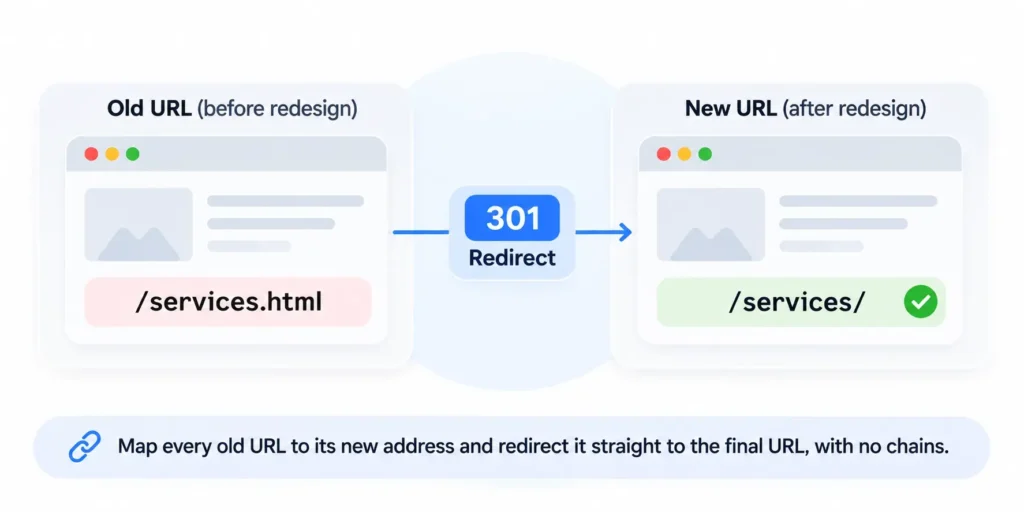
Take a typical case. The old site has /services.html, and the new one uses /services/. Without a redirect, every link and every ranking that pointed at the old address now points at an error page.
- Crawl and export every old URL. Use a crawler, the old XML sitemap and the Page indexing report in Search Console so nothing is missed. Add the URLs that other sites link to, since those carry the most value.
- Map each one to a new URL. Google calls this preparing “a URL mapping from the current URLs to their corresponding new format.”
- Keep URLs that already rank wherever possible. A URL that does not change needs no redirect.
- Add server-side 301 redirects before launch. Redirect straight to the final URL, with no chains. Google notes that “301 and other permanent redirects don’t cause a loss in PageRank.”
- Keep titles, headings and content on pages that rank. Redesign the layout around the copy that earned the ranking.
- Keep the redirects for at least a year. Google says to keep them “for as long as possible, generally at least 1 year.”
- Watch Search Console and expect some temporary fluctuation. Google tells site owners to “expect temporary fluctuation in site ranking during the move.” For medium-sized sites, it says the switch to new URLs “can take a few weeks or more.”
Two more items from Google’s guide are easy to miss. Update internal links so they point straight at the new URLs instead of leaning on redirects. Submit a new XML sitemap with the new URLs, which Google says “can help make the discovery process quicker.”
We recommend that no redesign launches without a redirect map. It is the cheapest insurance in the project. For the full planning sequence, see our website redesign checklist, and for budgeting the work, our breakdown of website redesign cost.
SEO-friendly web design checklist before launch
Run this list on the staging site, then again on launch day. Each item maps to a section above, so a failed line points straight at the fix. The list works for any platform and any designer. If you are briefing an agency, hand it over before the first design round, when every item is still cheap to get right.
Structure
- Every menu, card and pagination link is an <a> element with an href.
- Every important page has at least one internal link.
- URLs use readable words and one consistent pattern.
- Breadcrumbs appear on pages deeper than one level.
Content
- Headlines and offers are HTML text placed over the image.
- Tab and accordion content is in the page HTML.
- Paginated lists have unique, linked URLs.
- Key pages show their content in the URL Inspection tool’s rendered HTML.
Mobile
- Mobile pages carry the same content as desktop.
- Headings and alt text match on both layouts.
- No full-screen pop-up appears on arrival.
- Cookie consent uses a banner or overlay, with no redirect.
Speed
- Every image has width and height set.
- The hero image is compressed and is not a carousel with autoplay.
- Fonts are limited, with font-display set.
- Each template passes LCP, INP and CLS in PageSpeed Insights.
Launch
- Remove noindex from every page that staging blocked.
- Submit the XML sitemap in Search Console.
- Test every redirect in the URL map and fix any chains.
- Inspect the homepage and one page per template with the URL Inspection tool.
- Check that title and meta description fields are filled on every template.
What design cannot do for SEO
Design gives a site a sound base. It does not make a page rank. Google says it “always seeks to show the most relevant content,” and relevance comes from useful content, links from other sites and time. A fast, crawlable page with thin content stays a fast, crawlable page with thin content.
The reverse holds too. A strong page on a broken template can sit unindexed, or rank below a weaker page that loads and renders cleanly. Design removes the reasons Google cannot use a page. Content and links give it a reason to.
That is the honest scope of the work. Pixelean designs and builds sites on WordPress, Webflow and Framer with these basics in place from the start. See how we design and build websites or tell us about your project.
Frequently asked questions
What is SEO-friendly web design?
SEO-friendly web design is building a website so Google can crawl its links, read its content in the HTML, index the mobile version and load pages quickly. It also covers keeping existing rankings when URLs change, through a URL map and 301 redirects. It does not cover writing content or earning links, which decide rankings after that.
Does web design affect SEO?
Yes, in specific ways. Design decides whether Google can follow links, read text, see the same content on mobile and load pages within Core Web Vitals thresholds. A redesign that changes URLs without redirects can lose existing rankings. Visual style itself, such as colors, is not something Google’s documentation lists as a ranking input.
Is SEO part of web design?
Part of it is. The technical base of SEO, including site structure, crawlable links, rendering, mobile layout, speed and redirects, is decided during design and build. Content planning, writing, link earning and ongoing monitoring are separate work. A site can be built SEO-friendly before any ongoing SEO work starts.
Do headings need to be in order for SEO?
No. Google’s SEO Starter Guide says that from a Google Search perspective, it does not matter if headings are used out of order. Semantic heading order still helps people who use screen readers, so a logical order is still the right default for accessibility.
Is infinite scroll bad for SEO?
It can be. Google’s crawlers do not click buttons and generally do not trigger JavaScript that loads more content on scroll, so items beyond the first set may stay unseen. Back infinite scroll with paginated pages, each with a unique URL and linked with a standard a href link.
Do pop-ups hurt SEO?
Full-page pop-ups can. Google advises against interstitials that cover the whole page or redirect users to a separate page for consent, because they make content harder to reach and understand. Small banners are fine. Legally required dialogs, such as age gates, are exempt but should overlay the content.
Will a website redesign hurt my rankings?
A redesign that keeps URLs and content carries little search risk. One that changes URLs is a site move. Google’s site move guide says to map old URLs to new ones, add server-side 301 redirects, keep them for at least a year and expect temporary ranking fluctuation while Google recrawls the site.