

A redesign can go wrong in two ways.
The first is quiet. It launches on time. It looks better than the old site. And it moves no number that matters. Six months later someone asks what the rebuild actually did, and nobody has an answer.
The second is loud. The new site goes live, and the traffic that took years to build falls off a cliff in a week.
Both are avoidable. Both start before anyone opens Figma.
This is the checklist. It starts earlier than the ones you have read, because the expensive mistakes happen in the planning, not the pixels. We run design and SEO on the same projects at Pixelean, so the launch and redirect parts of this list run longer than most. That is what turns this into a real website redesign SEO checklist, not just a design brief. It is also the part a design-only studio has to stay vague about. We do not.
Copy the lists into your own doc. Work them top to bottom. The website redesign steps run in order, so treat the whole thing as a redesign project plan, not a menu. You will not need the prose to use them.
Key takeaways
- A falling number is usually not a design problem. Fix the cause before you buy a rebuild.
- Baseline every metric before you touch anything, or you can never prove the redesign worked.
- The redirect map decides whether you keep your rankings. One old URL to one new URL, every time.
- Before you celebrate, confirm the live site is indexable and staging is not. One stray noindex tag can hide the whole site from Google.
- Expect a dip in weeks one to three after launch. If it is still falling after four, something broke.
Before anything else, should you redesign
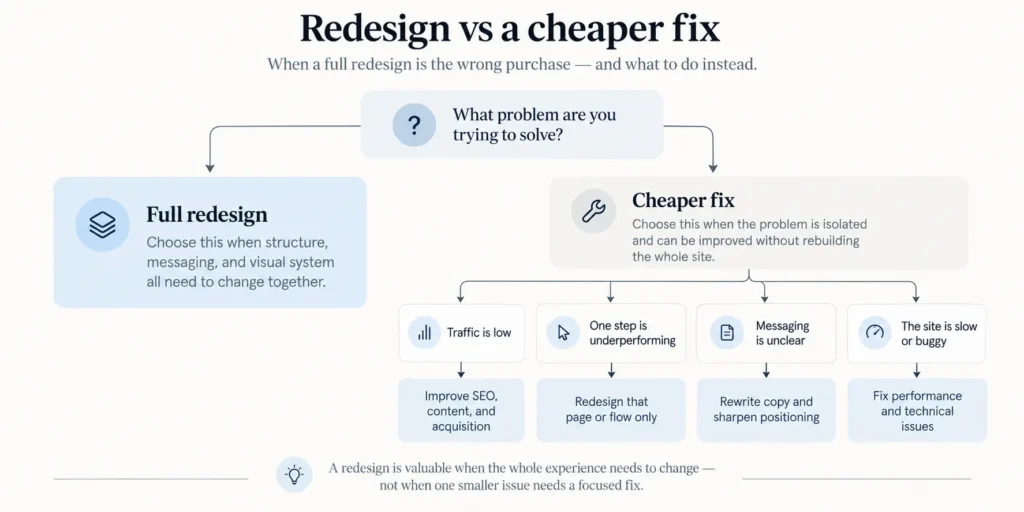
Redesign when the structure is wrong. For almost everything else, a smaller and cheaper fix will beat a rebuild.
Here is the pattern we see. A number falls. Traffic, or leads, or sales. Someone in a meeting says the site looks dated, and someone approves a redesign to fix the number. But a falling number is usually a content, demand, or speed problem that happens to show up on the website.
Four cases where a redesign is the wrong purchase.
The content is the problem, not the layout. Rewrite your top ten pages first. It is faster, it costs a fraction of a rebuild, and it tells you if the design was ever the issue. If new copy on the old design lifts the number, you just saved a redesign.
The traffic is the problem. A redesign does not create demand. If fewer people are arriving, look at acquisition before you look at the page. A prettier site with the same traffic converts about the same.
One flow is broken, not the site. If checkout leaks, or the demo form fails on mobile, fix that flow. You do not rebuild a house because one tap drips. Find the broken step with a scoped UX audit, then repair it.
The site is slow, not ugly. Performance work on the existing build costs far less than a rebuild, and it often moves rankings on its own. Core Web Vitals are fixable without a redesign.
Now the honest other side. Four cases where a redesign is the right call.
- The platform cannot do what the business now needs. If you have outgrown the stack, the surface is not the problem. Our take on that choice sits in Webflow vs WordPress.
- The brand changed and the site now contradicts it.
- The structure is wrong, not the surface. The navigation, the URL logic, and the page hierarchy fight the user.
- The build is unmaintainable, and every small change costs money and a developer.
The rule is short. Redesign when the structure is wrong. Everything else is a smaller, cheaper fix wearing a redesign costume, and you find out which by trying the fix first. For the money side of that decision, we break it down in website redesign cost.
Phase 1. Baseline what you have
Every website redesign plan should start here, with a baseline. Baseline means recording every number the redesign could move, before you change a thing. Skip it and you will never prove the new site worked, and worse, you will not notice when it did not.
Do this before design starts.
- Record organic sessions and top landing pages for the last twelve months
- Record conversion rate by page and by source
- Export every ranking URL and its position
- Record Core Web Vitals for your five most important templates
- Screenshot the current funnel, step by step
- Note your average page load on mobile
- Save a full crawl of the existing site
- Write down the one number this redesign must move
That last item is the one people skip, and it is the one that matters. A redesign with no target number is a decorating project. And you judge a decorating project on taste. Taste means the loudest person in the room wins. Pick the number first. Then the redesign has a job, and you can tell if it did it.
The full crawl matters more than it looks. It is the raw material for your redirect map later. You cannot redirect a URL you forgot existed.
Phase 2. Decide what to keep
Start from what you keep, not what you build. It usually gets called a content audit, which sounds like a chore. Keep-first is the same work, aimed at the risk instead of the busywork.
- List every page that earns traffic or conversions
- Mark each page keep, merge, rewrite, or delete
- Flag every page with backlinks pointing at it
- Find the pages that rank but nobody remembers writing
- Decide what happens to each deleted URL
- Name the person who owns the new copy
- Set the date the copy is due, before design starts
Two of these carry most of the risk.
The backlink flag. Deleting a page that other sites link to is deleting money someone else spent years giving you. Those links point at a URL. Kill the URL without a redirect and the link points at nothing. Keep the page, or redirect it, but never quietly drop it.
The copy deadline. Content arriving late is the single most common reason a redesign runs over. Design waits on words nobody owns. Assign a name and a date now, before anyone draws the first screen. To see where copy sits in the order of work, our UI/UX design process lays it out.
Phase 3. Structure before surface
Agree the sitemap and every URL before anyone designs a screen. Structure decides where content lives and how authority flows. Surface is what it looks like once it is there. Get them in that order.
- Map the new sitemap before any visual work
- Decide the URL for every page, new and old
- Agree the primary conversion path
- Name one person who approves direction
- Agree the review cadence and keep it
Structure comes first because it is expensive to change late. Move a page in the sitemap after design and you move it in the navigation, the internal links, the redirect map, and every template that referenced it. Move it on a diagram and you move a box.
One approver, not a committee. A redesign with five people who can each say change this will never ship, and every one of them shows up at the final review. Name the one who decides. The design stages themselves belong in our UI/UX design process, so this list stops where the structure is locked.
Phase 4. The redirect map
A redirect map is a spreadsheet that points every old URL at its closest new URL. Old address in one column. New address in the next. Every single old URL, not just the ones you remember.
Here is the stake. In our experience, the redesigns that lose a big slice of their traffic at relaunch are almost always the ones where no single person owned this file. Links break quietly, the old URLs return nothing, and the traffic that took years to earn drains over a few weeks while everyone is still admiring the new design. It is the most expensive gap in a redesign, and the cheapest one to close.
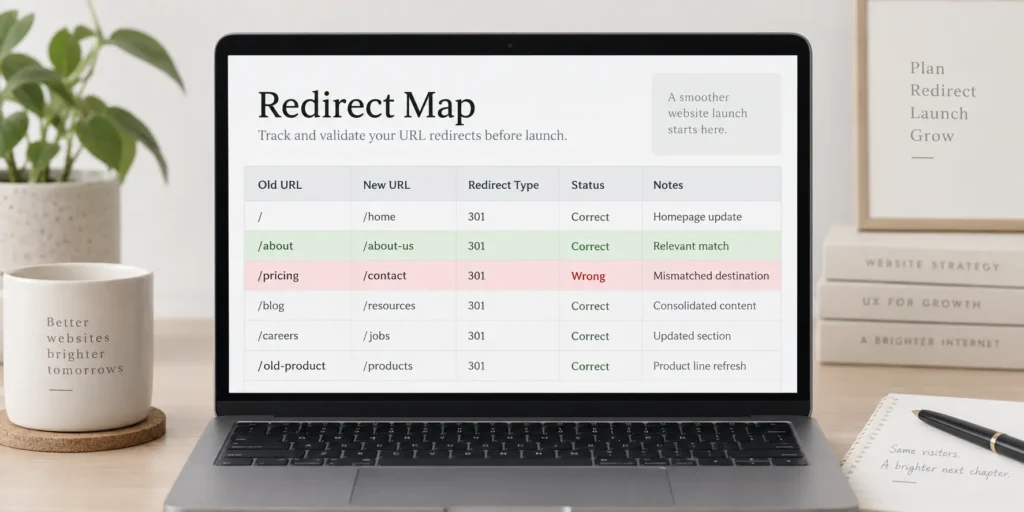
Work the file like this.
- Export every URL from the old site, including the ones you forgot existed
- Map each one to its closest new equivalent
- Never point everything at the homepage
- Use a 301, not a 302, for anything permanent
- Redirect in one hop, not a chain
- Keep the URL identical where the page has not changed
- Test the full map on staging before launch day
- Keep the old sitemap submitted for a few weeks after
Three mistakes cause most of the damage.
Everything redirected to the homepage. A page about one topic redirected to a generic homepage looks like a dead end to Google. Google often treats it as a soft 404. Map to the closest match, not the front door.
Redirect chains. Old URL to a second URL to a third leaks authority and slows the crawl. Point the old URL straight at the final destination in one hop. Google recommends a 301 for permanent moves (Google Search Central), and keeping every redirect to a single hop is a rule we hold on our own migrations.
URLs changed for tidiness. If the page has not changed, keep its address. Rewriting a URL that ranks, just to make the structure look neat, throws away the history attached to it. Change a URL only when there is a real reason.
Nobody notices a redirect map when it is done right. The traffic simply stays. That is the whole job.
Phase 5. Launch week
This is your pre-launch checklist, and one line on it outranks every other. Indexing. Staging blocked from Google, live site open to it. Get that backwards and nothing else matters.
- Confirm staging is blocked from indexing, and the live site is not
- Check robots.txt on the live site, not the staging copy
- Submit the new sitemap
- Verify analytics and conversion tracking fire on the new templates
- Crawl the live site and fix every 404 you find
- Check canonical tags on the templated pages
- Confirm forms deliver to a real inbox
- Test the primary conversion path on a real phone
One line here has cost more traffic than any design decision ever will. A staging site launched with noindex still on, or a live site that inherited the tag from staging. The whole site tells Google to stay away, and Google listens. Check it on the live domain the hour you go live, not on the copy (Google Search Central).
Then the forms. Test them by submitting one and reading the inbox, not by trusting the success message. A form that shows a green tick and sends nothing looks fine right up until you notice the leads stopped.
Phase 6. The first ninety days
A short dip after launch is normal. A drop that is still falling after four weeks is not. That difference is the whole reason to keep watching after you ship.
Website relaunch checklists usually stop at launch. That is the instinct that gets sites into trouble, because the evidence that the redesign worked or failed shows up in the weeks after, not on launch day.
- Compare against your Phase 1 baseline at 30 and 90 days
- Expect a dip in weeks one to three, and know a dip from a drop
- Watch Search Console for coverage errors every week
- Fix 404s as they show up in the logs, not once a quarter
- Recheck Core Web Vitals on real traffic
- Collect the first real user complaints and act on three
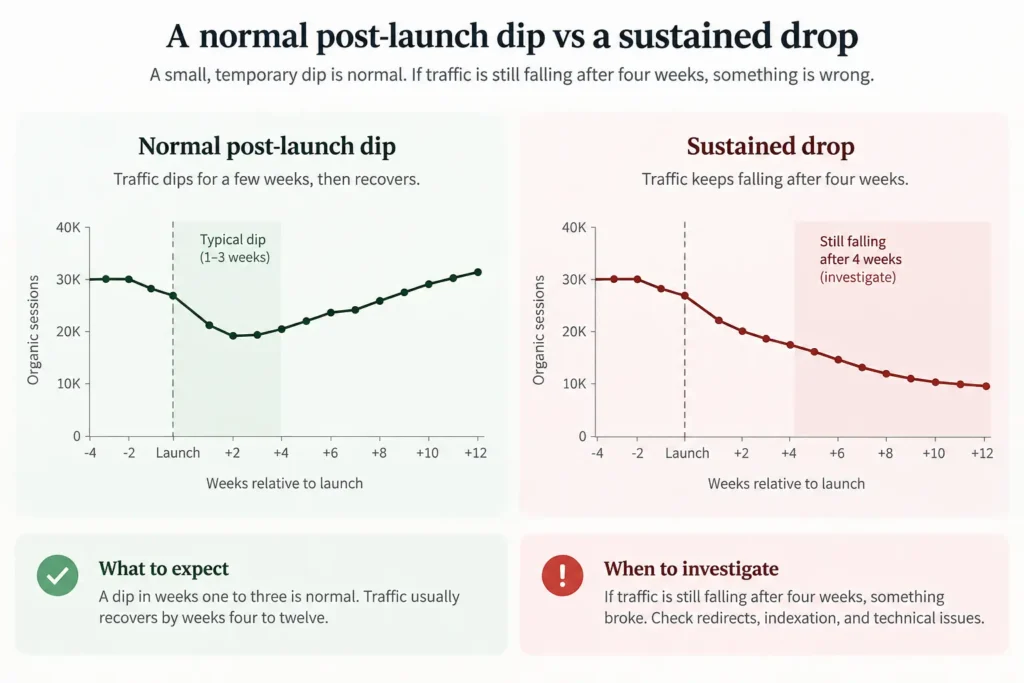
Here is the part that saves the relationship. When rankings wobble in the first couple of weeks, clients panic and blame the agency. Some movement is normal while Google recrawls and reprocesses the new structure. For a mid-sized site, Google says it can take a few weeks or more before the new URLs fully replace the old ones (Google Search Central). A normal fluctuation and a real structural loss look the same for the first few days, which is why the wrong read sets off a panic.
They are not the same. A dip recovers as the crawl catches up. A drop that is still falling after four weeks means something in the redirect map is wrong, and you go back to Phase 4. Do not deploy and abandon. Keep the Search Console tab open.
What usually goes wrong
Five patterns cause the redesigns clients call us in to rescue. Each one is cheap to prevent and expensive to unwind.
Copy written after the design is finished. The team builds the layout around placeholder text. Then the real content never fits, the launch slips, and everyone waits on words.
The executive who appears at the final review. They were not in any earlier meeting, they do not like the direction, and now the work restarts a week before launch.
A redirect map nobody owned. It was on the list, it was everyone’s job, so it was no one’s job, and the old URLs went live pointing at nothing.
Launch scheduled the week before a campaign. The new site is still settling and recrawling exactly when the paid traffic arrives, so the campaign pays full price for a shaky site.
No baseline, so nobody can say if it worked. The site looks better. The numbers are a mystery. And someone approves the next redesign on taste again.
None of these are design failures. They are planning failures, and every one of them is a line item you can assign to a name and a date before the project starts.
How we run redesigns
Two things are non-negotiable on our projects. The redirect map and the baseline. Neither is glamorous. Both are the difference between a relaunch that keeps its traffic and one that quietly loses a big slice of it. We build the map before design starts, and we record the baseline before anyone touches the site. That work lives in web development and SEO, not in the visuals, which is the part a design-only studio tends to skip.
What we push back on. Changing URLs with no traffic reason. Launching the week before a campaign. A rebuild bought to fix a number that a rewrite would fix for less. We would rather talk you out of a redesign you do not need.
Who we are not for. If you want the cheapest build, the fastest launch, and no migration plan, we are the wrong team. If you want a site that looks new and keeps the rankings it already earned, that is the work we do. See WordPress development, UI/UX design, and our guide to choosing a WordPress development agency. Numbers are on the pricing page.
Frequently asked questions
What should be included in a website redesign checklist?
A complete website redesign checklist covers six phases. Baseline your current numbers, decide what to keep, lock the structure and URLs, build the redirect map, run the launch-week checks, then compare against the baseline for ninety days. The planning phases matter more than the design ones, because that is where traffic gets lost.
How long does a website redesign take?
A marketing site redesign usually takes four to eight weeks from kickoff to launch. It depends on the size of the site and how fast content and approvals move, not on the design itself. The two things that stretch a timeline are copy that arrives late and an approver who was never named. Fix those and a redesign runs on schedule.
Will a website redesign hurt my SEO?
Only if you skip the redirect map. Rankings live on URLs, and a redesign that changes or drops URLs without redirecting them loses the history attached to each one. Map every old URL to its closest new one with a 301 and the rankings carry across.
How do I avoid losing traffic after a redesign?
Baseline before you start, redirect every old URL in one hop, confirm the live site is indexable, and watch Search Console for the first ninety days. The traffic you lose at launch almost always traces back to a missing redirect or a stray noindex tag, both of which are preventable.
What should I do before starting a website redesign?
Record where you are and decide what the redesign must move. Baseline organic sessions, conversions, rankings, and speed. Then write down the one number that would make the project a success. Without that number, you judge a redesign on taste instead of results.
How often should a website be redesigned?
Redesign when the structure stops serving the business, not on a fixed schedule. A site can go many years without a rebuild if the content stays current and the platform still fits. Chasing a redesign every couple of years on looks alone usually costs more than it returns.
How much does a website redesign cost?
It varies with scope, platform, and how much content and migration work the site needs. We keep the full breakdown in one place rather than repeat it here. See website redesign cost for what you pay and where the money goes, and UI/UX design cost for the design side.
The bottom line
A website redesign checklist is not a design document. It is a traffic-protection document that happens to include a redesign. The sites that come through a relaunch intact baselined first, kept what earned its place, owned the redirect map, and watched for ninety days. Redesign when the structure is wrong, baseline before you touch anything, and map every old URL to a new one. Do those three and the new site keeps what the old one earned. Skip them and you are gambling years of rankings on a fresh coat of paint.
Before you commit
If you are about to sign off a redesign, get a straight read first. Send us your current site and the one number you want it to move. We will tell you if a redesign is the right spend, or if a rewrite, a speed fix, or one flow repair gets you there for less. If a rebuild is the wrong call, we will say so, even though it is the bigger project. See the pricing page, or send your URL through the contact form.