
Two kinds of people look up what a UX audit is.
The first was told to get one, usually by someone who sells them. A founder hears the phrase in a sales call, nods along, and starts reading on the way home to work out what they just agreed to consider.
The second is watching a number slide. Signups flat, trial conversion down, a checkout that used to convert and now does not. Nobody on the team can say why, and the guesses have started to contradict each other.
If you are either person, this is written for you. You will get what an audit finds, what it costs, what a good one looks like on delivery, and the exact situations where it is the wrong thing to spend money on. One disclosure before any of that. We run UX audits at Pixelean, and we talk a good share of the people who ask for one out of buying it. The second half of this article is the reason the first half is worth trusting.
Key takeaways
- A UX audit is a diagnosis of where your product loses people and why. It is not a redesign, and it is not a list of everything wrong.
- Buy one when you cannot name the problem yourself. Skip it when you already know what is broken, have no analytics yet, or have already decided to rebuild.
- Budget roughly $2,000 to $8,000 for one scoped flow and $8,000 to $25,000 for a full product audit, broken down by project type in our UI/UX design cost guide.
- Pricing, positioning, and the wrong audience all look like UX problems in a dashboard. An audit will find interface issues and still leave that number flat.
- You can run a rough audit yourself. Five users put through one flow surface roughly 85% of its usability problems.
- Judge any audit by what changes in the product afterward, not by the length of the report.
What a UX audit actually is
A UX audit is a structured review of where your product loses people, and why.
That is the whole thing in one sentence. An expert, or a small team, walks your real flows the way a stranger would, pulls the data on where users stall or leave, and comes back with a ranked account of the problems and their causes.
What throws people is everything the word gets stretched to cover. So here is what a UX audit is not.
- It is not a redesign. A redesign changes the product. An audit tells you whether you should, and where.
- It is not user research, though a good one uses research. Research asks what people need. An audit checks whether your product serves a need people already have.
- It is not a visual critique. Whether the buttons are on brand barely matters if people cannot find them.
- It is not a list of everything wrong. Forty problems in no order is a way of admitting you found nothing worth doing first.
Hold one line and the rest of this follows from it. An audit is a diagnosis. Treatment is a separate decision, and a separate invoice.
Audit, usability test, heuristic review. What is the difference
Buyers use these words as if they mean the same thing, and get sold the wrong one. They answer different questions, and only some of them need real users in the room.
| Method | What it answers | Needs real users | Relative cost | When it fits |
| UX audit | Where you lose people, and why | Sometimes | Medium | You have a problem you cannot name |
| Usability test | Can a real person finish the task | Yes | Medium | You doubt one specific flow |
| Heuristic evaluation | Does this break known usability rules | No | Low | You want a fast expert read |
| Analytics review | Where people drop off | No | Low, often in-house | You have traffic and want the leak |
| UX research | What people actually need | Yes | High | You are deciding what to build |
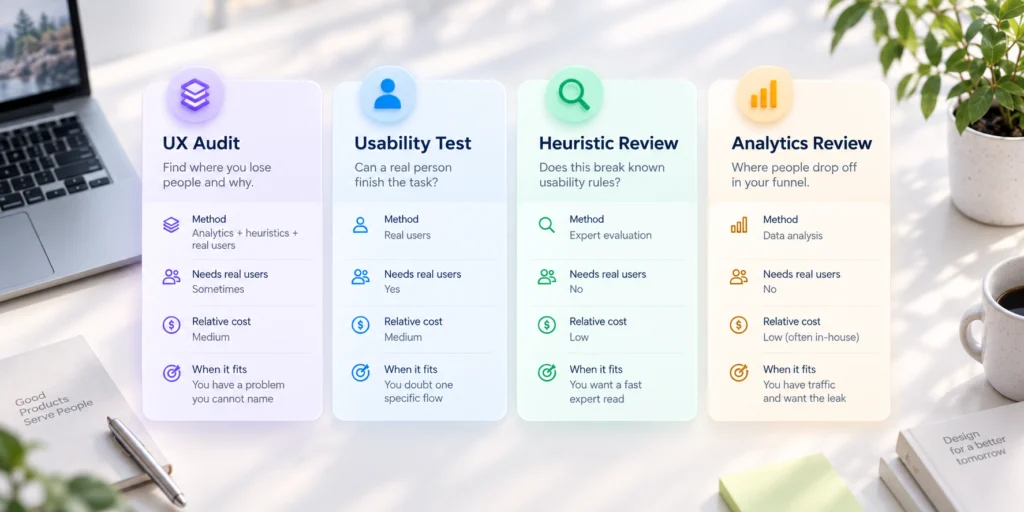
The audits worth the name combine the middle three. An analytics review to find the leaks, a heuristic pass to explain them, and a few real users to confirm them. If a proposal calls itself an audit and only runs the heuristic pass, you are buying an opinion, not a diagnosis. That is the sentence to keep in your head before you sign anything.
What is inside a real audit
What you actually receive is the part nobody spells out before you pay, so here it is.
The inputs a real audit pulls from.
- Analytics and funnel data, so problems are ranked by how many people they cost you
- Session recordings or heatmaps, when they exist, to see the stall instead of guessing at it
- Support tickets and sales objections, because your users already wrote most of your findings for you
- A heuristic pass over the key flows, run against known usability principles
- Five users put through the core task when the budget allows, which is often enough to surface roughly 85% of the problems.
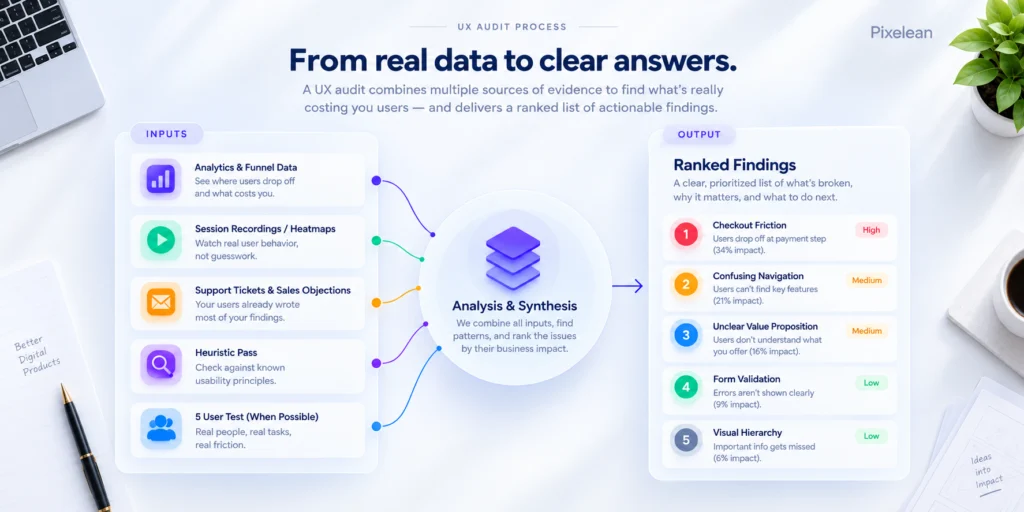
The output, and this is where good and useless part ways.
- A ranked list of findings, not a catalogue
- Severity and effort marked on every finding, so the team can plan the work
- Evidence attached to each one, a recording, a number, a screen
- A recommended order of work
- A short list of what to leave alone
That last item matters more than it looks. An audit that recommends changing everything has told you nothing. The skill is in what it leaves out. Once you hold the ranked list, the findings turn into design work, which is a separate track with its own process.
When a UX audit is the right call
An audit earns its cost when you cannot yet name the problem. Here are the five situations where that is true.
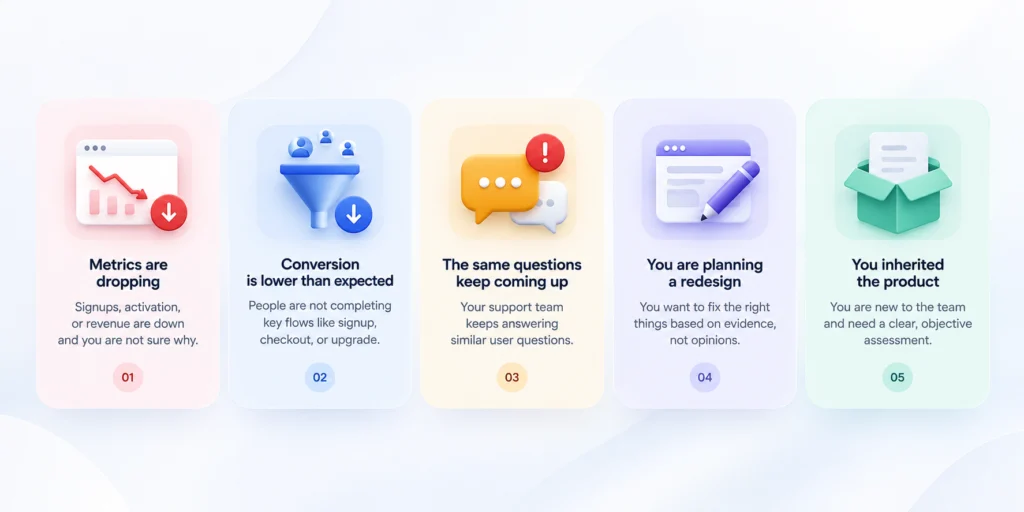
A metric moved and nobody can explain it. When conversion drops and every explanation on the team contradicts the last, you are guessing. An audit swaps the guessing for a ranked account of what actually changed for the user.
You have traffic but not conversion. People arrive and leave. That gap sits in the flow between landing and action, and finding it is exactly what an audit is built for.
Support keeps answering the same question. A question asked a hundred times is an interface problem in a costume. The audit finds where the product fails to say what support keeps repeating.
You are about to fund a redesign. This is the highest-leverage moment for one. Moving a box in a flow diagram takes a minute. Moving that same box across forty finished screens takes days. An audit tells you which boxes are worth moving before the screens exist, so the redesign brief is built on evidence instead of taste.
You inherited a product. New owner, new lead, new roadmap to defend. An audit is the fastest way to draw a map of the problems before you commit to fixing any of them.
When you do not need one
Almost everything written about UX audits was published by someone who sells them. We sell them too. So here is the part our competitors leave out, the five times you should keep your money.
You already know what is broken. If your team can name the problem and agrees on it, an audit will spend three weeks and several thousand dollars confirming what fits on a sticky note. Fix the thing. If the fix does not move the number, then you have a real reason to look closer.
You have no analytics. An audit with no data underneath it is a heuristic review with a bigger invoice, one person’s opinion dressed as a finding. Instrument the product, give it a month of real traffic, and then decide. The wait makes the audit cheaper and sharper.
You have almost no users. Pre-launch, or a few weeks in, there is nothing to audit. You cannot review behavior that has not happened. What you need is research into what to build, and that is a different purchase with a different question at its center.
You have already decided to rebuild. If the product is being replaced wholesale, auditing the version you are about to delete is archaeology. Spend the money on getting the new structure right, and if cost is what you are weighing, what a redesign runs is the more useful read.
Your problem is not the interface. This is the expensive one. Pricing, positioning, and the wrong audience all show up in a dashboard looking exactly like a UX problem. An audit will find interface issues, because interface issues are what it looks for. You will fix them, ship them, and watch the number stay flat, because the number was never about the interface. In our experience this is the most common reason an audit disappoints. The tool worked. It was pointed at the wrong wall.
Here is the rule under all five. Buy an audit when you cannot name the problem. Do not buy one to confirm a problem you already named.
How to tell an audit from a sales pitch
A free or unusually cheap audit is usually prospecting, and a prospecting audit reaches its conclusion before it starts. The conclusion is that you need a redesign, sold by the same people who ran the audit.
That is not always dishonest. Sometimes the answer really is a redesign. But you should know which document you are holding, a diagnosis or a pitch with findings stapled to the front.
The tell has gotten easier to spot as tool-run audits, part of a broader shift toward AI in UI/UX work, have spread. An automated pass over your screens produces a tidy list in an afternoon. It reads like a diagnosis. It is closer to a spell-check. It flags what breaks a rule and stays quiet on what costs you money, because it never watched anyone try to use the thing.
Four questions sort the diagnosis from the pitch. Ask them before you commission anything.
- What happens if you find nothing serious. A real auditor has an answer that is not a redesign.
- Will the findings be ranked, and by what. Severity over effort is honest. Vibes is not.
- Who does the work, and can I meet them. The person reviewing your product should be a person you can name.
- Is the recommended fix something you also sell. This is the sharp one. The honest answer is usually yes, and a team that says so plainly is a team you can work with.
None of this means the industry is crooked. It means you are the one paying, so you get to know what for.
What a UX audit costs and how long it takes
A UX audit cost lands in two bands, and the number that matters is which band you need.
- One scoped flow, checkout or onboarding or signup, runs $2,000 to $8,000 and takes one to two weeks.
- A full multi-flow product audit runs $8,000 to $25,000 and takes three to five weeks.
- Compliance-heavy work, accessibility conformance and the like, sits above that range.
One variable moves the price more than any other, whether real users are tested or the review is expert-only. An expert-only pass is faster and cheaper and catches the obvious. Putting real users through the flow costs more and finds the things no expert predicts, because users are reliably stranger than the people who design for them. Provider type is the other lever. An automated tool, a freelancer, and a studio are three prices for three depths.
The full picture, every project type broken out, lives in our UI/UX design cost breakdown. This is the short version, scoped to audits.
What makes an audit useless
An audit is worth exactly what gets fixed because of it, and by that measure a lot of them are worth nothing. Here is where they fail.
The sixty-page PDF nobody opens. Findings with no ranking are a data dump, and a data dump moves nothing. The team scrolls, feels bad, and closes the tab.
Findings with no evidence. Improve the hierarchy is an opinion. Users drop at step three, and here is the recording of three of them doing it, is a finding. One you can act on. The other you can only nod at.
No effort estimate. Without a rough cost per fix, the team cannot slot the work into a sprint, so it slots in nothing.
Delivered to a room with no engineer in it. Findings that never reach the people who ship become a nice conversation that changes zero lines of code.
No follow-up. The audit lands, the room nods, everyone agrees it was sharp, and six months later not one finding has shipped. The pattern we see is that the audits that work are the ones where a single person owned the list afterward and refused to let it die.
Judge an audit by what changed in the product ninety days later. On that test, the expensive binder and the ranked one-pager are not close.
Can you run your own audit
You can run a real audit yourself this week, and if you can, you probably should. The readers able to do this were never going to hire anyone. Here is the method, stripped to what works.
- Pick one flow that matters to the business. Checkout, onboarding, the upgrade path. One.
- Pull the drop-off for each step of it. You are hunting the step where people vanish.
- Watch ten session recordings of people who dropped. Not summaries. The recordings.
- Ask five people to complete the task while you stay quiet and watch. Five is enough to surface roughly 85% of the problems in a single flow (NN/g, five-user testing research). The rule assumes comparable users, so if one flow serves very different groups you will want a few more. Treat five as the floor, not the ceiling.
- Write each finding with its evidence attached, and rank the list by damage divided by effort.
- Fix the top three. Then measure. Then run it again.
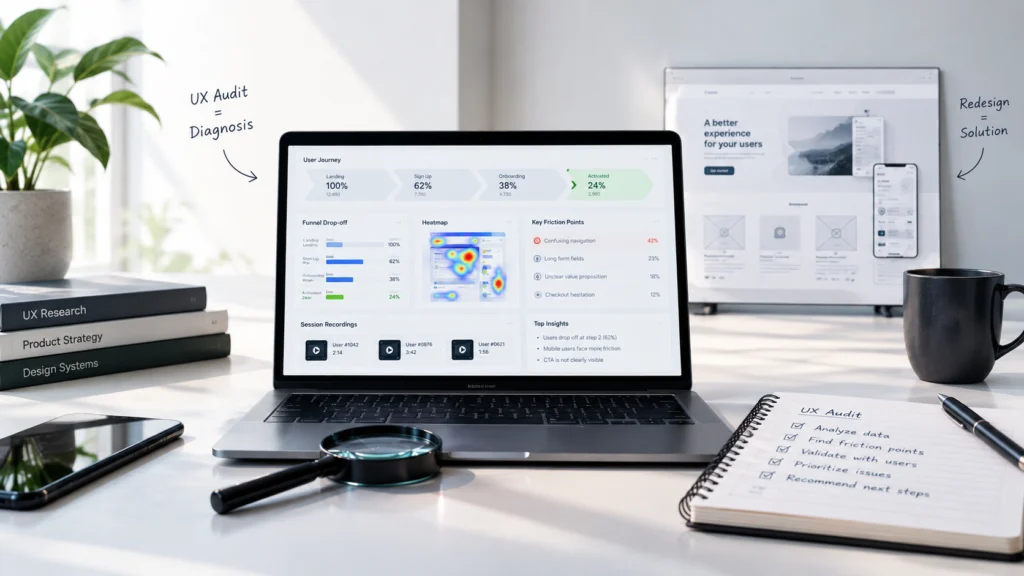
That is a ux audit process you can run without a budget, and it beats a good share of what agencies charge for.
Here is the one thing you cannot do yourself. You cannot see your own product as a stranger.
You already know exactly how it is supposed to work, so you walk straight past the spots where a first-time user gets stuck. That single blind spot is the entire honest case for an outside reviewer. It is worth less than a lot of agencies charge for it, and more than nothing. Price the outside read against that, not against the length of the report.
How we run audits
Here is how we run audits at Pixelean, in case the shape is useful whether or not you hire us.
What we include as standard. An analytics and funnel pass, session recordings where they exist, a heuristic review of the core flows, and five-user testing on the flow that carries the most revenue. Every finding ships with severity, effort, and evidence, and delivery is a ranked one-pager plus the recordings, not a binder.
What we skip by default. Full accessibility conformance unless you ask for it, exhaustive coverage of low-traffic flows, and any finding we cannot attach evidence to. Breadth is easy to sell and rarely worth buying.
What we tell the people who do not need one. A good share of the teams who ask us for an audit leave without buying, because the honest answer was instrument first, or fix the thing you already named, or spend the money on the rebuild instead. We would rather lose that sale than take money for three weeks of confirming what you knew.
If an audit is the right spend, our UI/UX design work and pricing are both here.
Frequently asked questions
What is a UX audit?
A UX audit, also called a UX design audit or usability audit, is a structured review of where your product loses users and why. It combines analytics, expert review, and a few real users into a ranked list of problems with evidence attached. It diagnoses. It does not redesign.
How much does a UX audit cost?
A scoped audit of one flow runs $2,000 to $8,000. A full multi-flow product audit runs $8,000 to $25,000. The biggest driver of ux audit cost is whether real users are tested or the review stays expert-only. Full figures sit in our UI/UX design cost breakdown.
How long does a UX audit take?
One to two weeks for a single flow, three to five weeks for a full product audit. Timelines stretch when real user testing is included, since recruiting and running sessions takes calendar time that an expert-only review skips entirely.
What is included in a UX audit?
A UX audit checklist covers analytics and funnel data, session recordings, support tickets, a heuristic pass over the core flows, and user testing when the budget allows. The output is a ranked list of findings with severity, effort, and evidence on each.
What is the difference between a UX audit and usability testing?
Usability testing watches real people attempt a task and reports what breaks. A UX audit is wider. It folds testing together with analytics and an expert review into one ranked diagnosis. Testing is one input to an audit, not the whole thing.
Do I need a UX audit before a redesign?
Often yes, unless you are replacing the product wholesale. An audit turns a redesign brief into something built on evidence rather than taste, and catching problems before the rebuild costs far less than fixing them after. If the old product is being deleted entirely, skip it.
Can I do a UX audit myself?
Yes. A website UX audit you run yourself starts with one commercial flow, its drop-off numbers, ten recordings of people who left, and five users tested. Rank findings by damage over effort and fix the top three. The one thing you cannot do is see your own product as a stranger.
The bottom line
A UX audit is a diagnosis of where your product loses people, and it is worth buying in one situation, when you cannot name the problem yourself. When you can name it, an audit is an expensive way to hear yourself think. When you have no data, no users, or a rebuild already scheduled, it is money aimed at the wrong stage. And when the interface is not the real problem, the best audit in the world will find interface issues and leave your actual problem untouched. Get the diagnosis when you are genuinely stuck on why. Skip it when you already know. Judge whichever one you buy by what changes in the product, not by the weight of the report.
Ready to find out where your product loses people?
Two ways we can help, and one of them is advice that might cost us a sale. Send us the flow that worries you and we will scope a single-flow audit, the two-week, $2,000 to $8,000 kind, aimed straight at it. Or tell us the number that is sliding and we will give you an honest read on whether an audit is the right spend at all. If it is not, we will say so, and point you at what is.
Sources
- Nielsen Norman Group, Why You Only Need to Test with 5 Users