You are about to send one message to four or five agencies. You will describe your website or app, ask for a price, and compare the replies. Those replies can only be as good as the message you send.
A vague brief hurts your price long before it hurts your design. Each agency fills the gaps with its own guesses, prices those guesses, and sends you a number. Five agencies make five different guesses. The gaps come back later, as a change order. A written brief fixes the project scope before anyone writes a proposal or a statement of work.
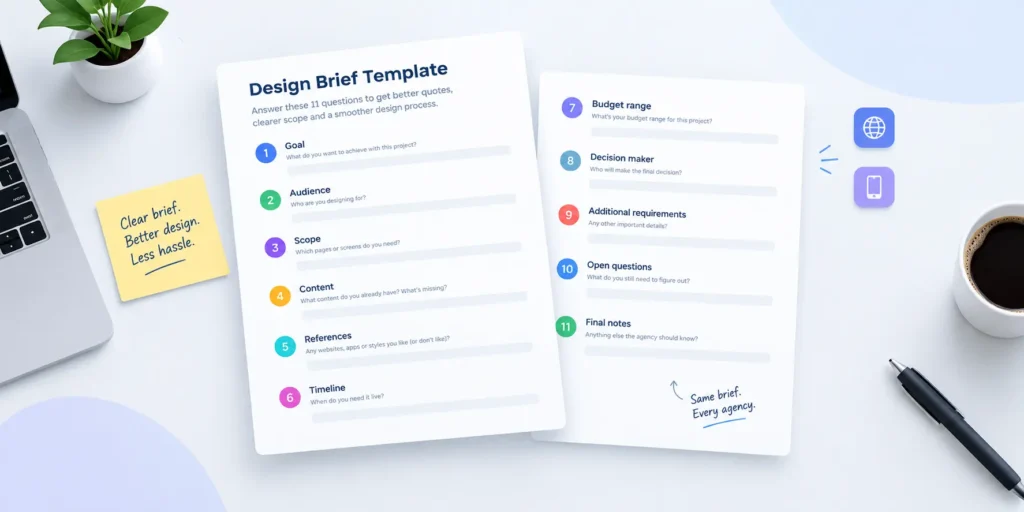
This page gives you five things. What goes into a brief. A filled design brief example for a website. A filled one for an app. A weak version of each, so you can see the difference. And a template you can copy today, with a note under every question on how to answer it.
Go to the template
On this page. What goes into a brief · Website example · App example · Short examples · Template · How to write one · Mistakes · After you send it · FAQ
Key takeaways
A design brief is a short written document that tells a designer what you need, who it is for, when it must be live, and how much you have set aside. It should include eight things.
- The goal
- The audience
- The scope (pages or screens)
- Content
- References
- Timeline
- Budget range
- Decision maker
Keep it to one to three pages. Mark what you do not know as an open question, and send the same version to every agency.
What a design brief is, and who writes which part
A design brief is the written description of a design project, sent before any quote or work. It says what the project must change, who it serves, what it includes, and the limits on time and money.
The client owns the brief. The designer helps finish it. Each part has a natural author and a natural checker.
| Section | Who writes it | Who checks it |
| Goal | Client | Decision maker |
| Audience | Client | Designer |
| Budget range | Client | Decision maker |
| Launch date | Client | Decision maker |
| Content plan | Client | Designer |
| Scope questions | Designer | Client |
| Deliverables, from the page or screen list | Designer | Client |
| Final version | Both | One decision maker signs off |
The client knows the business, the money and the date. The designer knows what a page list turns into in hours. Put both on paper, and one person gives sign-off on the final version.
Our recommendation is one to three pages. A longer brief stops getting read. The agency skims it, your own team skims it, and the important line on page six never gets acted on. Short documents get read and get answered.
You may not know half the answers yet. That is normal, and it is no reason to skip the brief. Write what you know. Mark the rest as open questions in plain words, such as “Open question. Do we need a customer login?” The designer helps close them. The open questions also show the agency where the risk sits, which is exactly what it needs to price the work honestly. Three honest open questions are worth more than three confident guesses.
What goes into a design brief
Eleven sections cover almost every website or app project. The table shows what to write, a weak answer, a strong answer, and what each one changes in the quote or the timeline.
Read the last column first. Every weak answer in the table forces the agency to guess, and every guess has a price. An agency may price a guess high to protect itself, or low to win the work and recover the difference later through change requests. You cannot tell which one you got by looking at the total. A strong answer removes the guess, so the number you get back describes your project instead of the agency’s fears about it.
| Section | What to write | Weak answer | Strong answer | What it changes in the quote or timeline |
| 1. Company and product | What you sell and to whom, in two sentences | “We are a fast-growing fintech brand.” | “We sell payroll software to US restaurants with 10 to 50 staff.” | Sets the context the designer prices research against |
| 2. Goal | One measurable sentence | “A modern site that converts better.” | “Double demo requests from the site within six months of launch.” | Decides which pages get the most design time |
| 3. Audience | The top two user types and what they come to do | “Everyone.” | “Restaurant owners comparing payroll tools, and their bookkeepers checking integrations.” | Sets how much user research goes into the quote |
| 4. Scope | The page or screen list | “A full website.” | “Twelve pages, listed, each marked must-have or nice-to-have.” | Usually the biggest driver of price. A list narrows the range |
| 5. Content | Who writes the copy and who supplies the images | “We will send the copy later.” | “Our marketing lead writes all copy by week three. We supply product screenshots.” | Copywriting adds fees. Late copy moves the launch |
| 6. References | Sites you like and dislike, each with a reason | “Like Apple.” | “Linear’s pricing page, because the plans are easy to compare. We dislike long scroll animations.” | Fewer concept rounds spent guessing at style |
| 7. Platform | For websites, WordPress, Webflow, Framer or Shopify. For apps, the dev team and handoff format | “Whatever is best.” | “Webflow, edited by two marketers. No developer on staff.” | Changes build effort and who needs to be on the project |
| 8. Timeline | A fixed date and the reason behind it | “ASAP.” | “Live one week before our spring trade show, where we demo.” | A real date shapes the phase plan. A rushed date adds cost |
| 9. Budget range | The range you have set aside | “Not sure. Tell us what it costs.” | “[Your low figure] to [your high figure], written the same way in every email.” | Lets each agency size the project to the money |
| 10. Success measure | One or two measures | “People like it.” | “Demo requests per month, and time to publish a blog post.” | Tells the designer what to test and report on |
| 11. Decision maker and feedback rounds | One approver and the number of rounds | “The team will review.” | “Our CEO approves. Two feedback rounds per page group.” | Rounds are time. More reviewers mean more rounds |
The strong answers are short. None of them takes more than two sentences, and none of them needs design knowledge. They need decisions. That is the real work of a brief, and it is work only you can do.
Three rows move a quote more than the others.
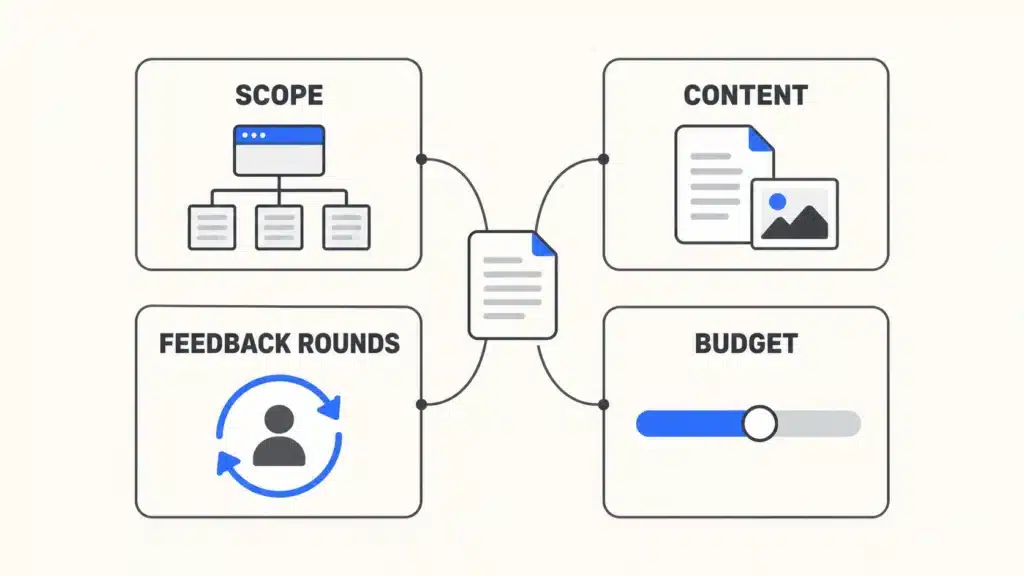
Scope. The page or screen list is usually the largest input to price. Without it, the agency has to price the largest site you might mean, or the smallest, and either guess is wrong. A design project brief with twelve named pages gets a quote for twelve pages. A brief that says “a full website” gets a range wide enough to hide in.
Content. Someone has to write every headline, button and paragraph. If that person is on your team, say so and name them. If you expect the agency to write the copy, say that too, because copywriting is usually priced as its own line. “We will send the copy later” is the line that moves launch dates.
Feedback rounds. Every round of review is design time. Two rounds with one decision maker is a plan. Five reviewers with no named approver is an open door, and the agency will price the door.
Budget. You may worry that a stated budget gets you a quote at the very top of it. The opposite risk is larger. Without a range, each agency guesses the size of project you want, and the quotes come back sized for different projects. One proposes a template. Another proposes six weeks of research. Neither is useful. A range lets every agency propose the right size of project for the money, and you can see which one gives you the most for it. You are buying a scope. The range tells the seller which scope to show you.
Design brief example for a website
The same project can be described in four lines or in two pages. Both versions below describe the same website. Only one gets a useful reply.
The weak version
This is the web design brief a busy founder sends at 11 at night.
Hi, we need a new website, modern and clean, like Apple. We are growing fast and the current site does not reflect who we are. Can you send a quote? We would like to launch soon.
Nothing in it is false. Nothing in it can be priced either. The agency does not know how many pages, who writes them, which platform, what “soon” means, or who says yes.
The strong version
This brief is fictional. The company, people and dates are invented to show the format.
It follows the headings of the website brief template further down the page.
- Company and product. Ledgerpine sells accounting software to B2B firms with 20 to 200 staff. Buyers are finance leads at those firms.
- Goal. Double demo requests from the website within six months of launch.
- Users. Finance leads comparing accounting tools, and IT leads checking integrations and security.
- Scope. Rebuild the 12-page marketing site. Must-have pages are Home, Product, three feature pages, Pricing, Integrations, Security, About, Contact and the blog index. Nice-to-have is a customer stories page.
- What exists. Logo, brand guidelines and a short style guide. Current site analytics, shared on request.
- Content. Our content lead, Priya, writes all page copy by the end of week three. We supply product screenshots. We need stock photography sourced by the agency.
- References. We like Linear’s pricing page because the plans are easy to compare, and Stripe’s docs because the navigation is plain. We dislike sites where text appears only on scroll.
- Timeline. Live one week before our spring user conference, where the sales team demos the product.
- Budget. [Your low figure] to [your high figure] for design and build, written the same way in every email.
- Success. Demo requests per month, and how long it takes an editor to publish a blog post.
- Decisions. Our CEO approves. Two feedback rounds per page group.
Website add-on.
- Platform. Webflow.
- CMS. A blog with categories, edited by two people on the marketing team with no developer.
- Forms and integrations. Demo form posting to HubSpot.
- Redesign. Keep all current blog URLs. Redirect old feature pages to the new ones.
That is a full website design brief. It fits on two pages.
What each version gets back from an agency
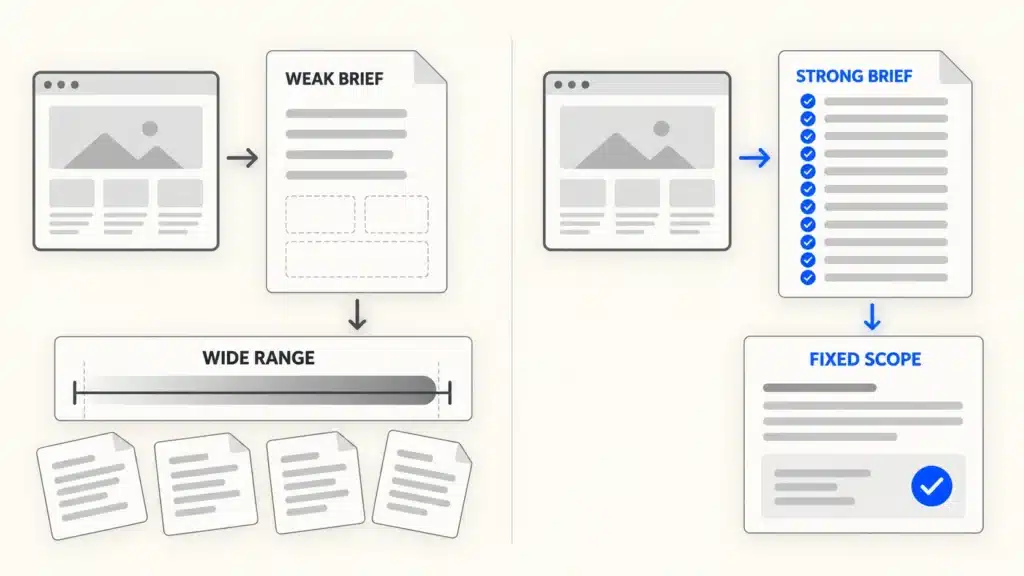
The weak brief gets a discovery call first. Then it gets a quote with a wide range and a list of assumptions underneath. The assumptions are the agency’s guesses, written down so the agency is protected later. A list often looks like this. Up to ten pages. Client supplies all copy. Two rounds of revisions. Blog uses the platform’s standard template. No integrations. Every one of those lines is a future change order if the guess is wrong.
The strong brief gets a fixed scope and a firm price. The agency can count the pages, see who writes the copy, see the date and the reason, and price exactly that. The questions that come back are few and specific.
For what these projects cost, see our UI/UX design cost guide and our web design agency pricing breakdown. For how we price our own work, see our design plans.
Design brief example for an app or SaaS product
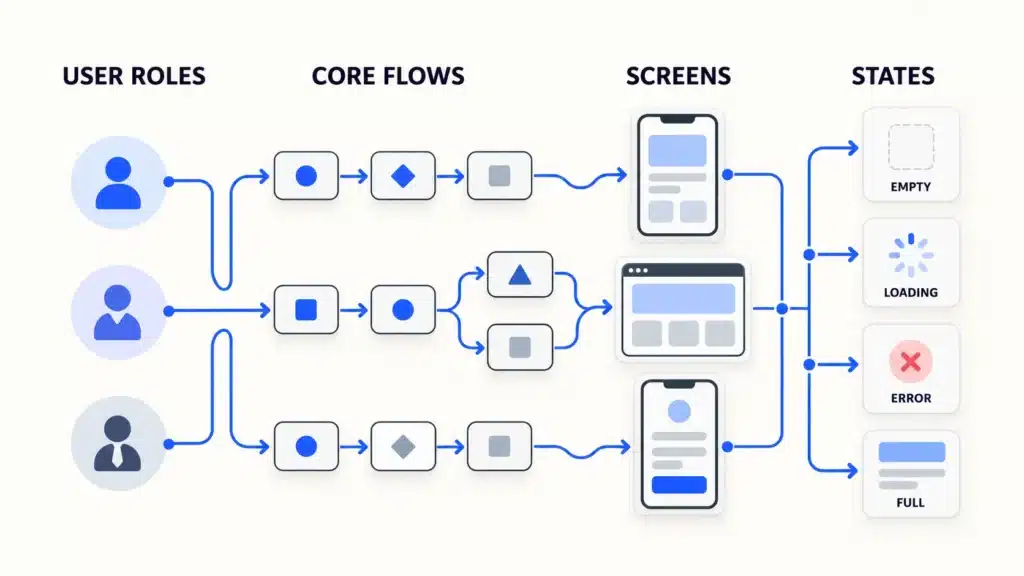
An app brief needs everything a website brief needs, plus the parts that make software expensive. Those are user roles, flows, screens and the states each screen can be in.
The weak version
We want an app like Calendly, but for clinics. Patients book, staff see the bookings. iOS and Android. What would it cost and how long would it take?
The agency cannot tell how many roles exist, what the staff do besides look, how many screens that adds up to, or who builds it after design.
The strong version
This brief is fictional. The product, clinics and team are invented to show the format.
A strong ux design brief adds the app fields to the core template.
- Company and product. ClinicSlot is a scheduling tool for small clinics with one to five practitioners.
- Goal. Ship an MVP that lets three pilot clinics run all bookings through it within four months.
- Users. Patients booking and moving appointments, clinic staff running the day, and clinic owners setting hours.
- Scope. MVP only. Billing and video visits wait for version two.
- What exists. Logo and two brand colors. No design system.
- Content. Our clinical advisor writes reminder messages and help text.
- References. We like how Linear shows a busy list without clutter. We dislike booking flows that ask for an account before showing times.
- Timeline. Designs ready for the developers by the date the pilot contract starts.
- Budget. [Your low figure] to [your high figure] for design only.
- Success. Share of bookings made without a phone call, and no-show rate at the pilot clinics.
- Decisions. Our product lead approves. Two feedback rounds per flow.
App or SaaS add-on.
- User roles. Admin (clinic owner), staff (front desk and practitioners), patient.
- Core flows. Patient books an appointment. Patient reschedules or cancels. Staff manage today’s schedule. Admin sets opening hours and practitioner availability. The system sends reminders.
- Platforms. Staff and admin on the web. Patients on iOS and Android.
- Rough screen count. About 25 screens across web (staff and admin) and mobile (patient).
- States per screen. Empty, loading, error and full. An empty schedule needs its own design, and so does a failed booking.
- Dev team and handoff. Two in-house developers. Handoff as a Figma file with specs, components, annotated states and a clickable prototype of the booking flow.
What each version gets back from an agency
The weak brief gets a call and a broad estimate, because “like Calendly” could mean ten screens or eighty. The strong brief gets a priced plan per flow, because the agency can count roles, flows, screens and states.
One line belongs in every app brief. The design brief ends at developer handoff. Backend work needs its own brief, written with the developers who will build it. If your team is planning that handoff now, our SaaS application design page walks through our process, from flows and Figma screens to developer-ready files. If you already have components, our guide to design systems and how to create one explains what to share with the designer.
Short brief examples for other common projects
Not every project needs two pages. For smaller or narrower projects, three fields do most of the work. Get these right and the rest of the template fills in quickly.
Each row below is a short design brief example for one common project type. The three fields are the ones an agency asks about first for that kind of work, because they change the size of the job more than anything else. Fill them in, then use the full template for the remaining sections.
| Project type | The three fields that matter most | One example line for each field |
| Website redesign | URLs to keep, what is not working now, analytics access | “Keep every /blog/ URL.” “Visitors leave the pricing page within ten seconds.” “Read access to Google Analytics for the agency.” |
| Landing page | One goal, traffic source, the offer | “Book a demo.” “Paid LinkedIn ads to IT managers.” “A 14-day trial with no card.” |
| SaaS dashboard | User roles, the top three decisions it supports, data sources | “Account managers and their team leads.” “Which accounts need a call this week, which renew next month, which are growing.” “Our Postgres database and the billing system.” |
| Shopify store | Product count, variants, apps already in use | “About 120 products.” “Size and color on most items.” “Reviews and subscription apps already installed.” |
| Mobile app MVP | Core flow, platforms, what waits for version two | “A user logs a workout in under a minute.” “iOS first, Android after launch.” “Social sharing and coaching wait.” |
A redesign brief gets far easier once you have walked through a website redesign checklist. For a landing page, look at a few SaaS landing page examples and write down what you like and why. For dashboards, these SaaS dashboard design examples help you name the decisions your users make.
The pattern holds across all five. The fields that matter most are the ones that change the size of the job.
Design brief template
This design brief template works for websites and apps. Answer the core part first. Then add the website or app section that fits your project. Each question has a short note on how to answer it. Keep your answers short. A long answer usually means a decision has not been made yet.
Copy the questions into a document, answer them in order, and stop when you reach one you cannot answer. Write “Open question” next to it and move on. A finished design brief template with three open questions is ready to send. A perfect one still sitting in your drafts folder helps nobody.
Template begins
Core part
1. Company and product. What do you sell, and to whom?
Two sentences, no slogans.
2. Goal. What should this project change, by when?
One sentence with a number or a date.
3. Users. Who will use it, and what do they come to do?
Name the top two user types.
4. Scope. Which pages or screens do you need?
A list, marked must-have or nice-to-have.
5. What exists. Brand, design system, current site or app, analytics?
Add links.
6. Content. Who writes the copy and who supplies the images?
Name a person, not a team.
7. References. Three you like and one you do not, and why?
The reason matters more than the link.
8. Timeline. What is the fixed date, and what happens on that date?
A launch event, a funding round, a sales season.
9. Budget. What range have you set aside?
A range is enough.
10. Success. How will you know it worked?
One or two measures.
11. Decisions. Who approves the work, and how many feedback rounds do you expect?
One decision maker.
Website add-on
1. Platform. WordPress, Webflow, Framer, Shopify, or undecided?
If undecided, say who will edit the site after launch. Our Webflow vs WordPress comparison can help.
2. Page list. Every page, marked must-have or nice-to-have.
3. Forms, integrations and CMS needs. What must the site connect to, and who edits what?
New to the term? Read what a CMS is.
4. Redesign only. Which URLs must stay, and where do the old ones redirect?
App or SaaS add-on
1. User roles. Who logs in, and what can each role do?
2. Core flows. Three to five, each as one sentence.
3. Screens and states. A rough screen count, and the states each screen needs.
Empty, loading, error.
4. Dev team and handoff. Who builds it, on what stack, and in what handoff format?
Template ends
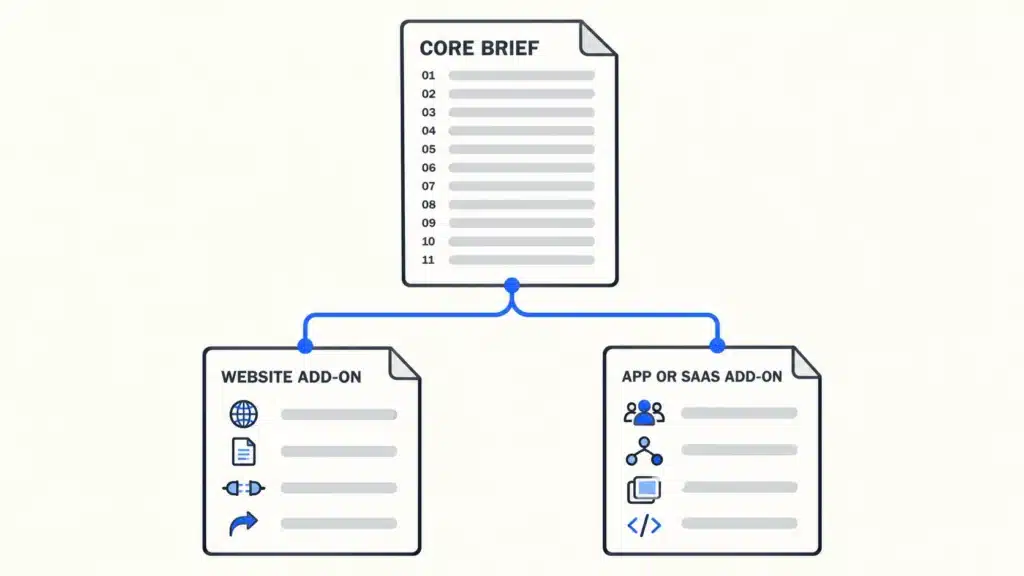
Use it as your web design brief template or your app brief. The questions do not change much. The answers do.
How to write a design brief in six steps
This is how to write a design brief in one sitting. Each step takes minutes when you have the template open.
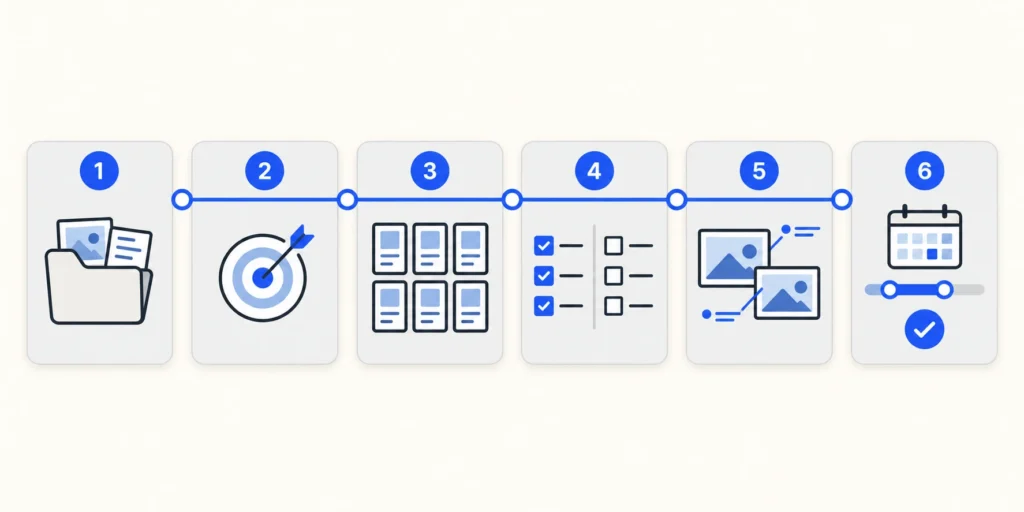
1. Gather what already exists
Collect your brand files, analytics access, any old briefs and any research you have. Put the links in one place. A designer who can see your current numbers asks better questions.
2. Write the goal as one measurable sentence
Name the change and the date. This sentence becomes your main success metric, the KPI the designer works toward. “Double demo requests within six months” is a goal. “A better website” is a wish.
3. List the pages or screens
Write every page or screen you can think of. Do not worry about order or completeness. The list will change, and that is fine. A list that changes is still better than no list.
4. Mark each item must-have or nice-to-have
Go down the list and mark each line. Be strict. If the launch would happen without it, it is nice-to-have. This one step gives the agency room to fit your budget by trimming scope instead of raising the price.
5. Add references, each with a reason
Pick three you like and one you do not. Write one line on why for each. “Clean” tells the designer very little. “The pricing table fits on one screen” tells them what to build.
6. Set the date and the budget range, then get one approval
Write the fixed date and what happens on it. Write the range you have set aside. Then have one decision maker read the whole brief and approve it before it goes out.
You may think a call would be faster. A call explains the project to one agency. The brief explains it to every agency, in the same words, before the first call. A first draft fits in one sitting with the template, and it saves the same hour on every call with every agency.
Brief mistakes and what they cost later
Scope creep is common in every kind of project. PMI’s 2018 Pulse of the Profession found that 52 percent of projects completed in the previous 12 months experienced scope creep or uncontrolled changes to the project’s scope (PMI, “Scope Patrol”, PM Network, 1 July 2018). That survey covers projects across industries. A brief cannot stop every change. It can make each change visible and priced.
Six mistakes cause most of the damage.
- No page list. The quote comes back with a wide range.
- “We will send the copy later.” The timeline slips.
- Five reviewers and no decision maker. You pay for extra rounds.
- References without reasons. The designer builds toward the wrong style.
- No budget. The proposal is sized for the wrong project.
- A different brief sent to each agency. You get quotes you cannot compare.
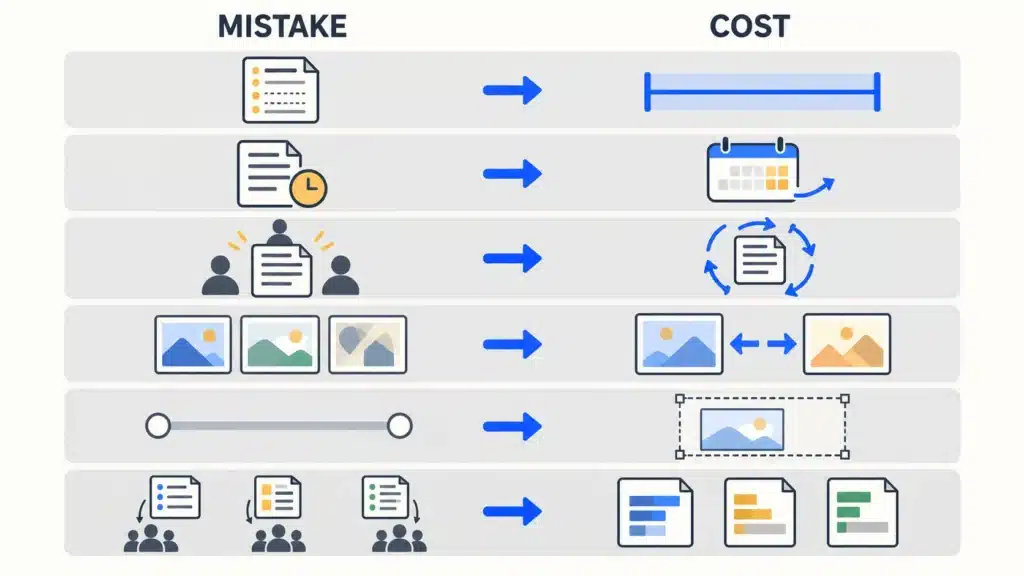
The last one is the most expensive and the least obvious. If you explain the project slightly differently to each agency, each one prices a slightly different project. You then compare five numbers for five different jobs and pick the lowest, which is often the one that priced the smallest version of your project. Send one brief, word for word, to everyone. Then the differences in the quotes are differences in the agencies, which is what you wanted to compare in the first place.
To see what a normal range looks like for the numbers you get back, see our UI/UX design cost guide and our guide to web design agency pricing.
Design brief vs creative brief vs project brief
The three names get mixed up. They do different jobs.
| Brief type | What it is for | Who writes it | What it contains |
| Design brief | Defining a website, app or product design project before it is quoted | The client, with the designer | Goal, audience, scope, content, references, timeline, budget range, decision maker |
| Creative brief | Directing a marketing campaign or a piece of advertising | The marketing team or account lead | Campaign message, audience insight, channels, tone, deliverables |
| Project brief | Aligning a team on how a project will be delivered | The project manager | Objectives, scope, milestones, resources, risks, stakeholders |
Designers and product teams use a design brief. Marketing campaigns use a creative brief, and project managers use a project brief.
The overlap causes trouble when a creative brief template is used for a website. It asks about tone and channels and never asks for a page list, so the agency still has to guess the scope. If you are hiring someone to design a site or an app, start from a design brief.
What happens after you send a brief
A brief starts a conversation with each agency. Knowing the next steps helps you prepare for them.
The steps
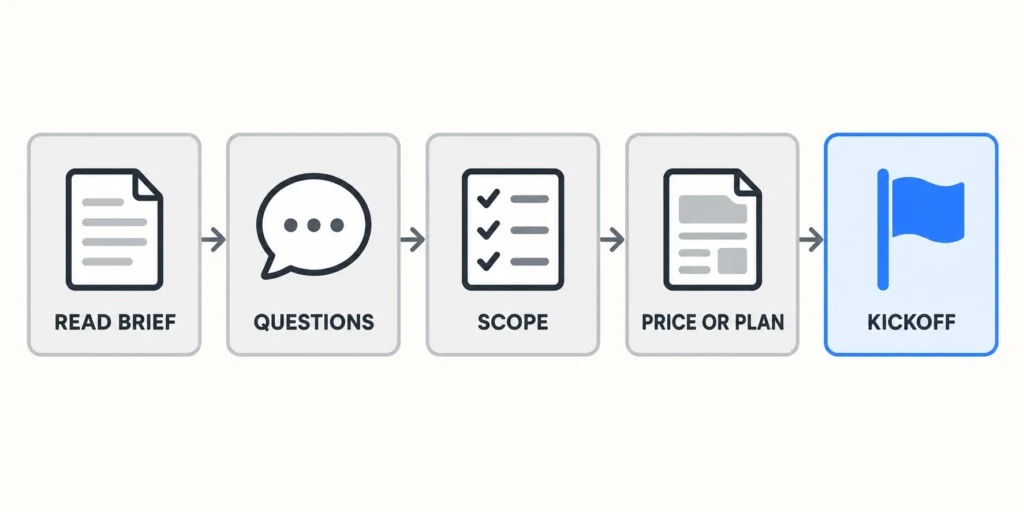
This is the order we follow when a brief arrives.
- We read the brief in full.
- We send questions back, usually about the gaps the brief marks as open.
- We write a scope document that turns your page or screen list into deliverables, such as a sitemap, wireframes and final screens.
- We send the price, or the plan that fits the scope.
- We hold a kickoff with your decision maker.
Other agencies use different names for these steps. The shape is usually similar. For what happens once design starts, see our UI/UX design process.
The questions a designer will likely ask you
You may expect every agency to ask different questions. They overlap more than you might expect, because every designer needs the same few facts to price the work. Prepare answers to these five and you have covered the core of nearly every first call.
- Who makes the final decision?
- What is the hard deadline, and what happens on that date?
- What must not change, such as the logo, the URLs or a core flow?
- Who supplies the content?
- What happens after launch, and who maintains it?
If your brief already answers them, the first call gets to the real decisions faster.
When your brief is ready, send it through our contact page for a scope and a price.
Frequently asked questions
How long should a design brief be?
One to three pages is enough for most website and app projects. A short brief gets read in full by everyone who needs to act on it. If yours runs longer, the extra pages usually hold decisions that have not been made yet. Mark those as open questions instead.
Who writes the design brief, the client or the designer?
The client writes the first draft, because the client knows the goal, the audience, the budget and the date. The designer then adds scope questions and turns the page or screen list into deliverables. One decision maker on the client side approves the final version.
Should I put my budget in a design brief?
Yes. A budget range lets each agency propose a project sized to your money. Without one, agencies guess the size of project you want, and the quotes come back for different projects. A range is enough. You do not need an exact figure.
Can I send the same brief to several agencies?
Yes, and you should. Sending the identical brief to every agency is the simplest way to get quotes you can compare line by line. If each agency hears a different version of the project, each one prices a different project, and the numbers stop meaning anything.
What is the difference between a design brief and a creative brief?
A design brief defines a website, app or product design project before it is quoted. It covers the goal, users, scope, content, timeline and budget. A creative brief directs a marketing campaign or an ad, covering the message, audience insight, channels and tone.
What if I do not know all the answers yet?
Write what you know and mark the rest as open questions. A brief with honest gaps is still useful, because it shows the designer where the uncertainty sits. A good designer helps you close those questions before quoting, and the gaps become part of the conversation instead of hidden assumptions.