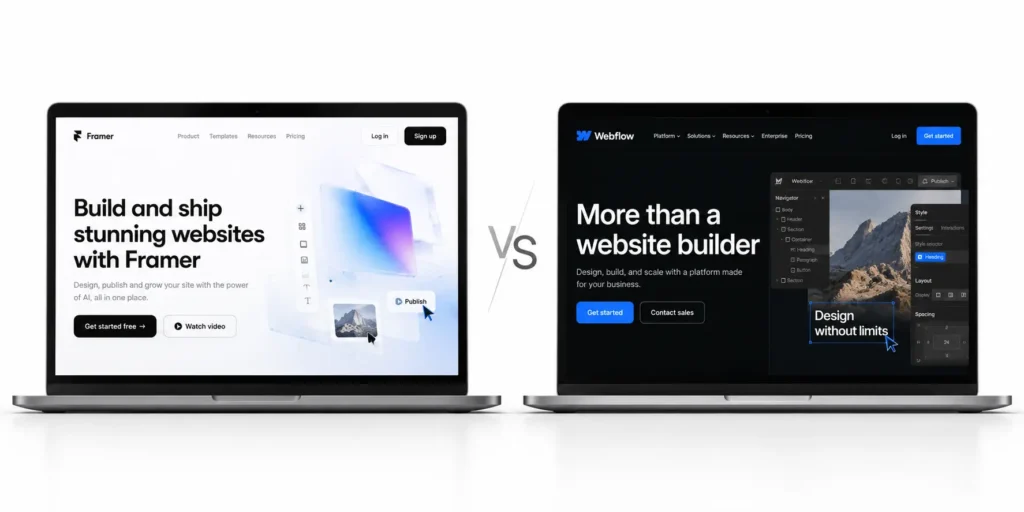
You have two good options and a deadline. Every Framer vs Webflow comparison you open was written by someone who sells one of them, and the verdict tends to match the invoice. This page has the same conflict, with one difference that matters to you. We build on both, so we have no reason to push one over the other.
Three questions decide it. Who edits the site every week after launch? How much content will it hold in two years? Does it need to sell products? Answer them honestly and each one maps to a hard limit or a line item on the invoice. Get them wrong and you pay twice, once for the build and again for the rebuild a year later.
Every price and limit below was read on the official Framer and Webflow pages on 15 October 2026 and links back to the page it came from.
- How the two platforms build a site
- Pricing, checked against the official pages
- What a business site costs over two years
- Who edits the site after launch
- CMS and content limits
- SEO
- Lock-in, code export and migration
- Which platform fits which site
Key takeaways
Framer is the better pick for a small team that wants to launch fast and edit pages visually. Webflow is the better pick once the site carries a large CMS, several editors who need fixed roles, or a native store. Once a site adds a translated language or outgrows 2,500 CMS items, Webflow usually costs less over two years. Extra editors alone keep Framer cheaper.
- Framer, for small teams that want to launch fast and edit pages visually.
- Webflow, for content-heavy sites, larger teams and native ecommerce.
- Neither, for large stores (Shopify) or plugin-heavy builds (WordPress).
Framer vs Webflow at a glance
This Framer vs Webflow comparison puts the main business plans of both no-code website builders side by side. Framer’s is Pro. Webflow’s is Premium, the plan that replaced its old CMS and Business plans in May 2026.
Prices checked on 15 October 2026. Billed yearly unless stated.
| Criterion | Framer | Webflow |
| Best for | Small teams, launch sites, motion-heavy marketing pages | Content-heavy sites, several editors, native stores |
| How you build | Frames and stacks on a free canvas, close to Figma | CSS classes and the box model, close to hand-written HTML and CSS |
| Learning curve | Short for designers | Longer, shorter for anyone who knows CSS |
| Entry paid plan | Basic, $10 a month ($15 billed monthly) | Basic, $15 a month ($25 billed monthly), no CMS |
| Main business plan | Pro, $30 a month ($45 billed monthly) | Premium, $25 a month ($39 billed monthly) |
| CMS items on that plan | 2,500, then $20 per 10,000 up to 40,000 | 20,000, no item add-ons |
| Pages on that plan | 150, then $20 per 100 up to 700 | 300 static pages |
| Editor seats | Owner free, editor $20, content editor $10 | Owner free, full seat $39, limited seat $15 |
| Localization | $20 per locale, up to 20 | Localize from $9 per locale |
| Ecommerce | No native store, third-party plugins | Native, from $29 a month |
| Code export | No supported self-host export, see the lock-in section | HTML, CSS and JS on paid Workspace plans, without CMS content |
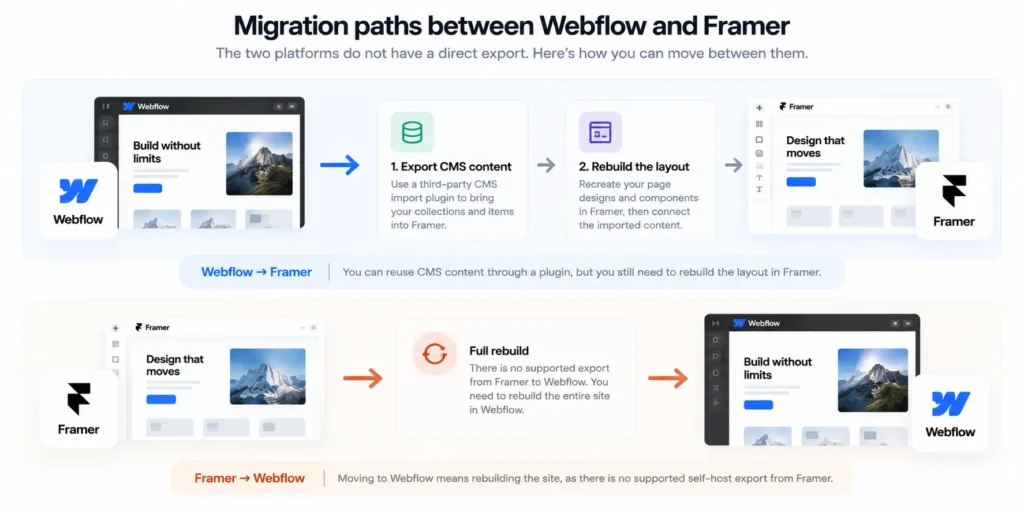
| Moving away later | Webflow calls it a rebuild | Third-party CMS import plugin into Framer |
How Framer and Webflow think about building a site
The two tools disagree about what a web page is, and the price, editing and SEO differences below follow from that.
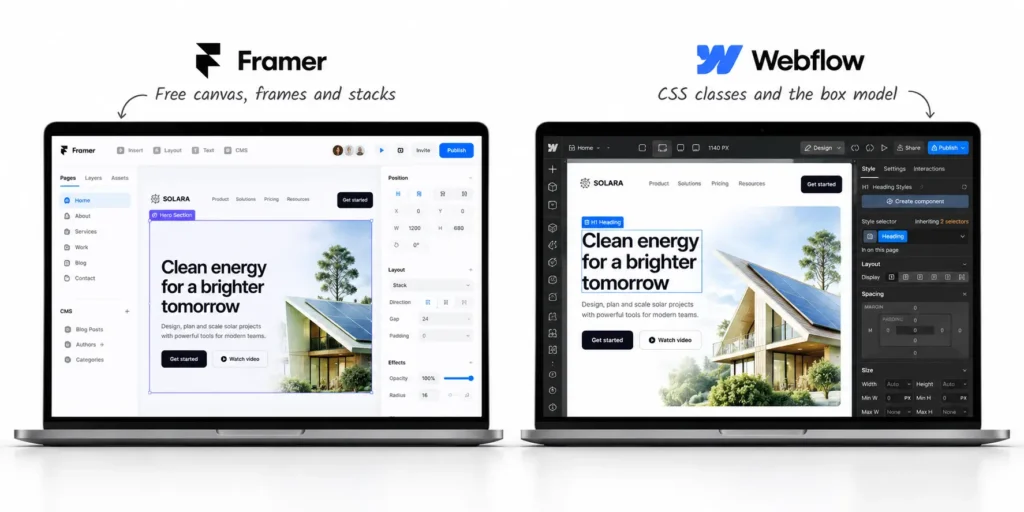
Framer works like a design tool
Framer gives you a canvas. You place frames, group them into stacks and set how each one responds at every breakpoint, which is close enough to Figma that a designer can produce a finished page on day one with the animations already attached.
The cost of that speed sits in the HTML. A frame is a box until someone tells Framer what it is, so the heading level of a title, the tag on a section and the order a screen reader follows are all choices the builder has to make on purpose. Framer gives you the controls and then trusts you to use them.
That is the honest answer to the “Framer HTML is weak for SEO” worry. A careless Framer build produces a page of divs with a styled title that is really a paragraph. A careful one reads like a careful Webflow build.
Webflow works like the web itself
Webflow asks you to style elements with CSS classes and to think in the box model of margins, padding and flex containers. Anyone who has written CSS will feel at home within a day. Anyone who has only used Figma will spend the first week asking why a change to one button changed eleven others.
That friction buys structure. Classes repeat across pages, the element tree maps closely to the HTML that ships, and a developer can read the site the way they would read code. Large sites with many templates stay consistent because the system makes consistency the easy choice.
The person who builds it is rarely the person who runs it
The designer who builds the site in six weeks and the marketing lead who edits it every Tuesday for three years are usually different people. The builder’s comfort decides the first six weeks, and the editor’s comfort decides the next three years, so this page weighs the second more heavily.
Webflow vs Framer pricing, checked against the official pages
Webflow changed its plans on 13 May 2026, and many comparisons still quote the old CMS and Business plans. Any Webflow vs Framer price table older than that date is wrong on the Webflow side. The new Webflow pricing, per Webflow’s help article on the change, merged both into one Premium plan at $25 a month billed yearly or $39 billed monthly.
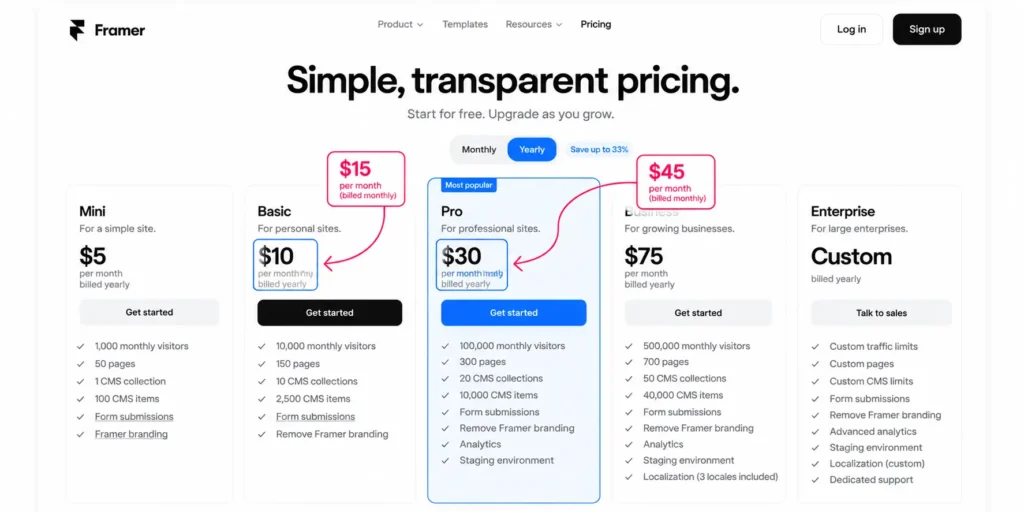
Framer’s trap sits in a toggle. Its pricing page opens with yearly billing switched on, so the $10 and $30 figures you see in every comparison are yearly rates. Switch to monthly and Basic becomes $15, Pro becomes $45, and every seat and add-on rises with it.
Framer plans
Framer Pro costs $30 a month billed yearly and includes 150 pages, 10 CMS collections, 2,500 CMS items and 100 GB of bandwidth. Prices checked on 15 October 2026.
| Plan | Yearly billing | Monthly billing | Pages | CMS collections | CMS items | Bandwidth |
| Free | $0 | $0 | Design pages, Framer domain | 10 | Not listed | 1 GB |
| Basic | $10 a month | $15 a month | 30 | 2 | 1,000 | 50 GB |
| Pro | $30 a month | $45 a month | 150 | 10 | 2,500 | 100 GB |
Webflow plans
Webflow Premium costs $25 a month billed yearly and includes 300 static pages, 20,000 CMS items, 40 collections and 50 GB of bandwidth. Prices checked on 15 October 2026.
| Plan | Monthly billing | Yearly billing | Pages | CMS items | Collections |
| Starter | Free | Free | 2 static | 50 | 20 |
| Basic | $25 a month | $15 a month | 300 static | No CMS | No CMS |
| Premium | $39 a month | $25 a month | 300 static | 20,000 | 40 |
| Team | Annual only | $2,500 a month | 500 static | Not listed | 100 |
Team, per the pricing page, needs an annual contract and bundles 10 seats and Webflow Localize.
The costs people miss
On a site with a team, the plan price is often the smallest line. The table below lists the others, billed yearly.
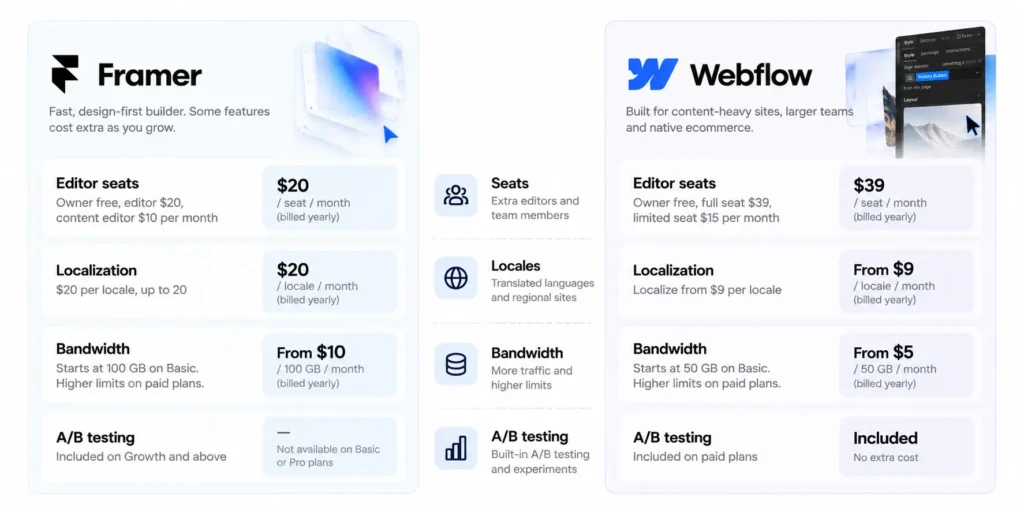
- Seats. Framer charges $20 a month for each extra editor and $10 for each content editor, while Webflow charges $39 for a full seat and $15 for a limited seat. Viewers and reviewers are free on both.
- Locales. Framer charges $20 per locale, and Webflow Localize Essential charges $9 per locale for up to three locales and 10,000 translated words a month.
- Bandwidth. Framer Pro adds $40 per 100 GB, while Webflow Premium goes from $25 to $45 a month when you move from 50 GB to 100 GB.
- A/B testing. Framer’s Convert add-on costs $50 per 500,000 events, and Webflow Optimize starts at $299 a month.
Will the price go up after you commit? Assume it will change. Framer moved to a new billing system on 27 May 2026. Webflow has changed its pricing twice in two years, in December 2024 and again in May 2026, and its own help article shows a yearly Business site using 150 GB going from $59 to $65 a month under the new plan. Read the plan page before every renewal and keep a list of the add-ons you use.
What a business site costs on each platform over two years
Framer is cheaper for most single-language sites, even with several editors, because its seats cost less. Webflow pulls ahead when the site adds a translated language or outgrows 2,500 CMS items, because it charges $9 per locale against Framer’s $20 and includes 20,000 items in its main plan.
The table below prices three sites at the yearly rates checked on 15 October 2026. It assumes the client owns the site and buys its own seats, and that the workspace owner is one of the editors (free on both platforms), and that bandwidth stays inside each plan’s base allowance. Agencies on Webflow’s Freelancer or Agency Workspace plans can hand out free client seats instead, which lowers the Webflow side.
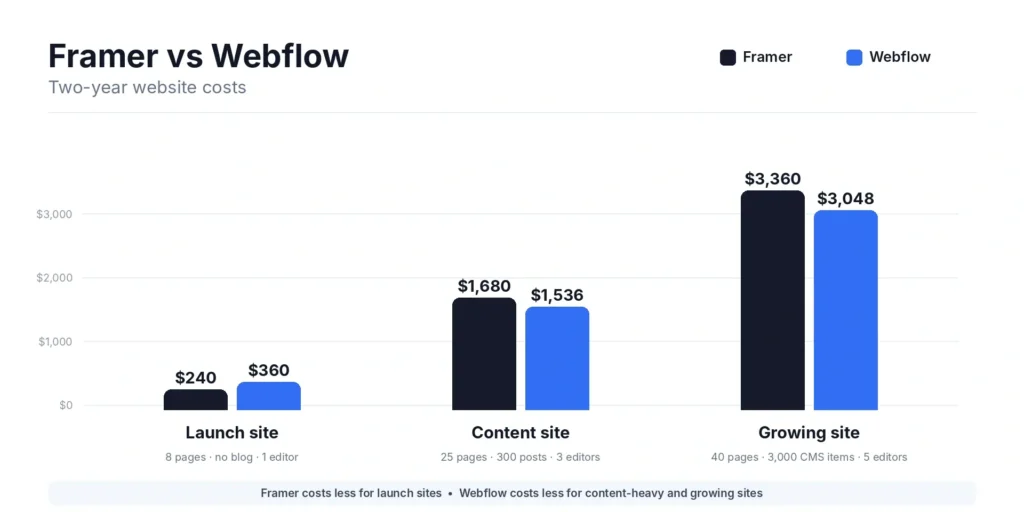
| Scenario | Platform and plan | Seats | Locales and add-ons | Per month | Per year | Two years |
| A. Launch site, 8 pages, no blog, 1 editor | Framer Basic $10 | Owner only, $0 | None | $10 | $10 x 12 = $120 | $240 |
| A. Launch site, 8 pages, no blog, 1 editor | Webflow Basic $15 | Owner only, $0 | None | $15 | $15 x 12 = $180 | $360 |
| B. Content site, 25 pages, about 300 posts, 3 editors, 1 extra language | Framer Pro $30 | Owner plus 2 content editors, 2 x $10 = $20 | 1 locale, $20 | $70 | $70 x 12 = $840 | $1,680 |
| B. Content site, 25 pages, about 300 posts, 3 editors, 1 extra language | Webflow Premium $25 | Owner plus 2 limited seats, 2 x $15 = $30 | Localize Essential, 1 locale, $9 | $64 | $64 x 12 = $768 | $1,536 |
| C. Growing site, 40 pages, about 3,000 items, 5 editors, 2 extra languages | Framer Pro $30 plus one 10,000-item block $20 | Owner, 1 editor $20, 3 content editors 3 x $10 = $30 | 2 locales, 2 x $20 = $40 | $140 | $140 x 12 = $1,680 | $3,360 |
| C. Growing site, 40 pages, about 3,000 items, 5 editors, 2 extra languages | Webflow Premium $25 | Owner, 1 full seat $39, 3 limited seats 3 x $15 = $45 | Localize Essential, 2 locales, 2 x $9 = $18 | $127 | $127 x 12 = $1,524 | $3,048 |
Billed monthly, Scenario C costs $4,800 on Framer against $3,960 on Webflow over two years, and Framer keeps its lead on the small site. Remove the extra language from scenario B and Framer is cheaper, $50 against $55 a month. Two notes on the table.
- Scenario B could run on Framer Basic, which holds 300 posts. Basic has no site redirects, though, and a rebuild needs them.
- Webflow Localize Essential caps translation at 10,000 words a month. Translating 300 long posts at once may need Localize Advanced at $29 per locale.
The build itself (design and development) is a separate and larger cost, and our page on what a site build costs explains how we price it.
Who edits the site after launch
Pick the platform your weekly editor can run without filing a ticket.
Editing on Framer
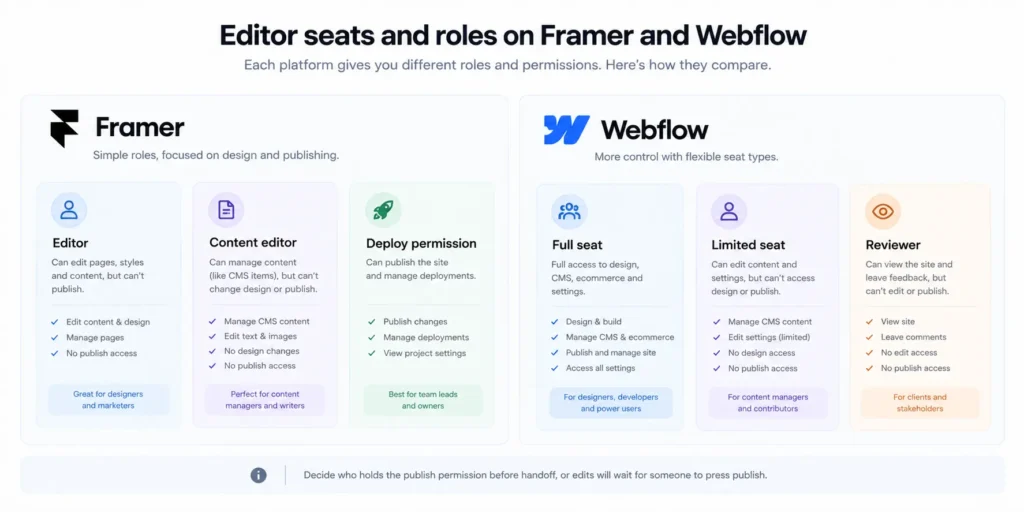
Framer sells two editing seats. A content editor ($10 a month billed yearly) can “manage CMS content, localization, and on-page editing”, in the words of Framer’s roles article. On-page editing means changing text and images in the visual editor, on the live layout, and an editor seat ($20 a month) adds design changes on top.
Publishing is a separate permission. With staging turned on, any project member can publish to staging, while only people with the Deploy permission can push changes live. Decide who holds Deploy before handoff, or the marketing team will edit all week and wait for someone to press publish.
Editing on Webflow
Webflow retired its old client Editor on 4 August 2026, according to its migration page. Editors now work inside Webflow on a seat with one of three roles, Marketer, Content editor or Reviewer. Webflow’s pricing page describes the limited seat ($15 a month billed yearly) as one that can “edit content or build pages with components.” A full seat ($39) can “design full sites or manage admin settings,” and a Reviewer on a limited seat moves to a free seat.
This answers the “Webflow is too hard for my team” worry. Weekly editors work with the fields and components the builder set up and never touch the class system.
Three questions to settle before handoff
- Who publishes each week? Name the person, then give them the right seat and the publish permission.
- Do they need to change layouts, or only text and CMS items? Layout changes need a Framer editor seat or a Webflow Marketer role. Text and CMS changes need only the cheaper seat.
- How many people need access? Count them now. Seats alone keep Framer cheaper, since a content editor costs $10 there against $15 on Webflow, but Framer caps edit access at 10 people.
CMS and content limits that can decide for you
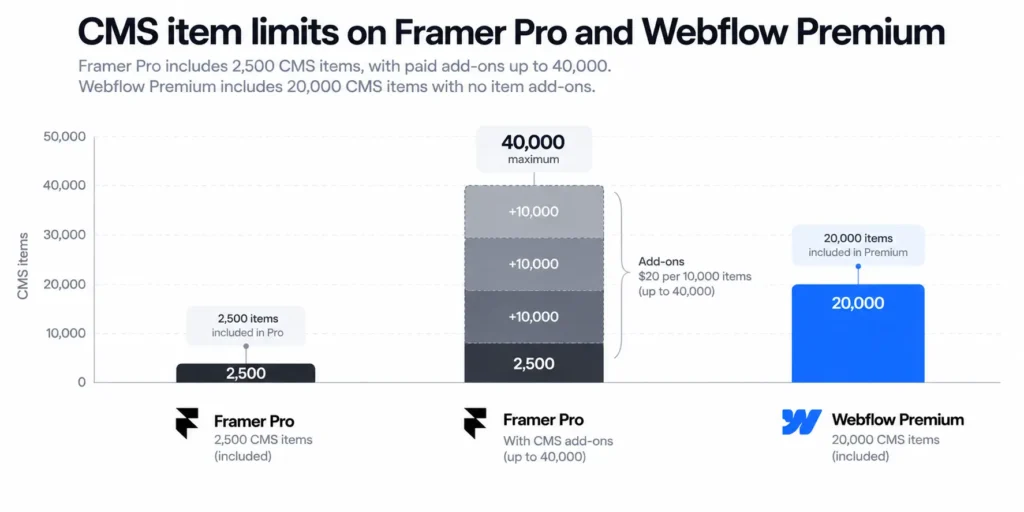
Framer CMS limits start at 2,500 included items on Pro, and a growing blog hits that ceiling before any other. Each extra 10,000 items costs $20 a month billed yearly, up to 40,000. Webflow Premium includes 20,000 items with no item add-ons, so its first ceiling is usually the 50 GB of bandwidth. Prices checked on 15 October 2026, billed yearly.
| Limit | Framer Pro | Framer add-on path | Webflow Premium | Webflow path past the limit |
| Pages | 150 | $20 per 100, up to 700 | 300 static | No page add-on listed, Team or Enterprise |
| CMS collections | 10 | $40 per 10, up to 40 | 40 | Team (100) or Enterprise |
| CMS items | 2,500 | $20 per 10,000, up to 40,000 | 20,000 | Item add-ons removed, Team or Enterprise |
| Bandwidth | 100 GB | $40 per 100 GB, up to 2 TB | 50 GB | Add-ons to 2.5 TB (100 GB costs $45 a month in total) |
Every blog post is one CMS item, and so is every author, category and resource in its own collection. A site publishing three posts a week, with tags and authors as their own collections, passes 2,500 within a few years. Pages rarely run out first, because a CMS generates post pages from one template (what a CMS does) and the 150-page limit counts the pages you design.
On Framer, crossing the line is a $20 add-on per 10,000 items, up to 40,000. On Webflow, the help article confirms that “CMS items add-ons have been removed.” Past 20,000 items, the next step is the Team plan at $2,500 a month or Enterprise. Few business sites reach 20,000 items, but those that will should price Team first.
Bandwidth works the other way. Webflow Premium includes half of Framer Pro’s allowance, so a traffic-heavy site meets the Webflow add-on sooner.
Design freedom and animation
Framer is faster for visual, motion-heavy pages. A product launch page with scroll effects and a hero that reacts to the cursor takes days on the canvas, and changing it next week is just as quick.
Webflow gives finer control over complex layouts and structured interactions. A resource library with filters and templates that must behave identically across 400 entries is where the class system pays off, because one fix applies to every card.
Neither wins outright. Plan a site that needs both around the part it will spend more years running.
Framer vs Webflow for SEO
Both platforms handle the basics, and neither will rank a site on its own. Is Framer good for SEO? Yes, when the builder sets the structure on purpose. So is Webflow.
What both handle well
Both let you set a title and meta description per page and per CMS template, generate a sitemap.xml automatically, keep clean URLs, add alt text and set canonical tags. Framer documents these in its SEO features guide and canonical URL article. Webflow covers them in its articles on titles and meta descriptions, sitemaps and canonical tags.
Heading structure and semantic HTML
On Framer, the builder sets heading levels and HTML tags on purpose, as covered in the build section above. On Webflow, the element tree sits closer to the final HTML, so a wrong tag is easier to spot. Check any build by viewing the page source and reading the heading outline from H1 down.
Redirects
Framer includes site redirects on Pro only. Its developer reference allows up to 2,500 redirects per project, and its redirects article supports wildcards and capture groups. Webflow includes 301 redirects on paid site plans. Its redirects article sets no hard cap, recommends staying under 1,000 rules, and supports wildcard capture groups. Some older comparisons say Framer allows only 100 redirects or one-to-one rules, which Framer’s current documentation contradicts.
Localization and hreflang
Framer adds hreflang tags automatically for each locale, and its language attribute article says they are not editable in the interface. Webflow Localize lets you choose how hreflang is generated, through page tags or sitemap entries, in the Localize SEO settings. That difference matters if you need control over hreflang for a complex locale setup with regional variants.
Large blogs
Plan category and tag pages as their own collections, decide how post lists paginate, and confirm that each list template gets its own title and canonical. Then check the item count against each plan’s CMS limit, since categories and tags count as items too.
Page speed
The platform controls hosting and the CDN. Per their pricing pages, Framer Pro serves from over 300 locations and Webflow hosting runs on Cloudflare’s CDN. The builder controls image weight, font files, scripts and animation, which is where weak Core Web Vitals usually come from. Test your own build in PageSpeed Insights before launch instead of trusting a platform’s speed claims, ours included.
Ecommerce, a native store or third-party tools
Webflow sells native ecommerce and Framer does not.
Webflow’s ecommerce plans cost $29 a month billed yearly for Standard (500 items, 2% transaction fee), $74 for Plus (5,000 items, no transaction fee) and $212 for Advanced (15,000 items). Store items count separately from CMS items, and Webflow’s May 2026 update left the ecommerce plans unchanged.
Framer sellers add a checkout through Framer Marketplace plugins such as Checkout Page, which runs payments through your own Stripe account.
For a handful of products either route works, but for a large catalog with inventory, variants and fulfillment, Shopify is the better base.
Lock-in, code export and moving between them
Vendor lock-in is real on both, because both platforms host your site and neither lets you leave with everything intact.
What you can take with you
Can you export code from Webflow? Yes, on a paid Workspace plan. Webflow’s code export article says that “Site plans do not include the ability to export your site’s code.” The export gives you HTML, CSS, JavaScript and assets. It leaves out CMS content and Collection lists (they show their empty state), ecommerce, user accounts, code components, password protection, form processing, site search, and every locale except the primary one. CMS collections can be exported separately as CSV files.
Framer’s position is harder to state, because its own help center gives two answers. One article, updated 15 September 2026, says “Framer does not offer HTML export for self-hosting.” Another, with the same update date, says of the published HTML, CSS and JavaScript, “You can download these files at any time and move them to any hosting provider.” CMS content leaves through plugins as CSV or JSON. The safe reading is that a static copy of your published pages is possible and a supported, editable self-hosted site is not.
Moving from Webflow to Framer
To migrate Webflow to Framer, the common route is a third-party plugin. Webflow Import, by Adam Kansky, reads Webflow’s CSV exports and brings in CMS collections, references, images, rich text and 301 redirects in one pass. It is free for the first 25 items of every collection, then $49 for one project or $99 for unlimited projects, and the redirects need a Framer plan that includes them, which means Pro.
Framer’s own step-by-step guide covers inventory, rebuilding pages from components, forms and integrations, and switching DNS after testing. Layouts and interactions are rebuilt by hand.
Moving from Framer to Webflow
There is no import tool in this direction. Webflow’s migration article says it plainly. “Migrating from Framer to Webflow is a rebuild, not a transfer.” Every layout, style, CMS structure and interaction gets recreated in Webflow using the Framer site as a reference, so budget it as a new build.
Keeping rankings during a move
Rankings drop during a move when URLs change and redirects are missing. Four steps protect them.
- Map every old URL to its new one, including CMS posts and paginated lists.
- Add 301 redirects before the domain switch, and test each changed path for the right status and destination.
- Keep titles, meta descriptions and heading structure on the pages that already rank.
- Check redirect support on the new plan before you sign. Framer needs Pro.
Our redesign checklist covers the same steps for any platform move.
Which platform fits which kind of website
The fourth column says what would change each pick.
| Website type | Pick | Reason | What would change the pick |
| SaaS marketing site | Webflow | Content, docs and landing pages grow fast, and several people publish | Framer, if the team is two people and the blog stays small |
| Startup launch page | Framer | Fastest route from design to live, cheapest plan that fits | Webflow, if a content program starts within the year |
| Portfolio | Framer | A few designed pages, motion matters, Basic covers it | Webflow, if the portfolio becomes a large case-study library |
| Agency site | Framer | Visual work, small team, frequent layout changes | Webflow, if the agency publishes heavily or needs client-style roles |
| Content-heavy blog | Webflow | Cheaper locales and room for 20,000 items | WordPress, if the editorial workflow needs plugins |
| B2B site with a resource library | Webflow | Filters, nested collections and consistent templates | Framer, if the library stays under a few hundred items |
| Multi-language site | Webflow | Localize gives control over hreflang and translated URLs | Framer, if two or three locales on a small site are enough |
| Small store | Webflow | Native ecommerce from $29 a month | Framer with a checkout plugin, for a handful of products |
| Large store | Shopify | Catalog, inventory and fulfillment tools neither builder matches | Nothing in this comparison |
| Local business site | Framer | Few pages, one editor, lowest cost | Webflow, if the owner wants a cheap CMS-free plan with 300 pages |
For real SaaS sites built on both platforms, see our SaaS website examples.
Choose Framer if, choose Webflow if, choose neither if
Is Framer better than Webflow? For some sites, clearly. For others, clearly not. These conditions settle it.
Choose Framer if
- One or two people will run the site, and they think in layouts more than in fields.
- The site is a launch page, a portfolio or a marketing site under about 30 designed pages.
- The blog will stay inside 2,500 items for the next two years, or you are happy to pay $20 per 10,000 more.
- Motion and visual polish are part of the product story, and you want to change them weekly.
- You accept that leaving later means a rebuild of the layouts.
Our Framer development team builds sites of this kind.
Choose Webflow if
- Three or more people will publish, and you want each on a limited seat with a fixed role (Marketer, Content editor or Reviewer).
- The CMS will hold thousands of items, with categories, authors and resources as their own collections.
- You need a native store for a small or medium catalog.
- You need control over localization, hreflang and translated URLs.
- You want the option to export static code on a paid Workspace plan.
Our Webflow development team builds sites of this kind.
Choose neither if
- The editorial team depends on plugins, custom workflows or a large existing library of WordPress content. Our Webflow vs WordPress comparison covers that choice.
- The store is the business, with a large catalog, inventory and fulfillment. Shopify is the better base.
- The site is really an application, with logins, dashboards and user data. Neither builder is meant for that.
How we pick a platform on client projects
Four questions decide the platform before any design starts.
- Who publishes each week? One designer-minded marketer points to Framer. A team of editors points to Webflow.
- How many CMS items will the site hold in two years? Under 2,500 fits Framer Pro without add-ons. Well past that, Webflow Premium’s 20,000 is the cheaper headroom.
- Will it sell products? A small catalog points to Webflow. A large one points to Shopify.
- Who owns the account and hosting after handoff? We recommend that the client owns both from day one, so seat costs belong in the client’s budget and in this decision.
We pick Framer when one or two people own the site, they edit pages visually, and the CMS will stay inside Framer Pro’s 2,500 included items. We pick Webflow when the site will run in more than one language, the CMS will pass a few thousand items, several people need fixed roles, or the site needs a native store. Ask any agency, us included, which of these answers changed its pick. Our guide to choosing a Webflow agency has more questions like it.
Send your page list and goals through our contact page and get a quote on either platform.
Frequently asked questions
Is Framer better than Webflow?
Framer is better for small teams building launch pages, portfolios and motion-heavy marketing sites, because the canvas is fast and the entry plan is $10 a month billed yearly. Webflow is better for content-heavy sites with several editors or a store, because Premium includes 20,000 CMS items and adds languages at $9 each.
Is Framer cheaper than Webflow?
Framer is cheaper for small sites. Framer Basic costs $10 a month billed yearly against $15 for Webflow Basic. For a content site with three editors and a second language, Webflow costs less, $64 a month against $70 billed yearly. The language makes the difference. Without it, Framer stays cheaper, $50 against $55, and extra editors widen Framer’s lead. Prices were checked on 15 October 2026.
Is Framer good for SEO?
Framer is good for SEO when the builder sets heading levels and HTML tags on purpose. It generates sitemaps, supports per-page titles, meta descriptions and canonical tags, adds hreflang for each locale, and offers up to 2,500 redirects per project on Pro. Like any platform, it will not rank a site without good content and links.
Can a marketing team edit a Framer site without a developer?
Yes. A Framer content editor seat costs $10 a month billed yearly and can manage CMS content, localization and on-page text and image edits. Changing layouts needs a full editor seat at $20 a month. Pushing changes live needs the Deploy permission, so the site owner should grant it to the weekly publisher at handoff.
Can you export code from Webflow or Framer?
Webflow exports HTML, CSS, JavaScript and assets on paid Workspace plans, without CMS content, ecommerce, forms, site search or extra locales. CMS collections export separately as CSV. Framer’s help center says it does not offer HTML export for self-hosting, while another Framer article says published files can be downloaded. CMS data leaves Framer through plugins.
Can I move my Webflow site to Framer?
Yes. The third-party Webflow Import plugin brings CMS collections, images, rich text and 301 redirects from Webflow’s CSV exports into Framer. It is free for the first 25 items per collection, then $49 or $99. Layouts and interactions are rebuilt by hand, and redirects need Framer Pro. Framer also publishes an official step-by-step migration guide.
Which is better for a SaaS website?
Webflow is the safer pick for most SaaS marketing sites, because the blog, docs and landing pages grow quickly and several people end up publishing. Framer fits a SaaS team of two or three people with a small blog and a launch-focused site. Check the CMS item count and the number of editors before deciding.