
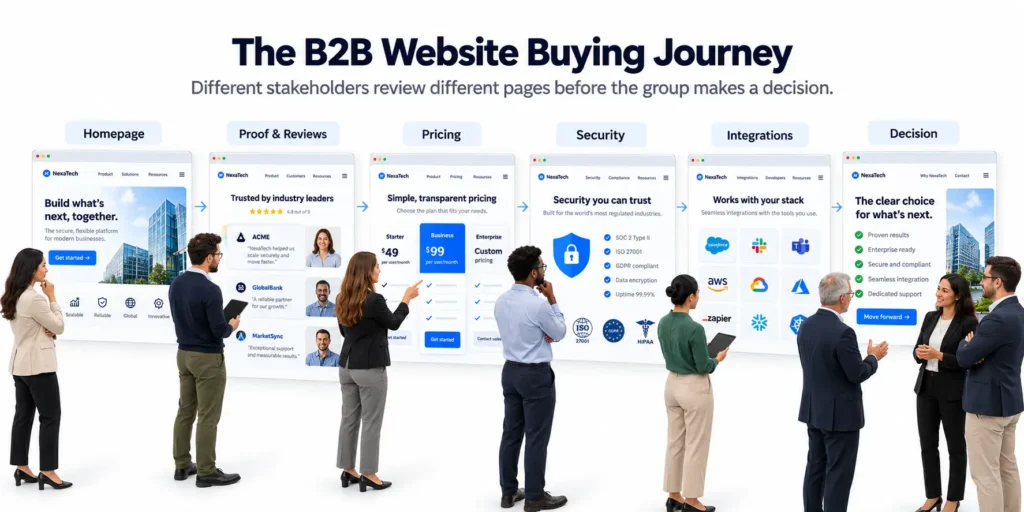
The person who found your website is rarely the person who signs the contract. They liked what they saw, so they forwarded one link to finance, one to IT, and one to the team that will use the product every day. Each of them opened a different page, looked for one answer, and left.
The usual lists of B2B website design best practices are written for a single visitor who starts on the homepage and scrolls politely to the bottom. This one is organized by the decision makers, and for each of them you get the question they bring, the page they check, and what to put on it.
Key takeaways
- Each member of the buying group checks a different page, and each one arrives with a single question.
- Every important page has to make sense when it is forwarded alone, because the homepage rarely travels with it.
- A security page and a pricing signal will not win the deal. Leaving them out can lose it.
- Without famous logos, show your people, your process and your prices, and link the reviews that back them up.
Why a B2B website is read differently
A B2B website is read by a group, in pieces, before anyone talks to you.
The group is large. Gartner’s Delainey Kirkwood describes buying groups “ranging from five to 16 people across as many as four functions” (Gartner press release, 7 May 2025). 6sense puts the average at more than ten members on purchases averaging $250,000 (6sense Buyer Experience Report 2025).
The group also does its homework without you. In the same 6sense study, buyers first contacted a seller 61% of the way through the buying journey. The vendor they contacted first won about 80% of the time.
Put those together. By the time your sales team hears a name, several members of the buying committee have already read your site and the favorite is largely chosen.
One limit. 6sense surveyed large purchases, so a $5,000 tool likely involves a smaller group.
The buying group, mapped to your pages
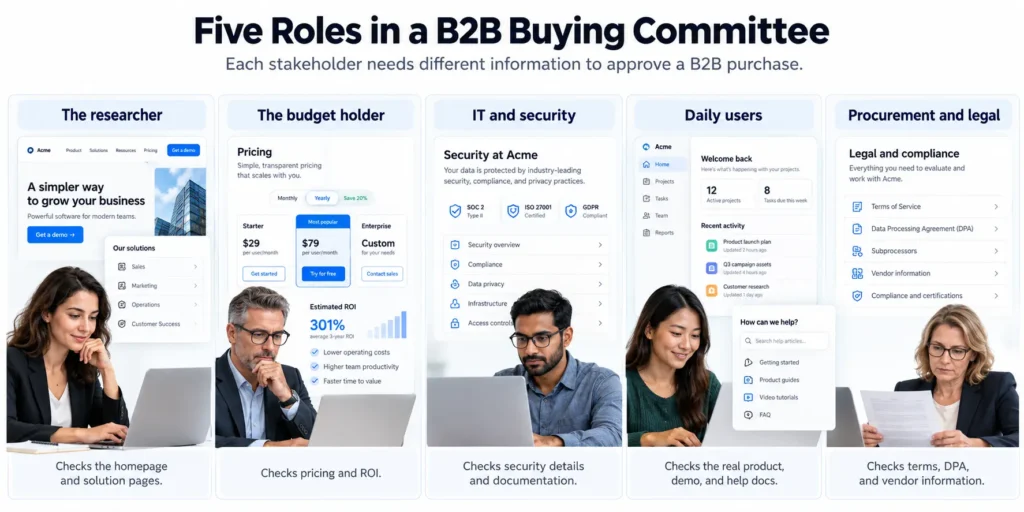
Five roles show up in most B2B deals, often filled by more people than that, and each role has a page.
| Who | The question they bring | The page they check | What makes them leave |
| The researcher (often your champion) | Is this for a company like ours? | Homepage, then one product or solution page | A headline that could describe any company |
| The budget holder | What will this cost, and what do we get back? | Pricing, then case studies | No figure anywhere, and results without numbers |
| IT and security | Is this safe to connect to our systems? | Security page, documentation | No security page, or badges with nothing behind them |
| The people who will use it every day | What will my week look like with this? | Product screens, demo, help docs | Illustrations where the product should be |
| Procurement and legal | Can we sign this without a month of email? | Terms, data processing agreement, vendor contact | Documents available “on request” |
April Dunford draws a line that explains this table. In her essay on value versus objection handling, she separates the reason a customer picks you from the things a customer needs before they can say yes. SOC 2 support, onboarding and integrations sit in the second group. A customer will rarely choose you for them, and may well disqualify you without them.
That is the job split on a B2B site. The champion’s pages carry the value, everyone else’s pages handle objections, and you should know which one you are writing.
The researcher
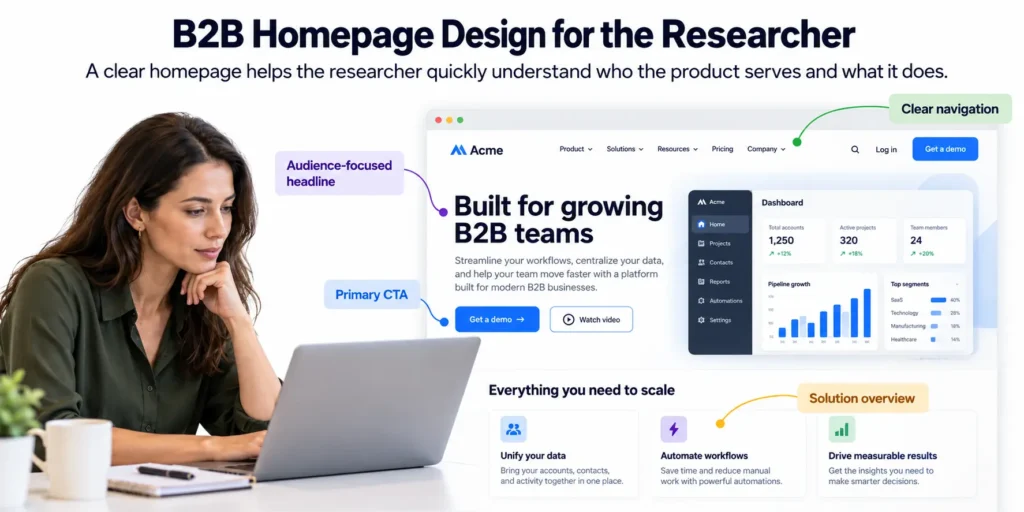
The researcher needs to know in one screen that you built this for a company like theirs.
This person is usually your champion. In Dunford’s guide to positioning for multiple personas, the champion is the one person who can make the deal happen, while every other stakeholder can stop it. So the researcher’s pages come first.
Say who it is for. One line on the homepage that names the customer and the job. A headline that would be just as true on a competitor’s site is too vague to help.
Label the navigation the way they would. Group pages by problem, industry or role, in the words a visitor would use. Internal product names mean nothing on a first visit.
Give basic answers without a form. What it does, who it is for and roughly what it costs should all be readable before anyone asks for an email address.
Build one page they can forward. A single page that explains you in two minutes, because they will not rewrite your pitch for their colleagues.
Example. Plausible’s homepage title reads “Simple, privacy-friendly Google Analytics alternative”, and its menu has a group called “Who it’s for” that lists ecommerce, SaaS, agencies, the public sector and enterprise (checked on 13 October 2026).
Mistake to avoid. Writing the homepage for everyone in the group at once, which leaves it speaking to nobody. The homepage belongs to the researcher.
The budget holder
The budget holder needs a number and a reason to believe the return.
They did not see the demo. They got a forwarded link and a one-line message, so they open the pricing page first, and a page that tells them nothing leaves them to assume the answer is “expensive”.
Show a price, a starting figure, or a reason. A full price list is best, and a “starts at” figure at least lets them rule themselves in or out. If every deal is custom, say so in a sentence and say what the quote depends on. Our post on SaaS pricing page design covers the Contact sales tier. Seven of the eight pricing pages we checked for it had a custom tier, and six of those gave no figure at all.
Use case studies with the customer’s own numbers. Pick a result the customer published or approved, and add how long it took to get there, since time to result is what a payback calculation needs.
Skip the invented ROI calculator. A calculator that multiplies their inputs by your optimism is weak evidence next to one worked example from a real customer.
Example. Basecamp prints a dollar price on each paid plan and offers a free trial of 30 days or more (checked on 13 October 2026).
Mistake to avoid. “Contact us for pricing” with nothing else on the page. It may be the honest answer when every contract differs, and it still reads as a refusal. Publish the smallest engagement you take, or the range past projects fell in.
IT and security
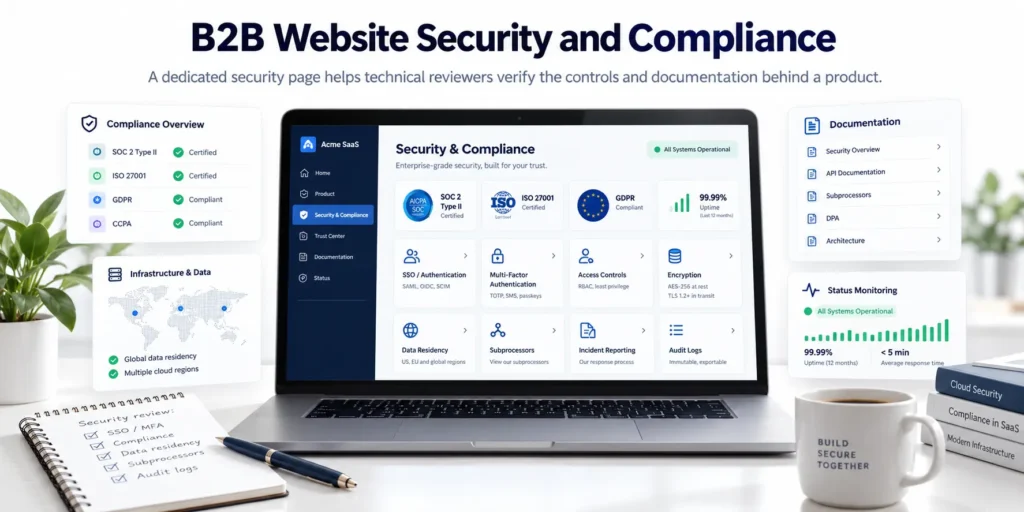
IT needs a security page that answers the standard questions before anyone has to ask.
This reviewer’s job is to find reasons to say no, and a missing page is the easiest one to find. In Dunford’s terms the security page is pure objection handling, so it will never win you the deal and it can keep you on the list.
Answer the four standard questions. How people sign in, including SSO. Where the data lives. Which subprocessors touch it. How to report a problem, with a real email address.
List certifications only if you hold them. With no SOC 2 report yet, describe the controls you do have. A plain description of real controls is more credible than a vague badge.
Publish integration and API documentation. Keep it open and searchable with no login, because a technical reviewer can judge the product from its docs and gated docs look like something to hide.
Add a status page if uptime matters. Past incidents, with dates, show how you behave on a bad day.
Example. Tailscale’s security page states that it holds a SOC 2 Type II certification and says where to get the report. It links the security policies it publishes, lists controls such as SSO and MFA for production access, and gives security@tailscale.com for reports (checked on 13 October 2026).
Mistake to avoid. A row of compliance logos in the footer with no page behind them. A reviewer who clicks a badge and finds nothing behind it will count the badge against you.
The people who will use it every day
Daily users want to see the real product and to know what their first week looks like.
They have no budget and no signature. They do have a veto of a kind, because a tool the team refuses to use becomes a failed purchase.
Show the product as it looks. Use real screens, a short tour, or a sandbox. An illustration where the interface should be suggests you would prefer not to show it.
Open the help docs. A user can read the documentation before buying and judge how hard the product is, which makes clear docs a demo you did not have to schedule.
Describe the first week. Say what gets set up, who does it, and when the team is working normally again, since the fear here is disruption and a plain timeline answers it.
Example. Plausible links “View live demo” from its homepage, and the link opens a working dashboard (checked on 13 October 2026). For what a good demo request page looks like when a call is needed, see the demo section of our SaaS landing page examples.
Mistake to avoid. Hiding every product view behind “Book a demo”. A user who only wanted a look is unlikely to book a call, and all they can report back is that they could not see it.


Which buyer is your website losing?
Send us your URL. We’ll check it against all five roles and tell you where the deal stalls.
Procurement and legal
Procurement needs your documents in public and one named person to send the vendor form to.
This is the last stop. The decision is made, the budget is approved, and what remains is paperwork, which is where a decided deal can sit.
Publish the terms and the data processing agreement. Put them up as pages or PDFs, linked from the footer, so a legal team can start its review without asking anyone.
Say how you take payment. List invoice, purchase order and card, along with your payment terms. Some finance teams cannot pay by card and need to know that before the contract stage.
Name a contact for vendor forms. One address that reaches a person who fills in security questionnaires and supplier onboarding forms.
This is probably the cheapest page on your site to build, since the documents usually exist already. Our position is that it belongs in the first release of a B2B site.
Example. PostHog has a DPA generator on its site. The page says the agreement is self-serve, arrives countersigned, takes a couple of minutes, and is available on any plan including the free one (checked on 13 October 2026).
Example outside software. Uline, a distributor of shipping and packaging supplies, explains in its help center that qualified business customers can choose “Invoice Me” at checkout for Net 30 billing, and that the first order placed that way starts the credit review. Its payment help page also lists the cards it accepts, including GSA SmartPay for government buyers (checked on 14 October 2026). A buyer’s finance team knows how to pay before anyone calls.
Mistake to avoid. “Available on request”. Each request is an email thread, and each thread is time in which a decided deal can stall.
Design every page to be forwarded
Every key page should make sense to someone who never saw your homepage.
The champion forwards deep links. They send the pricing page to finance and the security page to IT with a one-line note, and for the people who receive them those pages are now the first page of your site.
Make each key page stand alone. Each needs one sentence on what the company does, the proof that fits this reader, and a next step.
Use links that open at the right section. Add anchor links on long pages, so the champion can send “the part about data residency” and have it open there.
Check how pricing and security read as a PDF. A buyer may save these two pages and attach them to an approval document, and content inside tabs, accordions and hover states can vanish from a PDF.
Fix the link preview. Check the title, description and image that appear when the URL is pasted into Slack or email, because a preview that says “Home” under a broken image is a poor introduction.
One caution from the Gartner survey above. Of the buying teams in its survey of 632 buyers, 74% showed what Gartner calls unhealthy conflict, and content written for one individual made group agreement harder. So each role page should answer its reader’s question and still tell the same story about what you do and who it is for.
Trust when you have no famous logos
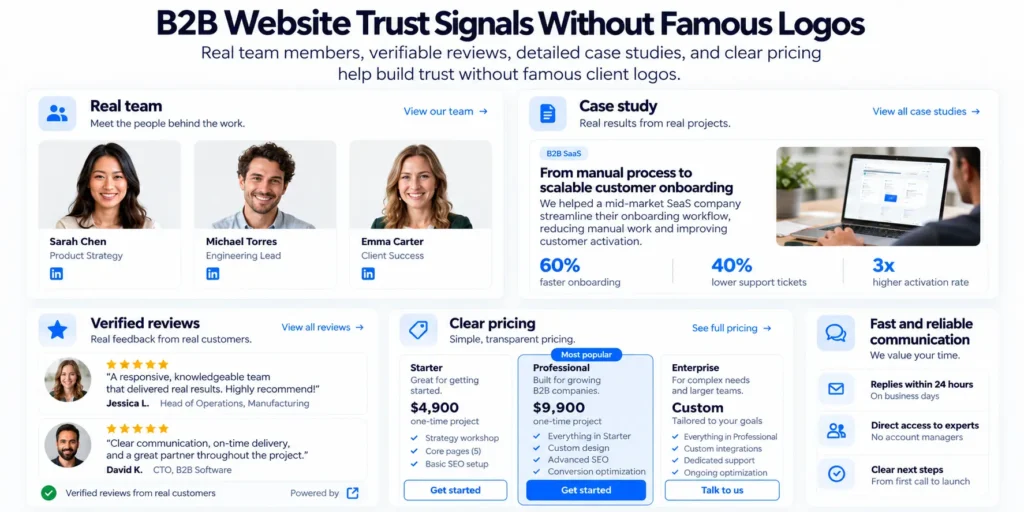
Without well-known customers, the trust signals that work are the ones a visitor can check.
A logo wall works because the reader recognizes the names and borrows their judgment. If your customers are good companies that few people outside their industry have heard of, the wall does less, and that is a normal position for a young or specialized B2B company.
Show the people. Use real names, real photos and real roles. A team page turns a group of strangers into people with jobs.
Show the process. Say what happens in week one, week two and week three, because a clear process is evidence that you have done this before.
Publish prices, or a starting figure. A company that states its price looks like one that expects to be compared.
Show real work in real detail. Take a small client with a specific problem and say what you did and what changed. Specific detail on a small project is more convincing than a vague line about a large one.
Link your reviews. Link to the live Clutch or G2 profile. A screenshot can be edited, and a link lets the reader see every review, including the lukewarm ones.
State a response time you can keep. “We reply within 24 hours” is a small promise the buyer can test on day one.
Add a founder note. Keep it short, on why the company exists and what it will not do.
What to leave out. Logo walls of companies you never worked with, and stock photos of handshakes. A number such as “trusted by 500 companies” is fine when the reader can check it, so put the reviews or the case studies one click away.
We publish our prices, our team and our Clutch reviews on pixelean.com for the same reason.
The basics that apply to every B2B site
The basics still apply, and they take less space here because the guides to B2B web design best practices that we read already cover them.
- Speed. Test your key pages on a mid-range phone on mobile data, since a forwarded link may well be opened on one.
- Mobile. Check the pricing table and any comparison table at phone width, where wide tables break first.
- Accessibility. Check contrast, keyboard access and labeled form fields. Some buyers ask for it in procurement, and it is the right thing to build anyway.
- One next step per page. Each page has a single main action that fits its reader. On a security page that action is “download the report” or “email security”, and a demo button there serves nobody.
- Short forms. Ask for as few fields as the stage allows. Our landing page examples post counts form fields page by page.
If you are rebuilding the whole site, the website redesign checklist covers the order of work and the redirect map.
A one-hour check of your own site
You can test your site against these B2B website best practices in an hour, with a timer and a private browser window.
- Be the researcher. Open the homepage. Time how long it takes to say who the product is for, in your own words.
- Be the budget holder. Start on the pricing page with no other context. Write down the number you would take to a budget meeting. If you have none, note that.
- Be IT. Find the security page from the footer. Look for sign-in, data location, subprocessors and a reporting address. Count how many of the four you found.
- Be a daily user. Find a real view of the product without filling in a form. Then find the help docs.
- Be procurement. Find the terms, the data processing agreement and a contact for vendor forms. Time it.
Anything that took more than two minutes, or could not be found, goes on the list. A fuller review is a UX audit, and that post explains what one finds and when to skip it.
How Pixelean designs B2B websites
We think a B2B website should start from the buying group map, before any page is designed.
A list of who signs off on the deals, and which page each person needs, should decide the sitemap. We design in Figma and build on Webflow, Framer or WordPress. For sales-led companies, the patterns in our SaaS website examples post are a good reference. Our pricing is public.
Who this is not for. A B2B portal with customer logins, custom integrations and account-level pricing is a software product, and it needs a product engineering team.
Frequently asked questions
How is B2B website design different from B2C?
A B2C site usually persuades one person who decides alone. A B2B site has to serve a group, in which a researcher, a budget holder, IT, daily users and procurement each read different pages. The design job is to give each of them a page that answers their question.
What pages does a B2B website need?
At minimum, a homepage that says who the product is for, a product page, pricing or a pricing signal, case studies, a security page, public documentation, and a legal page with terms and a data processing agreement. Each one maps to a person in the buying group.
Should a B2B website show pricing?
Yes, in some form. A full price list is best and a starting figure is next. If every deal is custom, one sentence on what the quote depends on is still better than a bare “Contact sales”, because the budget holder may read the pricing page without having seen anything else.
How many people are involved in a B2B purchase?
Gartner describes buying groups ranging from five to 16 people across as many as four functions (press release, 7 May 2025). 6sense reports an average of more than ten members on purchases averaging $250,000 (Buyer Experience Report 2025). Smaller purchases involve fewer people.
How do you build trust on a B2B website without big-name clients?
Use proof a visitor can check, such as named team members with photos, a week-by-week process, published prices, detailed work for real clients, linked reviews on Clutch or G2, and a response time you keep. Avoid borrowed logos and customer counts with nothing behind them.
The bottom line
A B2B website is a set of answers for five different people, and some of them may never see your homepage. Give the researcher a clear line on who you are for and the budget holder a number. Give IT a security page, users the real product, and procurement the documents. Then make each of those pages work when it arrives alone in someone’s inbox. With that in place, the rest of the B2B website design best practices are details.
Send us your website and tell us who signs your deals. We will tell you which person your site is failing first. The team replies within 24 hours.
Sources
All sources read on 13 October 2026, except Uline, read on 14 October 2026.
- Gartner, “Gartner Sales Survey Finds 74% of B2B Buyer Teams Demonstrate Unhealthy Conflict During the Decision Process“, press release, 7 May 2025.
- 6sense, “The B2B Buyer Experience Report for 2025“.
- April Dunford, “Value vs. Objection Handling“.
- April Dunford, “A Guide to Positioning with Multiple Products, Segments and Personas“.
- Plausible Analytics, homepage.
- Basecamp, pricing page.
- Tailscale, security page.
- PostHog, DPA generator.
- Uline, help center pages on payment method and credit, read on 14 October 2026.