
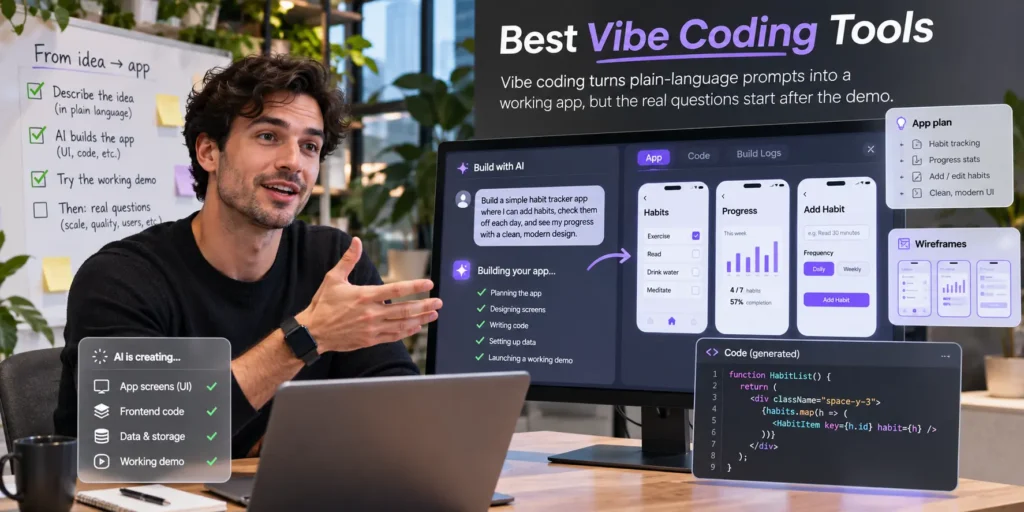
The best vibe coding tools can turn a weekend of prompts into an app you can click through on Monday. That part works. The questions arrive a week later. What will this cost once real people use it? Who owns the code? Will the login, the data and the screens hold up when the first hundred users arrive?
Vibe coding means building software by describing it in plain language while an AI tool writes the code. This guide sorts the vibe coding tools worth knowing by who they suit. App builders for founders who do not code come first, then AI coding assistants for developers. Each tool is judged past the demo, on code export, backend limits, security record, the quality of the interface it produces and the real monthly bill. Then the guide draws a clear line for when to stop prompting and bring in a designer or developer.
One disclosure before the list. Pixelean designs and builds MVPs, so we sell the option this guide describes last. No tool paid to appear, and every price was read on the tool’s own site on 21 November 2026.
Key takeaways
- Lovable, Bolt, v0, Replit and Base44 start at $16 to $30 a month on their entry paid plans ($16 is Base44 billed yearly), and each plan is a pool of credits, tokens or usage that can run out.
- A small vibe-coded app with real users costs about $86 a month in a busy month on the Lovable path in this guide, and the plan price is only $25 of that.
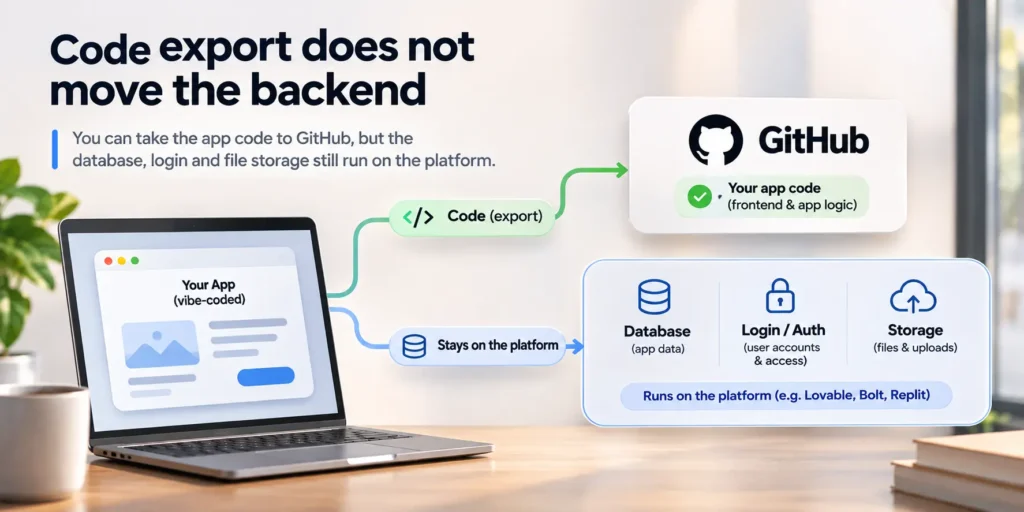
- Exporting code to GitHub does not move the backend. Check where the database, login and file storage run before you count on leaving a platform.
- Every builder here can produce screens that drift apart in spacing, color and button style, because no tool enforces a shared design system unless you supply one.
- The earliest sign it is time to hire is design drift across screens, and the most costly is taking payments or storing personal data with a missing access rule.
The quick answer
The best vibe coding tool depends on who is typing. A founder who does not code should start with Lovable for a full app with a database, or v0 if the interface matters most. A developer who already lives in an editor should start with Cursor, GitHub Copilot or Claude Code.
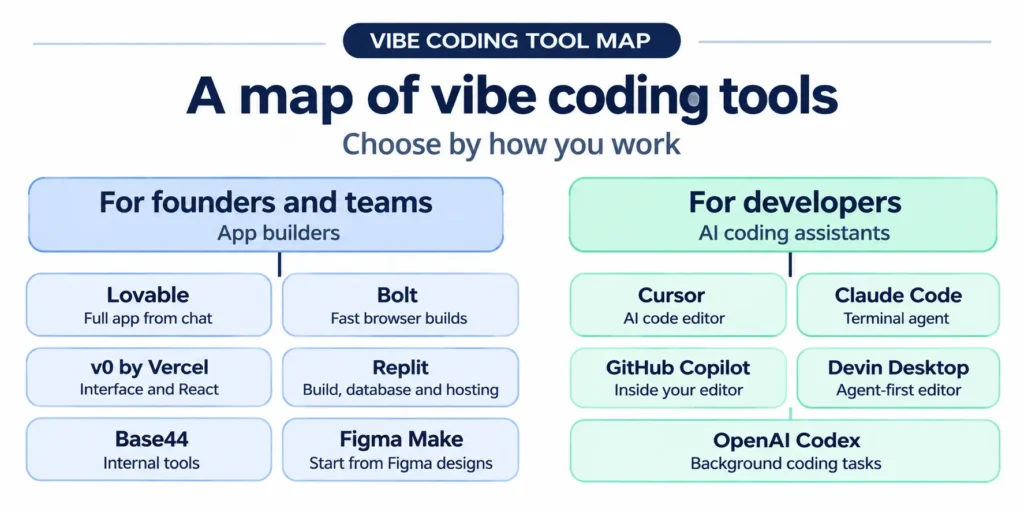
| Tool | Best for | Who it suits | Starting paid price | Code export | Backend included |
| Lovable | Full web app from a chat | No code | $25/mo | Git sync on all plans, download from Pro | Yes, Lovable Cloud |
| Bolt | Fast builds in the browser | No code | $25/mo | GitHub sync | Yes, databases and hosting |
| v0 by Vercel | Interface quality and React code | No code or developer | $30/user/mo | GitHub sync | No, connect your own |
| Replit | Build, database and hosting in one place | No code or developer | $20/mo | GitHub push and pull | Yes, built-in database |
| Base44 | All-in-one internal tools | No code | $16/mo billed yearly | GitHub sync, Builder and up | Yes, on every plan |
| Figma Make | Teams that design in Figma | Designer | $16/mo billed yearly ($20 monthly) | Yes, full and dev seats | Supabase connection |
| Cursor | AI code editor | Developer | $8/mo | Your own repo | No |
| Claude Code | Agent in the terminal | Developer | $20/mo | Your own repo | No |
| GitHub Copilot | Inside the editor you already use | Developer | $10/mo | Your own repo | No |
| Devin Desktop (formerly Windsurf) | Agent-first editor | Developer | $20/mo | Your own repo | No |
| OpenAI Codex | Background coding tasks | Developer | $20/mo via ChatGPT Plus | Your own repo | No |
How we picked the best vibe coding tools
We started from the tools founders search for and ask about most, then kept the best tools for vibe coding that are live, sold to the public and able to produce working software. Eleven made the list. Each was judged on seven points.
What you can build. Web app, mobile app, internal tool or only code changes.
Code ownership and export. What the terms say about who owns the output, and what you can take with you.
Design quality of the output. How consistent the generated screens are, and how much control you have over spacing, type and components.
Backend, login and database. What runs on the platform, and what you have to bring.
Security record. Published advisories, researcher findings and the tool’s own security features, with dates.
Real cost at normal use. The plan, the credits or usage behind it, and what happens when they run out.
Learning curve. How much a non-developer needs to understand before the tool stops helping.
This is a research comparison. It is based on each tool’s official pricing pages, documentation and terms, all checked on 21 November 2026, plus dated security research from named sources. We did not run a scored build test. No tool paid for its place. Pixelean sells design and development, which is why the hiring section is as concrete as the tool list.
Vibe coding apps for founders who do not code
The best vibe coding platform for a founder is the one that gets a working app in front of users without hiding the bill or the code. These six vibe coding apps all generate an interface, logic and, in four cases, a built-in backend from plain-language prompts. The best apps for vibe coding differ on what you own, what you pay when you prompt a lot and how far the output gets before it needs a developer.
Lovable
Best for. Non-technical founders who want a full web app, with screens, a database and login, from a chat.
What stands out. Lovable Cloud, the optional built-in backend for data, login and hosting, comes with a monthly grant of 20 Cloud credits on Free, Pro and Business, so a founder does not have to wire up a separate database on day one. Git sync to GitHub, GitLab or Bitbucket is included on all plans, and code download starts on Pro. Lovable also runs a quick security scan on every publish that checks for tables without row level security and rules that let everyone through (Lovable docs).
Price. Free gives 5 build credits a day, up to 30 a month. Pro is $25 a month for 100 credits, or $21 a month billed yearly. Extra credits on Pro cost $15 per 50. Checked on docs.lovable.dev on 21 November 2026.
Watch-out. Credits go fast. A planning message costs 1 credit plus any research Lovable runs, and a build request costs more as the change grows (Lovable docs). When the balance reaches zero, building stops and apps on the built-in backend pause, while the published site stays live (Lovable docs). Access rules for user data are the other risk. CVE-2025-48757 described Lovable projects with missing row level security that let anyone read or change data with the public key (Matt Palmer, 29 May 2025, NVD). Lovable’s terms also keep a license to train on your content unless you opt out (Lovable terms).
Skip it if. You need a native iOS or Android app. Lovable’s own docs say it builds web apps and has no App Store or Google Play flow.
Bolt
Best for. Founders who want a quick path from idea to a clickable web app in the browser.
What stands out. Bolt starts quickly, runs everything in the browser and keeps the project synced with GitHub, committing every change that does not break the project and checking for outside edits every 30 seconds (Bolt support). Databases and hosting are included on the free plan.
Price. Free gives 1 million tokens a month with a 300,000 daily limit. Pro is $25 a month billed monthly, starting at 10 million tokens, and unused tokens roll over for up to two months. Checked on bolt.new on 21 November 2026.
Watch-out. Bolt bills in tokens, and a large project can use more tokens per change. Review a long project often, and keep the GitHub copy current. Bolt’s terms also give it a license to train on content created from 7 October 2026 unless you opt out, except on Teams and Enterprise and for EEA, UK and Swiss accounts (StackBlitz terms).
Skip it if. You want the database and login to live somewhere you already control from the start.
v0 by Vercel
Best for. Founders and developers who care most about the interface, and want React code a developer can pick up.
What stands out. v0 is built around the screen itself. It generates React and Tailwind components, offers a design mode, syncs with GitHub on the free plan and deploys to Vercel in one step. A developer who opens the repo later finds familiar code.
Price. Free gives 7 messages a day, and new users get $5 in one-time credits. Plus is $30 per user a month, with $30 of monthly credits and $2 of free daily credits on login. Checked on v0.app on 21 November 2026.
Watch-out. v0 is built for the front end. Data, login and payments need a backend you connect, such as Supabase, and each one is a separate bill and a separate set of access rules. Hosting is the other trap. Vercel’s Hobby plan is for personal or non-commercial use only, so a business app belongs on Pro (Vercel terms, Section 4).
Skip it if. You want one tool to hold the whole app, backend included.
Replit
Best for. Founders who want the build, the database and the hosting in one account, including a path to iPhone apps.
What stands out. Replit Agent builds web apps with a built-in PostgreSQL database, and its docs describe building iOS and Android apps and preparing App Store submission, which needs an Apple Developer membership (Replit docs). Publishing to Google Play is not yet supported, according to the same page. Replit’s Git pane connects a project to GitHub and pushes and pulls commits (Replit docs).
Price. Core is $20 a month, or $18 billed yearly, and includes $20 toward more powerful models. Pro is $100 a month. Hosting is billed separately, from $2 a month plus usage for Autoscale, or $15 a month for a small Reserved VM. Checked on replit.com and docs.replit.com on 21 November 2026.
Watch-out. Billing is effort-based. Agent work and deployments draw from usage, so a busy month costs more than the plan price, and the free Starter plan’s one published app goes down after 30 days.
Skip it if. You want a fixed monthly number you can predict before you build.
Base44
Best for. Founders and operators building internal tools and simple business apps with data and login.
What stands out. Base44 includes a backend, database and authentication on every plan, including Free, so a working app with accounts needs no extra service. Two-way GitHub sync is available from the Builder plan.
Price. Free gives 25 message credits a month and up to 5 apps. Starter is $16 a month and Builder is $40 a month, both billed yearly. Checked on base44.com on 21 November 2026.
Watch-out. Security research has found a serious gap. Wiz reported an authentication bypass to Wix on 9 July 2025 that let anyone register for a private Base44 app with only its app ID, which also skipped single sign-on. Wix fixed it in less than 24 hours, Wiz found no evidence of past abuse and the research went public on 29 July 2025 (Wiz). Export is the second check. The code goes to GitHub, but the database and login run on Base44’s integrated backend (Base44 pricing), so check what the exported code still needs from Base44 before you plan a move.
Skip it if. You expect to move the whole app, data included, to another host within a year.
Figma Make
Best for. Product teams that already design in Figma and want a working prototype from their own files.
What stands out. Figma Make starts from the design team’s own work, which keeps the output closer to the brand than a blank prompt. Full and dev seats can export code, and Make can push to a GitHub repo it creates (Figma help). It can connect to Supabase for login and data. The design side of AI is covered in our guide to AI tools for UI/UX design.
Price. The free Starter plan gives 150 AI credits a day, up to 500 a month. Professional costs $16 a month per full seat, billed yearly ($20 billed monthly), with 3,000 AI credits. Checked on figma.com on 21 November 2026.
Watch-out. The GitHub push is one way, from Make to GitHub, so changes a developer makes in the repo do not come back into Make.
Skip it if. Nobody on the team uses Figma today.
Vibe coding tools for developers
The top vibe coding tools for developers work inside a codebase you already own, so the questions are usage limits, model choice and how much review the output needs.
METR’s July 2025 study found that 16 experienced open source developers took 19% longer on real tasks with AI tools, while believing they were 20% faster (METR). METR now marks those early-2025 results as out of date. The lesson that holds is the gap between how fast the work feels and how fast it is. Treat every tool below as a fast pair of hands that still needs a reviewer who knows the codebase, the tests and the parts of the system the model never sees.
Cursor
Best for. Developers who want the AI built into the editor itself.
What stands out. Developers searching for the best IDE for vibe coding often land on Cursor, because chat, agent and inline edits live in one familiar editor. Cursor’s terms assign its rights in suggestions to the user.
Price. Plus is $8 a month and uses Grok models only. Premium is $30 a month with four times the usage and access to other model providers at API prices. Super is $100 and Ultra $200. Checked on cursor.com on 21 November 2026.
Watch-out. The plans changed on 12 October 2026, when Cursor introduced The X Subscription, with one usage pool shared across Grok and Cursor. Existing subscribers can choose when to switch (Cursor forum). Check which models your plan includes before you commit.
Skip it if. Your team is standardized on another editor and will not switch.
Claude Code
Best for. Developers who prefer an agent in the terminal that reads and edits a whole repository.
What stands out. Claude Code works from the command line across many files, runs commands and proposes changes for review. Anthropic’s terms assign rights in outputs to the user.
Price. Included in Pro at $20 a month, or $17 billed yearly. Max is $100 a month and Ultra $200. The Free plan does not include Claude Code. Checked on claude.com on 21 November 2026.
Watch-out. Usage has a limit every five hours and another every week, so heavy days can hit the cap before the week ends.
Skip it if. Nobody on the team is comfortable working in a terminal.
GitHub Copilot
Best for. Teams that want AI inside the editor they already use, with GitHub billing.
What stands out. Copilot works in the common editors and on GitHub itself, and completions are unlimited on paid plans. GitHub claims no ownership of the output.
Price. Free gives 2,000 completions a month. Pro is $10 a month with $15 of monthly credits, and Pro+ is $39. One credit is $0.01. Checked on github.com on 21 November 2026.
Watch-out. Agent mode, code review and the cloud agent draw on credits. Set a dollar budget, or work stops at the limit.
Skip it if. You want the agent to be the main way you work.
Devin Desktop (formerly Windsurf)
Best for. Developers who want an editor built around running several agents at once.
What stands out. Cognition renamed Windsurf to Devin Desktop on 2 June 2026 and made its Agent Command Center the default view, with plans and pricing unchanged (Devin blog). Tab completion is unlimited on the free plan.
Price. Pro is $20 a month and Max $200, and Teams is listed at $80. Checked on devin.ai on 21 November 2026, where windsurf.com now redirects.
Watch-out. Extra usage beyond the plan is billed at API prices, on top of a daily and weekly allowance.
Skip it if. You want a single assistant and have no use for parallel agents.
OpenAI Codex
Best for. Developers who want to hand off whole tasks and review the result later.
What stands out. Codex runs tasks in the background in the cloud, with a CLI and editor extension for local work, and comes with ChatGPT plans many teams already pay for. OpenAI’s terms assign rights in output to the user.
Price. Included in ChatGPT Plus at $20 a month and Business at $20 per user a month billed yearly. Free and Go get limited access. Checked on chatgpt.com on 21 November 2026.
Watch-out. Limits differ by model and weekly limits may apply. Pro tiers appear at $100 and $200, so confirm the current price before you upgrade.
Skip it if. You want to watch every change as it happens.
Best vibe coding platforms side by side
The best vibe coding platforms differ less on what they generate than on how they bill and what you keep. The table puts every tool from this guide in one place. Prices are entry paid plans, checked on each tool’s site on 21 November 2026.
| Tool | Suits | Free plan | Starting paid price | Pricing model | Code export | Backend included | Mobile apps |
| Lovable | No code | 5 credits a day, max 30 a month | $25/mo | Credits | Download from Pro; Git sync on all plans | Yes | No, web apps |
| Bolt | No code | 1M tokens a month | $25/mo | Tokens | GitHub sync | Yes | Not listed |
| v0 by Vercel | No code or developer | 7 messages a day | $30/user/mo | Credits | GitHub sync | No | Not listed |
| Replit | No code or developer | Starter, one app for 30 days | $20/mo | Usage | GitHub push and pull | Yes | iOS and Android build, App Store prep |
| Base44 | No code | 25 message credits a month | $16/mo billed yearly | Credits | GitHub from Builder | Yes | Not listed |
| Figma Make | Designer | 150 AI credits a day, max 500 a month | $16/mo billed yearly ($20 monthly) | Seat plus credits | Full and dev seats | Supabase connection | No |
| Cursor | Developer | Limited agent and chat requests | $8/mo | Usage pool | Your repo | No | Depends on your stack |
| Claude Code | Developer | Not included | $20/mo | Usage limits | Your repo | No | Depends on your stack |
| GitHub Copilot | Developer | 2,000 completions a month | $10/mo | Credits | Your repo | No | Depends on your stack |
| Devin Desktop | Developer | Light quota, unlimited Tab | $20/mo | Usage | Your repo | No | Depends on your stack |
| OpenAI Codex | Developer | Limited access | $20/mo via ChatGPT Plus | Usage limits | Your repo | No | Depends on your stack |
What a vibe-coded app really costs in a month
The plan price is only the first line on the bill. A small app with real users adds extra credits in a busy month, a database plan that does not pause when traffic drops, an email service for sign-ups and receipts and a domain that renews every year. Every price below comes from the provider’s own page on 21 November 2026.
Take a small booking app built in Lovable with a few hundred active users. The founder ships changes every week, so one top-up of credits is normal. The database starts on Supabase Free and moves to Supabase Pro, which never pauses, in a busy month. Lovable Cloud can host the data instead, but it bills usage from credits without a published per-unit rate, so this example uses Supabase, which publishes its prices.
| Line | Quiet month | Busy month | Source |
| Lovable Pro, 100 credits | $25.00 | $25.00 | Lovable docs |
| Extra credits, 50 for $15 | $0.00 | $15.00 | Lovable docs |
| Hosting on Lovable publish, custom domain on Pro | $0.00 | $0.00 | Lovable docs |
| Database, Supabase Free or Pro | $0.00 | $25.00 | supabase.com/pricing |
| Email, Resend Free or Pro | $0.00 | $20.00 | resend.com/pricing |
| .com domain, about $11.17 a year | $0.93 | $0.93 | Verisign wholesale + ICANN fee |
| Total | $25.93 | $85.93 |
The busy month is $25 + $15 + $25 + $20 + $0.93 = $85.93. Over a year of busy months that is $1,031.16. The quiet month works only while the app stays inside free limits. Supabase Free pauses a project after a week without activity and caps the database at 500 MB, and Resend Free stops at 100 emails a day (Supabase, Resend).
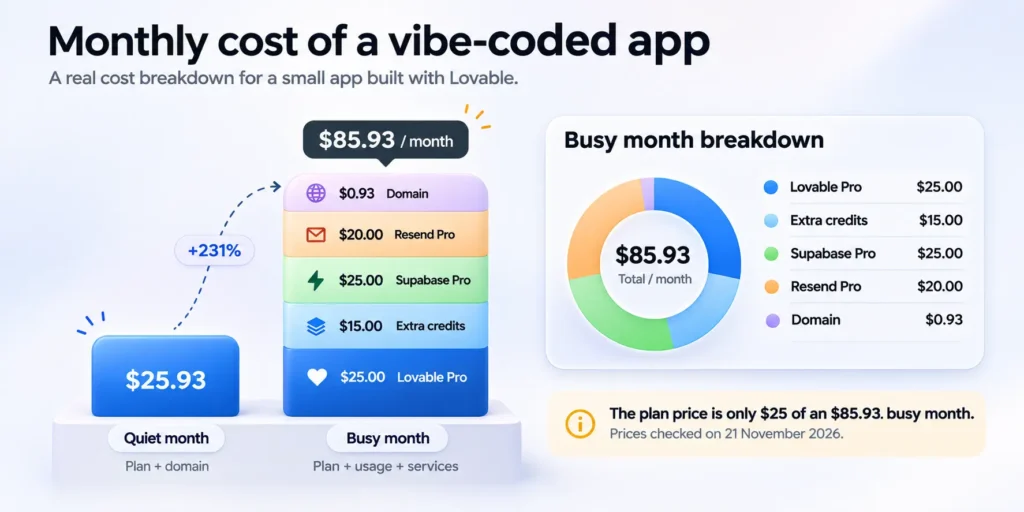
The domain line comes from Verisign raising the wholesale .com price to $10.97 from 1 November 2026, as Domain Name Wire reported on 23 April 2026, plus ICANN’s $0.20 yearly transaction fee, which an at-cost registrar passes through without markup (Domain Name Wire, ICANN).
The same app on the v0 path costs more, because v0 has no backend and commercial hosting needs Vercel Pro. v0 Plus at $30, Vercel Pro at $20, Supabase Pro at $25, Resend Pro at $20 and the domain at $0.93 come to $95.93 a month.
Two costs do not show on any pricing page. The first is the fix loop. Every failed attempt at the same bug spends credits, and at $15 per 50 Lovable credits, a week of retries can cost more than the plan. The second is your time. If a founder spends ten hours a week fighting the tool, the app is no longer cheap.
For comparison, a studio build costs far more up front and far less in retries. Our breakdown of what an MVP costs when a studio builds it gives the ranges.
Where vibe-coded apps break
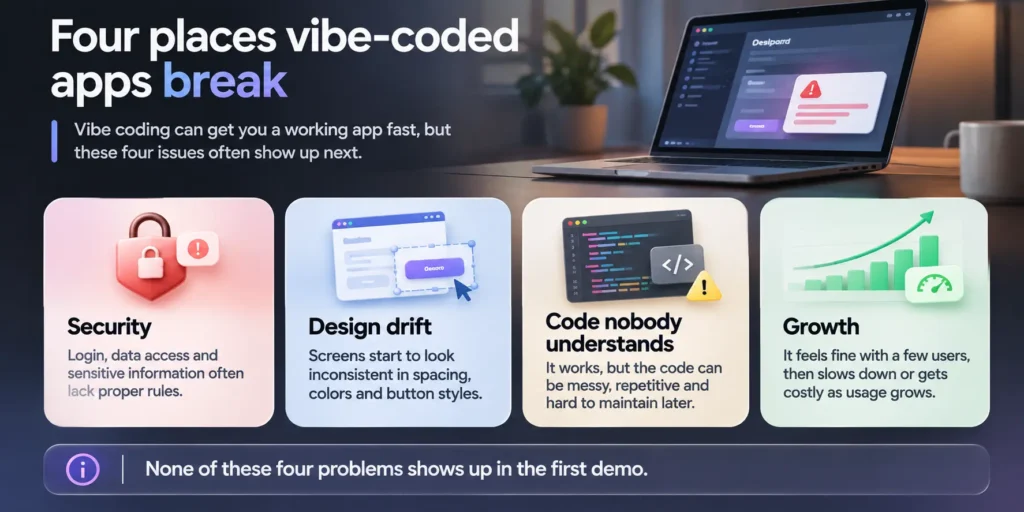
Vibe-coded apps break in four predictable places, and none of them show in the first demo. Each one below has a plain explanation and one check a founder can run today.
Security and user data
A frequent failure is data that anyone can read. Apps built on Supabase, which several of these tools use, need row level security turned on for every table that holds user data. Without it, the public key in the browser can read or change rows.
UpGuard found about 16,000 Supabase-hosted databases with some personal data exposed, as TechCrunch reported on 25 September 2026 (TechCrunch). In February 2026, a researcher reported 16 flaws in one app featured on Lovable’s Discover page, exposing 18,697 user records. Lovable said the vulnerable database was not hosted by Lovable (The Register).
The wider pattern is in Veracode’s 9 September 2025 research, where 45% of AI-generated code samples contained security flaws across 80 tasks and more than 100 models (Veracode).
Check this. Open your database dashboard and confirm that every table with user data has access rules turned on, and that no secret keys appear in the browser code.
Design that drifts
The demo looks finished, so the founder keeps prompting. “It looks done. One more screen.” No tool holds the spacing, colors and button styles from earlier screens unless you give it a shared set, so screen six has slightly larger padding, a second shade of blue and a button with a different radius.
A March 2026 study on design homogenization in vibe coding found that generated web design pulls toward the model’s own defaults (arXiv 2603.13036). The result is an app that looks generic and inconsistent at the same time. Users feel the drift before they find a bug.
The fix is small and comes early. Set one spacing scale, one type scale, a short color palette and one set of buttons and inputs, then tell the tool to reuse them on every screen. That is the start of a design system.
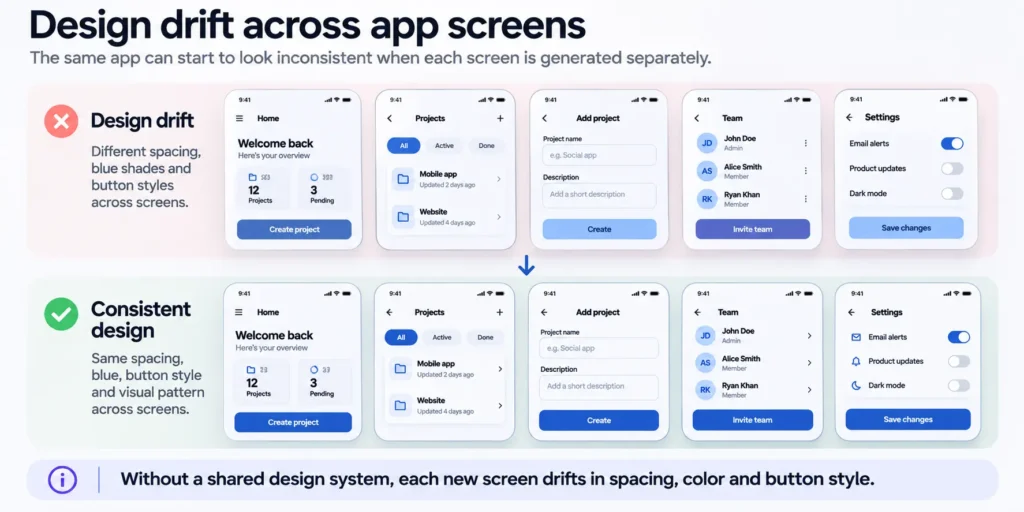
Check this. Put five screens side by side and count the button styles. More than two means the app has started to drift.
Code nobody understands
Fixing one bug can create another. The tool rewrites whatever code it needs to solve the problem in front of it, and because it cannot see how the rest of the app depends on that code, it quietly breaks something two screens away. The founder asks again, spends more credits and gets a new version of the same problem. After a few rounds, nobody, including the tool, has a clear picture of how the app works.
Check this. Count how many prompts the last bug took. If the same issue has come back three times, the code needs a human reader.
Growth and performance
A prototype with ten users hides slow queries, missing indexes and pages that load every record at once. At a thousand users, the same app slows down, the database plan runs out of room and usage-based hosting bills climb in a month you did nothing differently. Free tiers have hard limits, such as Supabase Free’s 500 MB database and 50,000 monthly active users, according to the same Supabase pricing page.
Check this. Look at your database size and monthly users against your plan’s limits, and note the date you will cross them.
When to stop vibe coding and hire a designer or developer
Hire when the cost of a mistake becomes larger than the cost of help, which usually happens the week real money, real personal data or a real reviewer enters the picture. Our rule is simple. Keep the prototype as the spec, and rebuild login, data and payments with someone who can read the code. These six signs mark the point.
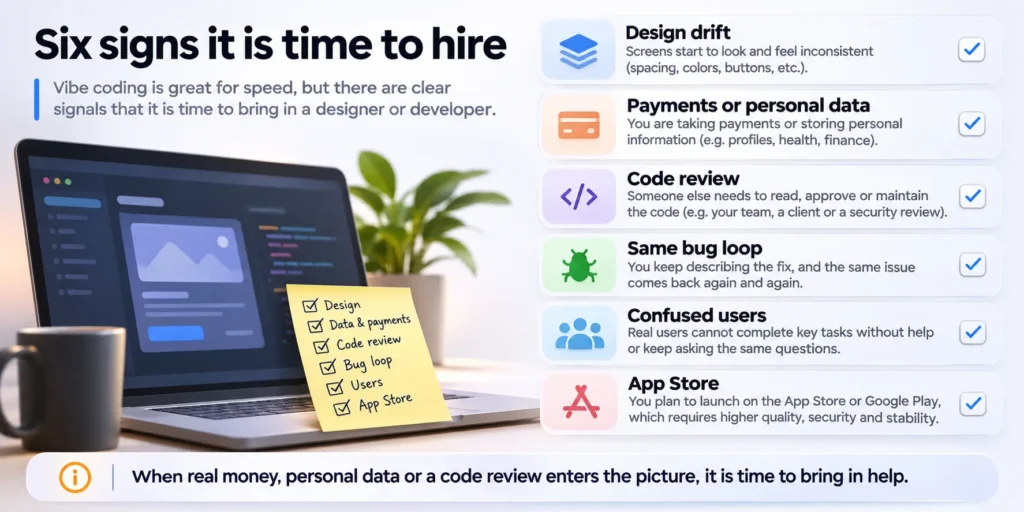
The design looks different on every screen. Users judge the app by this first. Drift only grows.
You are about to take payments or store personal data. One missing access rule then becomes a breach with legal and financial weight.
Investors or a big client will review the code. Due diligence reads the repository, and generated code with no tests or structure raises questions you will have to answer.
You keep looping on the same bug. Three attempts at one problem means the tool cannot see the cause, and every retry spends credits.
Users get lost in the app. Confusion in testing is a design problem a prompt cannot see. A UX audit or a round of usability testing finds the cause.
You need an app in the App Store or Google Play. Only Replit among the app builders describes a native app path, and store review, push notifications and device testing add work. Our guide to mobile app design cost covers that side.
There is a middle ground. Keep the vibe-coded prototype for testing ideas with users, and have a team rebuild the parts that carry risk. That usually means login, the data model, payments and the design system, while the tested flows and screen order stay. A throwaway prototype or a small internal tool with no payments and no personal data can stay vibe-coded. If you are comparing teams for that work, our guide to choosing an MVP development company lists what to ask, and Pixelean’s UI/UX design service covers the design side.
How to hand a vibe-coded prototype to a design team
A prototype is a head start. A good team reads it as a working spec and keeps what users already proved. Bring four things to the first call.
Code exported to GitHub. Even if the backend stays on the platform, the repo shows how screens and data connect.
A list of screens and user flows. One line per screen and the path a user takes to finish the main task.
What users said. Notes, recordings or messages from the people who tried it.
What must stay. The screens, words or flows that users already like.
A short design brief turns those four items into something a team can price and plan. If you want the full path from prototype to launch, our guide on how to build an MVP walks through it. Planning a smaller first release is covered in MVP, MMP and MLP.
A design team will check six things first. You can check them yourself before the call.
- Do the same components look the same on every screen?
- Is there one spacing and type scale, or a new value on each screen?
- Does every table that holds user data have access rules turned on?
- Are any keys or secrets visible in the frontend code?
- Can the code and the database move off the platform, and what stays behind?
- Does the main flow work on a phone and with a keyboard alone?
Frequently asked questions
What is vibe coding?
Vibe coding means building software by describing what you want in plain language and letting an AI tool write the code. Andrej Karpathy coined the term in a post on X on 2 February 2025 (Karpathy on X). App builders such as Lovable and Bolt do it for people who do not code, while assistants such as Cursor and Claude Code do it inside a developer’s own project.
What are the best free vibe coding tools?
The best free vibe coding tools for founders are Lovable, with 5 build credits a day, and Bolt, with 1 million tokens a month. For developers, GitHub Copilot Free gives 2,000 completions a month and Devin Desktop’s free plan includes unlimited Tab completion. Free plans are enough to test an idea, but each one limits building or hosting.
What is the best vibe coding tool for beginners?
Lovable suits a beginner who does not code, because it includes a database, login and hosting. Replit suits beginners who want to learn some code along the way. Start with one small project and a clear list of screens before you prompt.
Can you build a real business on a vibe-coded app?
Yes, for testing demand and running an early product with a small group of users. A business that takes payments, stores personal data or faces a code review needs the security, structure and design consistency a prototype lacks. Treat the vibe-coded app as the first version, and plan the rebuild of the risky parts.
Who owns the code a vibe coding tool writes?
For the tools whose terms we read, you do. Lovable, Base44, Bolt, Cursor, Anthropic and OpenAI terms assign output rights to the user, Replit’s terms leave the rights in your content with you, and GitHub claims no ownership of Copilot output. Lovable, Bolt and GitHub keep a license to train on your content unless you opt out, and Base44’s terms grant it a broad license that includes training. Read each tool’s terms before you build.
What are the best vibe coding apps for mobile apps?
Among the best vibe coding apps in this guide, Replit is the only one whose docs describe building iOS and Android apps and preparing App Store submission. Google Play publishing is not yet supported there. Lovable, v0 and Figma Make build for the web, and a web app can work on phones without a store listing.
The bottom line
The best vibe code tool is the one that matches who is typing. Founders should start with Lovable or v0, developers with Cursor, Copilot or Claude Code, and everyone should check credits, export and access rules before the first real user arrives. Use these tools to test an idea in days. When the screens drift apart, the same bug keeps returning or payments and personal data come into the app, it is time to hire a designer or developer. Prototype fast, then let a person who can read the code own what carries risk.
Built a prototype and not sure what comes next?
Book a call with your prototype link. We will walk through what to keep and what to rebuild.